![TacZ Mesh Loader [TML]](https://cdn.modrinth.com/data/SnuAzTh0/6a9215a1a79ad4a4d3aa2387ec997b1c83fccd45_96.webp)
TacZ Mesh Loader [TML]
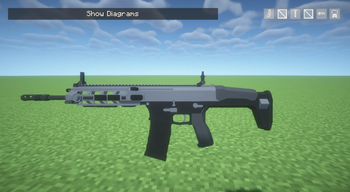
This mod allows you to load mesh geo models created with the Meshy plugin into TacZ.


This add-on is not an official TacZ add-on; it is unofficial. Please do not report any bugs caused by this add-on to the TacZ server under any circumstances. Please report them exclusively in the comments section of this mod or on Vell's Mods info server.
Please note that Forge 1.20.1 requires the official Timeless and Classics Zero Guns, Fabric 1.20.1 and 1.21.1 require TaCZ: Refabricated, and NeoForge 1.21.1 requires the [UNOFFICIAL] TaCZ NeoForge Port as dependency mods.
Overview
TacZ Mesh Loader is a client-side mod that allows TacZ gun and attachment models to use poly_mesh geometry exported by the BlockBench plugin Meshy.
By default, TacZ only supports Bedrock-format cube models. With this mod installed, gunpack creators can use polygon mesh models — smooth shapes built from triangle and quad polygons — directly in TacZ guns and attachments.
Features
Poly mesh support — Loads Meshy-exported poly_mesh geometry directly into TacZ's model pipeline.
Guns & attachments — Works for both gun models and attachments such as scopes and suppressors.
VBO caching — At first glance, you might think that mesh models put a strain on your computer, but this mod incorporates VBO processing, which minimizes the load even when you spawn a large number of mesh model guns at once.
For Gunpack Creators
-Those who want to enable VBO-
If you want to create everything with mesh models and enable VBO, first convert all cube models to mesh before exporting if you used cube models before converting to Bedrock geometry using the Meshy plug-in. Next, merge all converted mesh objects into one mesh object per bone. (You only need to merge them into one mesh object per bone, and you do not need to merge all hierarchical bone objects into one.) Failure to do this will cause rendering problems when the model is loaded by TacZMeshLoader after exporting using the Meshy plugin.
-For mixed cube and mesh models-(*VBO is not supported in the cube model.)
First, for the mesh model, be sure to merge each bone into a single mesh object as described above. Next, for the cube model, there is no need to do anything to it.
The model type can only be defined if this MOD is installed. In the JSON file used for display, simply define a new “model_type”and set it to “mesh”. Please note that the definition ‘model_type’:“mesh” is only required for the gun itself and is not necessary for attachments. Please note that even if a model consists primarily of cube models, you must define “model_type”: “mesh” if it contains even a single mesh model.
{
  "model_type": "mesh",
  "model": "mypack:gun/mygun_geo",
  "texture": "mypack:gun/uv/mygun",
  "animation": "mypack:mygun"
}
File locations and structure follow the standard TacZ gunpack format. Models should be created in BlockBench using the Meshy Plugin. You can download it directly from the blockbench plugin list.
Please note that if you use this MOD to create and release a gun pack for mesh models, you must define this MOD as a dependency.
Important Note: At this time, the ocular object does not support mesh models and only works properly with cube models. Therefore, please do not use mesh models when using the ocular object.
License
GPL-3.0
Credits
Author: VellEagle
