
Quick Craft
This mod allows you to craft items from nearby chests without having to collect the items from them.

QuickCraft 1.3.0
Now powered by CodxLib
QuickCraft now runs on CodxLib, a small companion library shared across my mods. The behind-the-scenes plumbing — checking nearby chests with the server, saving your settings, and update notices — now lives in one shared place, so QuickCraft stays smaller and more reliable.
New required dependency
QuickCraft now needs CodxLib installed alongside it, just like Fabric API. It's listed under Dependencies, so most launchers will install it for you automatically.
Everything works exactly as before — crafting from nearby chests, the recipe-book highlight, and all your settings are unchanged.
QuickCraft 1.3.0
Now powered by CodxLib
QuickCraft now runs on CodxLib, a small companion library shared across my mods. The behind-the-scenes plumbing — checking nearby chests with the server, saving your settings, and update notices — now lives in one shared place, so QuickCraft stays smaller and more reliable.
New required dependency
QuickCraft now needs CodxLib installed alongside it, just like Fabric API. It's listed under Dependencies, so most launchers will install it for you automatically.
Everything works exactly as before — crafting from nearby chests, the recipe-book highlight, and all your settings are unchanged.
QuickCraft 1.3.0
Now powered by CodxLib
QuickCraft now runs on CodxLib, a small companion library shared across my mods. The behind-the-scenes plumbing — checking nearby chests with the server, saving your settings, and update notices — now lives in one shared place, so QuickCraft stays smaller and more reliable.
New required dependency
QuickCraft now needs CodxLib installed alongside it, just like Fabric API. It's listed under Dependencies, so most launchers will install it for you automatically.
Everything works exactly as before — crafting from nearby chests, the recipe-book highlight, and all your settings are unchanged.
What's new
- The recipe book now uses your chests. Recipes you can make with items in nearby storage light up as craftable — not just the stuff in your backpack. Works at the crafting table, your inventory grid, and furnaces.
- Recipes show up automatically. If the materials are nearby, the recipe appears in your book — even for things you've never personally held. So if you've got oak planks in a chest, oak stairs are right there ready to make.
- Furnaces, smokers, and blast furnaces. Click a recipe in the furnace's recipe book and QuickCraft loads the item to smelt from your chests and adds fuel for you — using coal and charcoal first so it won't burn your wood unless it has to.
- Tell QuickCraft to leave a chest alone. Rename a chest to include
[ignore]and it'll be skipped (great for decoration or off-limits storage). See below. - Locked chests stay locked. Containers sealed with a lock are left untouched unless you're holding the key.
- Smarter material matching. Interchangeable materials (like any kind of planks) are treated as equal when filling a recipe.
- Optional ender chest support, if you want your ender chest counted too.
Fixes
- The big one: no more freezing. Opening the recipe book, crafting table, or even your inventory could drop the game to a near-frozen crawl for several seconds. That's gone.
- No more furnace lock-up. Using the furnace recipe book could hang the game so badly you couldn't even close it. Fixed.
- No more recipe-book crash. Opening the recipe book could crash the game in certain cases. Fixed.
- No more false "can't craft" recipes. Items in your chests were sometimes shown in red as if you couldn't use them. Now they're correctly shown as available.
- "Show All" shows all again — including recipes you can't currently craft.
- Smoother with big bases. Large connected storage rooms no longer cause lag spikes.
Leaving a chest out
By default QuickCraft uses every chest in range. To skip one, rename the chest in an anvil so its name includes
[ignore](for exampleDecorations [ignore]) before you place it. Want it back in? Just rename it without the tag.Works with most storage mods
Modded chests and barrels work as long as they act like normal storage. Big network-style systems (like Applied Energistics 2 or Refined Storage) aren't supported automatically yet — that's on the to-do list.
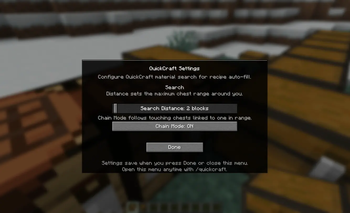
Most of these options can be adjusted in QuickCraft's config file if you want to fine-tune things. Found a bug or have an idea? Let me know your loader and Minecraft version.
Thanks for using QuickCraft 💛
What's new
- The recipe book now uses your chests. Recipes you can make with items in nearby storage light up as craftable — not just the stuff in your backpack. Works at the crafting table, your inventory grid, and furnaces.
- Recipes show up automatically. If the materials are nearby, the recipe appears in your book — even for things you've never personally held. So if you've got oak planks in a chest, oak stairs are right there ready to make.
- Furnaces, smokers, and blast furnaces. Click a recipe in the furnace's recipe book and QuickCraft loads the item to smelt from your chests and adds fuel for you — using coal and charcoal first so it won't burn your wood unless it has to.
- Tell QuickCraft to leave a chest alone. Rename a chest to include
[ignore]and it'll be skipped (great for decoration or off-limits storage). See below. - Locked chests stay locked. Containers sealed with a lock are left untouched unless you're holding the key.
- Smarter material matching. Interchangeable materials (like any kind of planks) are treated as equal when filling a recipe.
- Optional ender chest support, if you want your ender chest counted too.
Fixes
- The big one: no more freezing. Opening the recipe book, crafting table, or even your inventory could drop the game to a near-frozen crawl for several seconds. That's gone.
- No more furnace lock-up. Using the furnace recipe book could hang the game so badly you couldn't even close it. Fixed.
- No more recipe-book crash. Opening the recipe book could crash the game in certain cases. Fixed.
- No more false "can't craft" recipes. Items in your chests were sometimes shown in red as if you couldn't use them. Now they're correctly shown as available.
- "Show All" shows all again — including recipes you can't currently craft.
- Smoother with big bases. Large connected storage rooms no longer cause lag spikes.
Leaving a chest out
By default QuickCraft uses every chest in range. To skip one, rename the chest in an anvil so its name includes
[ignore](for exampleDecorations [ignore]) before you place it. Want it back in? Just rename it without the tag.Works with most storage mods
Modded chests and barrels work as long as they act like normal storage. Big network-style systems (like Applied Energistics 2 or Refined Storage) aren't supported automatically yet — that's on the to-do list.
Most of these options can be adjusted in QuickCraft's config file if you want to fine-tune things. Found a bug or have an idea? Let me know your loader and Minecraft version.
Thanks for using QuickCraft 💛
What's new
- The recipe book now uses your chests. Recipes you can make with items in nearby storage light up as craftable — not just the stuff in your backpack. Works at the crafting table, your inventory grid, and furnaces.
- Recipes show up automatically. If the materials are nearby, the recipe appears in your book — even for things you've never personally held. So if you've got oak planks in a chest, oak stairs are right there ready to make.
- Furnaces, smokers, and blast furnaces. Click a recipe in the furnace's recipe book and QuickCraft loads the item to smelt from your chests and adds fuel for you — using coal and charcoal first so it won't burn your wood unless it has to.
- Tell QuickCraft to leave a chest alone. Rename a chest to include
[ignore]and it'll be skipped (great for decoration or off-limits storage). See below. - Locked chests stay locked. Containers sealed with a lock are left untouched unless you're holding the key.
- Smarter material matching. Interchangeable materials (like any kind of planks) are treated as equal when filling a recipe.
- Optional ender chest support, if you want your ender chest counted too.
Fixes
- The big one: no more freezing. Opening the recipe book, crafting table, or even your inventory could drop the game to a near-frozen crawl for several seconds. That's gone.
- No more furnace lock-up. Using the furnace recipe book could hang the game so badly you couldn't even close it. Fixed.
- No more recipe-book crash. Opening the recipe book could crash the game in certain cases. Fixed.
- No more false "can't craft" recipes. Items in your chests were sometimes shown in red as if you couldn't use them. Now they're correctly shown as available.
- "Show All" shows all again — including recipes you can't currently craft.
- Smoother with big bases. Large connected storage rooms no longer cause lag spikes.
Leaving a chest out
By default QuickCraft uses every chest in range. To skip one, rename the chest in an anvil so its name includes
[ignore](for exampleDecorations [ignore]) before you place it. Want it back in? Just rename it without the tag.Works with most storage mods
Modded chests and barrels work as long as they act like normal storage. Big network-style systems (like Applied Energistics 2 or Refined Storage) aren't supported automatically yet — that's on the to-do list.
Most of these options can be adjusted in QuickCraft's config file if you want to fine-tune things. Found a bug or have an idea? Let me know your loader and Minecraft version.
Thanks for using QuickCraft 💛
Small bug fix. Someone reported that the client crashed when opening a crafting table and clicking on the recipe book. This was due to a faulty check and that resulted in a divide by zero error...
Small bug fix. Someone reported that the client crashed when opening a crafting table and clicking on the recipe book. This was due to a faulty check and that resulted in a divide by zero error...
Small bug fix. Someone reported that the client crashed when opening a crafting table and clicking on the recipe book. This was due to a faulty check and that resulted in a divide by zero error...
Version 1
Version 1
Version 1
