

Oh My, Meteors! - A meteorites mod
A Modern falling Meteor mod, highly configurable, pretty and with spirt of the old ones!

Add spice to your world, with giant peppers of molten (or frozen!) rock that fall from the sky!
This mod adds meteors, chunks of rock that randomly fall from the sky every now and then, exploding on impact and leaving useful resources in the impact craters they make. The explosions are even better than vanilla's ones!
You will be able to craft lasers to defend yourself from the destructive power of these touchy sky rocks, or maybe you could find some cuteness inside some them! Meow!
Video showcase of version 0.1.0 of the mod by Boodlyneck: https://www.youtube.com/watch?v=LWCvP63pooQ
This mod is extremely configurable, meaning that you can adjust it however you like. Would you like more metors at night? Cool! Would like them not to explode anything? Done! And a lot of other settings!
Inspired by the old meteor mods and commissioned by SlayerTheChikken
The best way to enjoy this mod is with other people on a server, so you can use the code EMALIGHTDEV on Nodecraft for discount!
Also checkout the Tekxit modpack: 
A fan of cool mods? Take a look at what else i've developed, might find something intresting like LightWithn which adds powers unique to each and every player!
Feature list
Meteor sizes
Meteors can spawn in a variety of different sizes, the bigger the size the bigger the damage and the "structure" that will be left behind. You can adjust which size of meteors is able to spawn and how frequently the meteors spawn.
Customizable meteors
You can add your own meteor structures using a datapack, like the example one! You can specify in which size category your structure can be spawned, and if it's special or not. (special ones have a lower chance of appearing). They are NBT structure files, like the ones from the Structure Block. See example datapack
Lasers blocks
They are used to defend your base from the falling meteorites, by shooting a laser at the meteor and destroying it while midair
There are two tiers of lasers:
- The basic one has a shorter, but still very considerable range by default (you can change it in the config file!). It also has a loger cooldown time (3s by default, you can even disable it all together) and won't be able to destroy meteors past a certain size (up to sizes that are 1/3 smaller than the biggest, configurable too)
- The advanced laser, bigger area coverage, shorter cooldown time and can destroy every type of laser. You will however need to gather some meteorich chunks to craft meteoric alloy in order to power up your basic laser to this advanced version
You can interact with the lasers using a Focusing Lenses item to make them display the area that they are currently covering. When a meteor hits this area the laser activates and explodes the meteor.
Items
This mod also adds a few items, Meteoric Chunks which can be obtained when breaking (without Silk Touch) the Meteoric Rock that spawns when meteors explode on land. This can be tuned into 9 raw iron or used to craft Meteoric Alloy. You will need to combine 2 Meteoric Chunks with 2 Iron Ingots to obtain 2 of the alloy, which you can then use in the crafting for the Advanced Laser. Then we have the Focusing Lenses, which are used in the crafting of the two lasers. They require lime glass, amethyst, and quartz.
Meteoric Rock block (1.5.0+)
Now the meteor entity and the meteoric rocks have 3 stages of texture: HOT MID and NORMAL, with the latter being the usual one. The meteoric rock now starts in the HOT state, and degrades all the way to NORMAl with time, cooling down. When HOT it damages players each time like a magma block, when MID it does only sometimes, and NORMAL does nothing.
Using snowballs on the block will make it tick down one state, while using a flint and steel will make it go up in hotness. You can make a state permanent by using an Echo Shard on the block.
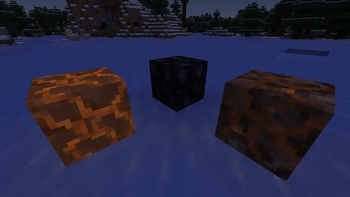
Meteor structure - Customizable meteors!
The ones that spawn when a meteor explodes. They are located in the folder /data/ohmymeteors/structure(s if below mc1.21) and you can customize them using a datapack. They are the same files that you get out of the Structure Block in vanilla. From version 1.2.0 there is an easier way to add custom meteors with a command, see more below in the command section!
And an example datapack is located here. If you want to remove default structures from spawning, you can add a structure file (copy one of the default ones for instance) and name it ignore_<nameofthestructuretoremvoe>.nbt, or if you want to ignore all of the use ignoredefault.nbt.
These structures can also contain entities, like the:
Meteor cat
A cute kitty could be travelling the galaxy at any given moment. And it could land on your minecraft world (as long as you don't shoot it down with a laser that is). They can survive in the fire, have a 15HP instead of 10HP, and if you so chose to dispose of them, they will drop some meteoric chunks (reminding you of your cruelty and cosmic-feline-bloodstained hands)
Meteor showers!
Meteor showers are a rare occurrence where a cluster of meteors fall together at the same time. Three types of meteor showers have been added:
- 'instant' where all the meteors fall at the same time around a central point
- 'delayed' with each meteor spawning a bit after the next one
- 'delayed directioned' with each meteor spawning after the next one but with all meteors following the same general trajectory
Config file
From version 1.5.0 you will need to install FzzyConfig, but in exchange you will get a beautyfull config menu screen which you can open from the mod menu. If you are a server admin or you have the ohmyemeteors.config.edit permission you can edit the server config file directly in game.
The file is located at /config/ohmymeteros/ohmymeteors_config.toml it contains a lot of settings that you can adjust to your liking.
You can reload the config in game using /omm reload or by saving your changes.
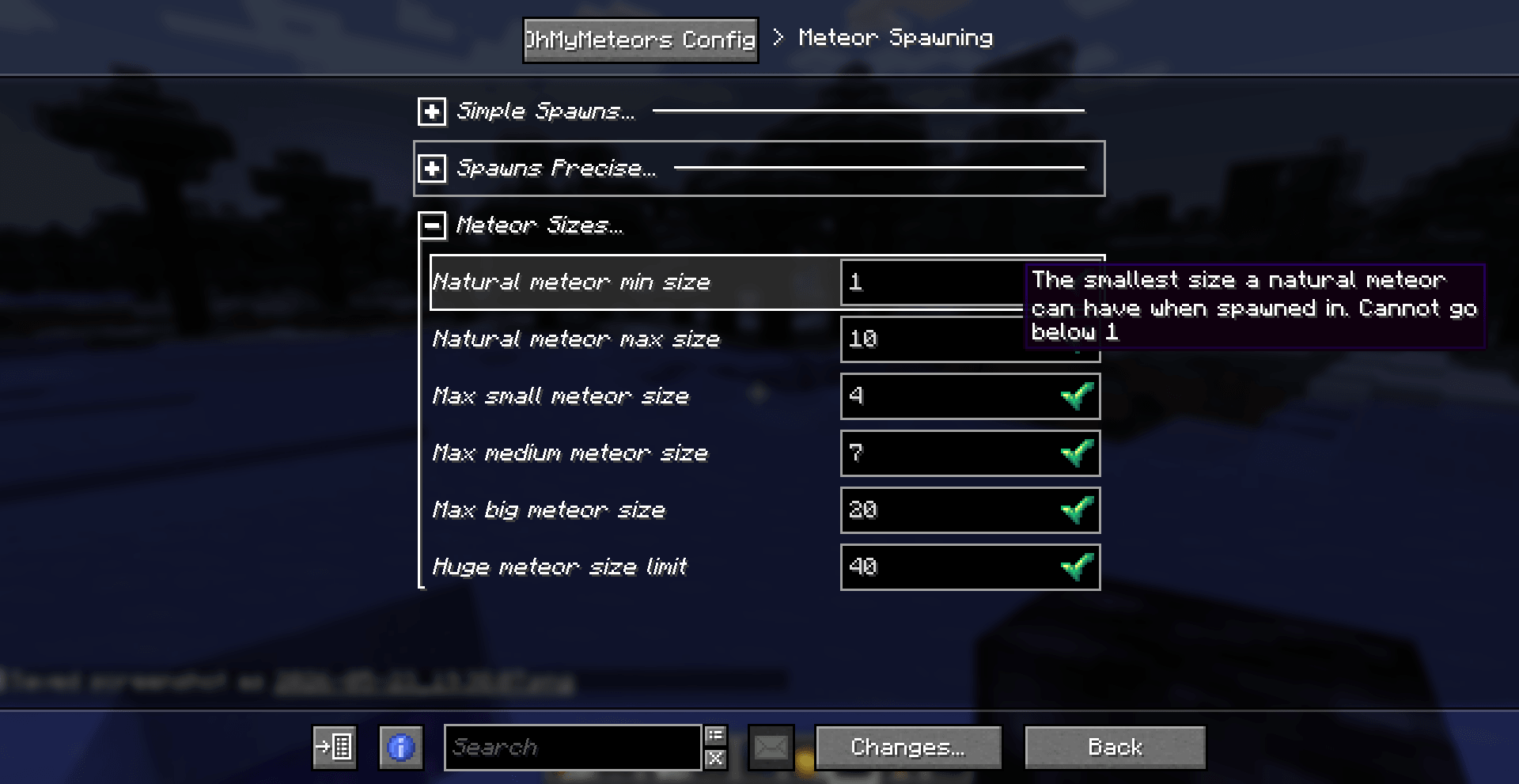
Config file version 1.5.0
# Don't change this! Version used to track needed updates.
version = 8

# Meteor Spawning

[meteorSpawning]
# Expressed as '1 in <x>' chances of spawning a meteor each tick (similar to randomTickSpeed). Setting it to a negative value will disable natural meteor spawn. For example, by default it has a chance of 1 in 30000, so 0.03%, or 1/30000
meteor_spawn_chance = 30000
# Should the spawn rate be different during the night?
modify_spawn_chance_at_night = false
# The chance for a meteor to spawn at night if enabled. Expressed as in 1 in <x> chances, as described above.
meteor_night_spawn_chance = 10000
# The chance of spawning a special meteor structure in a certain size category (for example the meteor cat meteor), on top of the normal meteor spawn chance. (works like the other chances, aka 1 in <x> probability)
special_meteors_chance = 10
# Should huge meteors be able to spawn? They are meteors bigger than the maximum size of the big ones
spawn_huge_meteors = true
# The chance for a spawned meteor to be of huge size. Expressed as in 1 in <x> chances. (on top of the 'normal' spawning chance)
huge_meteor_chance = 100
# Expressed in blocks, represents the min distance (as in a radius) from the origin of the meteor (like a player) in which the meteor wont' spawn in. (Remember that it has an angled trajectory so it could end up in that area regardless)
min_meteor_spawn_distance = 5
# Expressed in blocks, represents the max distance (as in a radius) from the origin of the meteor (like a player) in which a meteor can spawn in. (Remember that it has an angled trajectory so it could end up in that area regardless)
max_meteor_spawn_distance = 25
# The world height (y level) at which meteors spawn in the world
meteor_spawn_height = 300
# Should there be a cooldown between a meteor spawning one meteor and then another?
should_cooldown_between_meteors = true
# The minimum time interval (in seconds) between spawning a meteor and then another
min_meteor_cooldown_time = 20
# The higher the value the less the meteor will go diagonally, and will keep mostly vertical. (randomness remains so it's not 100%). Generally, you should remain between 1 and 10.
meteor_dispersion_factor = 3.1
# A list of the IDs of the dimensions in which meteors can or cannot naturally spawn in (see mode setting below), vanilla or not.
spawn_dimensions = [
    "minecraft:overworld",
    "minecraft:the_end"
]
# If set to false will behave like a blacklist, aka meteors won't spawn in those dimensions. If true will behave like a whitelist, meteors will spawn ONLY in those dimensions.
dimension_list_mode = true
# A map consisting of dimension:chance of spawning. The dimension must one in which the meteor can spawn in as specified above, otherwise meteors won't spawn at all. This chance will ALWAYS override the default if present. The spawn chance works as described above.
dimension_chances = { "minecraft:the_end" = 300000 }
# The same as above but with a possibly different chance at night if enabled
dimension_night_chances = { "minecraft:the_end" = 100000 }
# A list of the IDs of the biomes in which meteors can or cannot naturally spawn in (see mode setting below), vanilla or not.
biome_spawn_list = [ "minecraft:cherry_grove", "minecraft:soul_sand_valley", "modname:modbiome" ]
# If set to false will behave like a blacklist, aka meteors won't spawn in those biomes. If true will behave like a whitelist, meteors will spawn ONLY in those biomes.
biome_list_mode = false
# A map consisting of biome=chance of spawning. The spawn chance works as described above. The meteors must be able to spawn in those biomes, otherwise they won't!
biome_chances = { "minecraft:desert" = 29990, "modname:modbiome" = 2025 }
# The same as above but with a possibly different chance at night if enabled
biome_night_chances = { "minecraft:desert" = 9995, "modname:modbiome" = 2025 }
# The smallest size a natural meteor can have when spawned in. Cannot go below 1
natural_meteor_min_size = 1
# The biggest size a natural meteor can have when spawned in. Cannot go above 50.
natural_meteor_max_size = 10
# The maximum size of meteor that can be considered small, and that will spawn a small meteor structure upon impact
max_small_meteor_size = 4
# The maximum size of meteor that can be considered medium, and will spawn a medium meteor structure upon impact
max_medium_meteor_size = 7
# The maximum size of meteor that can be considered big, and will spawn a big meteor structure upon impact. Only these can spawn a meteor cat by default.
max_big_meteor_size = 20
# The max size limit of how big a huge meteor can be
huge_meteor_size_limit = 40

# Meteor Behaviour

[meteorBehaviourSection]
# A factor to ADD to the explosion power (by default, the power is equal to the meteor size), thus increasing the damage and radius of the explosion. Also supports negative numbers
explosion_power_modifier = 0
# A factor to MULTIPLY the explosion power (by default, the power is equal to the meteor size), thus increasing the damage and radius of the explosion.
explosion_power_multiplier = 1.0
# Should meteors be able to destroy blocks on impact?
meteor_griefing = true
# Should meteors spawn the meteor structure after impact?
meteor_structure = true
# Should the meteor structure only replace air blocks?
only_replace_air = false
# Should scatter meteors be spawned when a Basic laser destroys a bigger meteor?
spawn_scatter_meteors = false
# Should the meteors that come out of a bigger meteor when it's broken be able to destroy blocks on impact?
scatter_meteor_griefing = true
# Should the meteors that come out of a bigger meteor when it's broken be able to destroy spawn structures on impact?
scatter_meteor_structure = true
# Should the meteors that come out of a bigger meteor when it's broken only replace air blocks for their structure?
scatter_only_replace_air = true
# Should meteors explode when they come into contact with an entity? (if true you could use an arrow to make the meteor explode for example)
explode_on_entity_collision = false
# Should fire be spawned on meteor impact? (it looks cool!)
spawn_fire_with_meteor = true
# If true will use a spherical explosion instead of the vanilla cubical one. These look nicer at higher explosion power/ranges, but after power 100 become a bit laggy.
use_better_explosions = true
# A factor to ADD to the speed at which the meteor falls downwards. It is added to a randomly generated number between 1 and 0. Also supports negative numbers (the meteor may go upwards tho!)
downwards_speed_modifier = 0
# A factor to MULTIPLY the speed at which the meteor falls downwards. It is added to a randomly generated number between 1 and 0
downwards_speed_multiplier = 1.0
# Should meteors be (more or less) directed towards the nearest player?
homing_meteors = false
# If true meteors will try to load chunks like enderpearls, hopefully making contact and exploding
meteors_load_chunks = false
# How many chunks should be loaded before the meteors gets discarded? Aka how many loaded chunks are too many? (Each chunk is 16 blocks
chunk_loading_limit = 25

# Notifications

[notificationSection]
# Should players get a message in chat/hotbar when a meteor spawns?
announce_meteor_spawn = false
# Should players get a message in chat/hotbar when a meteor is destroyed?
announce_meteor_destroyed = false
# Should the (^above^) announcement be displayed above the hotbar in the actionbar or in chat?
actionbar_announcements = true
# If announcements are enabled, should they also display the (approximate) coordinates of the meteor being spawned/destroyed?
announce_location = true
# Should the explosion sound of the meteor be heard by all players online?
global_explosion_sound = false
# Should the explosion sound of the meteor be heard by all players around a certain area from the impact point?
area_explosion_sound = false
# The radius in blocks of the area in which the sound of the meteor will be heard if the option above is true
area_explosion_sound_radius = 500
# Set this to true to have more info while debugging
verbose = false

# Lasers

[lasersSection]
# The radius in blocks of the xz area covered by the Basic laser block, where meteors will be blown up
basic_laser_area_radius = 32
# How many blocks up from the position of the basic laser should meteors be checked for? (note that the detection box is only 2 blocks thick, not the whole way)
basic_laser_height = 64
# The radius in blocks of the xz area covered by the advanced laser block, where meteors will be blown up
advanced_laser_area_radius = 48
# How many blocks up from the position of the advanced laser should meteors be checked for? (note that the detection box is only 2 blocks thick, not the whole way)
advanced_laser_height = 64
# Should the laser be in a cooldown where it can't fire, after it has just fired?
should_basic_laser_cooldown = true
# How many seconds should this cooldown last?
basic_laser_cooldown = 5
# Should the laser be in a cooldown where it can't fire, after it has just fired?
should_advanced_laser_cooldown = true
# How many seconds should this cooldown last?
advanced_laser_cooldown = 3

# Visuals

[visualsSection]
# Should meteor and laser particles be forced? They will be rendered further away and look better, but if there are too many of them you may want to disable this for lag reasons. Note: some particles will never displays as forced, like the lasers target box
use_forced_particles = true
# Note: this setting influences client AND server performance a lot. It is a serverside setting.
# FANCY: the best particle animations, when spawning a lot of meteors can be laggy,
# LESS: a compromise, a bit less lag with still good looking particles ,
# MINIMAL: a compromise, a lot less laggy with some particles,
# NONE: most performant, no particles will be sent to clients
particles_mode = "FANCY"
# How far should meteors be rendered. WARNING: YOU NEED TO RESTART YOUR SERVER AND CLIENT IF YOU CHANGE THIS VALUE in order for it to take effect. It is multiplied by the 'entity' render distance of the server
meteor_render_distance = 200
# If true, makes the sky glow a certain color when a meteor passes by. This only applies if the meteor is in rendering range and not world or server wide.
meteor_skyglow = true
# Chose how the meteor entity projectile looks.
# DYNAMIC_AUTO: The texture goes from normal to hot the closer it gets to ground level or the longer it travels even horizonatally
# DYNAMIC_HEIGHT: The texture goes from normal to hot the closer it gets to ground level
# DYNAMIC_DISTANCE: The texture goes from normal to hot the more it travels
# NORMAL: Fixed texture on the Normal one
# MID: Fixed texture to the Mid level of hotness texture
# HOT: Fixed texture to the Hot level of hotness texture
meteor_texture_mode = "DYNAMIC_AUTO"
# The distance in blocks between texture changes from mid to hot when the meteor texture mode is set on DYNAMIC_DISTANCE (or auto using distance)
texture_change_distance_hot = 70
# The distance in blocks between texture changes from normal to mid when the meteor texture mode is set on DYNAMIC_DISTANCE (or auto using distance)
texture_change_distance_mid = 70

# The color to apply to the sky when a meteor passes by if it's enabled. By default it's a lightblue-cyan color. Bear in mind that Minecraft still applies its own colors, so some shades (like green) work less well than others (blue)

[visualsSection.meteor_skyglow_color]
# Red component, 0 to 255
r = 4
# Green component, 0 to 255
g = 141
# Blue component, 0 to 255
b = 161

# Meteor Showers

[meteorShowerSection]
# If true, there will be a chance that meteor showers will spawn (a lot of meteors spawning at the same time & place. It can also sometimes cause brief lag spikes, nothing too dramatic tho)
meteor_showers_enabled = true
# The chance for a meteor shower to spawn (on top of the normal meteor spawning chance, so it's meteor_spawn*meteor_shower_spawn)
meteor_shower_chance = 100
# The minimum number of meteors that are going to spawn in the meteor shower.
min_meteors_in_shower = 5
# The maximum number of meteors that are going to spawn in the meteor shower.
max_meteors_in_shower = 15
# The delay (in ticks) between each meteor that gets spawned in delayed and direction delayed meteor shower
meteor_shower_delay_ticks = 15
Commands
They are are a few commands:
/omm spawn <size> [velocity]Will spawn a meteor in your looking direction with the specified size and the optionally specified velocity/omm spawn randomWill spawn a random meteor in a random direction in a random postiont around you/omm spawn naturalWill spawn a meteor as if it had spawned naturally/omm spawn shower [instant|delayed|delayed_directioned]Will spawn a meteor shower as if it had spawned naturally, with the specified type of shower./omm config reloadWill reload the config file/omm config preset <preset>Will edit the config file to adjust to the preset. Two presets are currently available,performanceandno_griefing
Adding custom meteor structures/schematics
/omm custom And its sub commands will allow you to generate a datapack and add your meteor structures directly in game without needing to touch any files. You can then open the datapack folder and send the datapack to your friends if you want to!
Adding a new meteor
/omm custom add <type_of_schematic> <structureId/schemId> <size> <special>
type_of_schematic: is the type of schematic/structure file that is going to be used to spawn the meteor's structure. Three types are currently supported thanks to SchemConvert, and they are:
structureblock: the vanilla.nbtstructure files that you can create using a structureblockworldedit_schematic: worldedit's.schemfiles which you can create with the//schemcommandlitematica_schematic: litematica's.liteschemfiles Especially for the schematic files it's important to not move them from where they are generated
structureId/schemId: is the name of the structure/schematic file that you want to use. You don't need to specify the extension (like .schem or .nbt). This name is the same one that will be used by the meteor strucuture id, but you can change it later with the edit command if needed
size: the size correspondig to this new meteor structure, can be SMALL,MEDIUM,BIG,HUGE
special: weather or not this is a special meteor aka if this structure has a lower than normal chance of appearing
Removing default meteors
/omm custom ignoredefaults [true|false] If you set ignoredefaults to true this mod's default meteors will be disabled and only custom ones will be used. Make sure to add at least one meteor structure per category otherwise it will give an error.
Removing meteor structures
/omm custom remove <structureId> <size> <special> If you want to remove a meteor that you have previously added you can use this command. You will need to specifiy the structure's name, the corresponding size and if it is a special meteor
Editing meteor structure
/omm custom edit <originalName> <ogSize> <ogSpecial> <newName> <newSize> <newSpecial> You can use this command to edit a structure file name, class and if it's a special one or not. Pretty intuitive by now i think.
Seeing which meteors you have added so far
/omm custom display_current Will display all the meteors corresponding to a certain size and special. It will also display if you have currently disabled default meteors or not
Mod compatibility
You can use Flan and YetAnotherWorldProtector to define regions where meteors won't spawn or explode. Now you will be able to use either Flan or YAWP to define regions where meteors can't spawn or explode. Flan has its own global setting, while to disable the meteor spawning in YAWP you will need to set the flag explosions-entities to denied.
From version 1.5.0 onwards you can also use OPAC to define a claim in which meteors won't spawn or explode, by enabling the "Allow blocks from explosion" flag.
License
MIT
Credits
SlayerTheChikken for some assets and the idea of the mod Explodee mod (by KnownSH) for the code of the spherical explosions https://github.com/KnownSH/Explodee SchemConvert to allow the conversion between schematic formats https://github.com/PiTheGuy/SchemConvert
