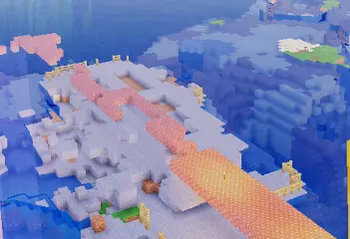

Lumavane Shaders
A shaders for low end system but still give good lighting and performance
Lumavane Shaders
Lumavane Shaders is a Minecraft Java shaderpack focused on beautiful lighting, realistic atmosphere, smooth clouds, better water, and strong performance. It is designed to make Minecraft feel more cinematic and natural while still keeping the original blocky Minecraft style.
Lumavane is built for players who want a shader that looks clean, realistic, and atmospheric without becoming overly heavy or turning Minecraft into a completely different game.
Features
- Improved sky colors and atmospheric horizon blending
- Soft realistic clouds with movement and depth
- Better ocean and water visuals
- Animated water waves
- Fresnel-style water highlights
- More natural sunlight and ambient lighting
- Controlled bloom for torches, lava, and bright highlights
- Improved fog and aerial perspective
- Warmer daytime lighting and cooler shaded areas
- Better night, cave, rain, and underwater visibility
- Multiple quality presets for different devices
- Low-end friendly performance options
Performance Presets
Lumavane includes multiple presets so you can choose the right balance between visuals and FPS:
- Potato — maximum FPS for very weak devices
- Low — lightweight visuals for low-end laptops
- Balanced — recommended default for normal gameplay
- High — stronger visuals for dedicated GPUs
- Cinematic — best visuals for screenshots and stronger hardware
The Balanced preset is the recommended starting point. It enables the main visual improvements while keeping performance reasonable.
Visual Style
Lumavane aims for a soft realistic Minecraft look:
- natural sky gradients
- cinematic but controlled lighting
- realistic-feeling water
- visible clouds without excessive performance cost
- smooth atmosphere without harsh white fog
- colorful but not oversaturated terrain
The goal is not to make Minecraft look unrecognizable. Lumavane keeps the vanilla identity while making the world feel more alive and polished.
Compatibility
Lumavane Shaders is designed for:
- Minecraft Java Edition
- Iris Shader Loader
- OptiFine-style shader loaders where possible
Future Minecraft versions may require testing and updates. Distant Horizons is not currently the main focus of this shaderpack.
Installation
- Install Iris or OptiFine.
- Download the Lumavane Shaders
.zipfile. - Place it into your Minecraft
shaderpacksfolder. - Open Minecraft.
- Go to Video Settings > Shader Packs.
- Select Lumavane Shaders.
- Start with the Balanced preset.
Recommended Settings
For low-end devices, use:
- Preset: Low or Potato
- Clouds: Fast or Off
- Water: Fast or Clean
- Bloom: Off or Low
- Shadows: Off
For better visuals, use:
- Preset: Balanced or High
- Clouds: Balanced
- Water: Balanced
- Bloom: Subtle
- Fog: Balanced
Known Notes
Lumavane is still being improved. Some effects may change between versions as the sky, water, clouds, lighting, and performance systems continue to be polished.
If you find visual bugs, broken settings, or performance issues, please report them with your Minecraft version, shader loader, GPU, preset, and screenshots if possible.
