
VeilMineX
It helps by adding Anti cheat and Anti Xray to your server to prevent cheating and xraying, You need protocol lib to be added to your plugin folder too.

VeilMineX
VeilMineX is a server-side Minecraft protection plugin built for server owners who want Anti-Xray, mining intelligence, and lightweight anti-cheat tools in one clean plugin.
It helps protect your server economy by hiding valuable blocks from X-ray users, tracking suspicious mining patterns, detecting impossible block interactions, and giving staff a simple dashboard to monitor alerts and player activity.
VeilMineX is designed for Paper, Spigot, Purpur, and Folia-style servers, with support planned for modern Minecraft versions including 1.20.x, 1.21.x, and 26.1.2. It is built for Java 17+ servers.
Features
Anti-Xray Protection
VeilMineX can hide valuable blocks from X-ray resource packs and hacked clients using packet-based obfuscation.
Supported protection ideas include:
- Ore hiding
- Fake block replacement
- Per-world Anti-Xray profiles
- Nether and Overworld protection
- Hidden chest/barrel/spawner support
- Proximity-based reveal
- Configurable reveal radius
- Round reveal mode using sphere distance
- Safe fallback if packet support is unavailable
The plugin does not permanently change your world blocks. It only changes what each player sees.
Mining Intelligence
VeilMineX does more than just hide ores. It also watches for suspicious mining behavior.
It can track:
- High-value ore mining rate
- Diamond and ancient debris patterns
- Direct tunnel-to-ore behavior
- Suspicious ore ratios
- Mining reach problems
- Through-wall mining attempts
- Fast break or nuker-like behavior
This helps staff investigate possible X-ray users instead of relying only on instant bans.
Lightweight Anti-Cheat Checks
VeilMineX includes lightweight checks focused mainly on mining and block interaction.
Included check types:
- Mining reach
- Mining angle
- Fast break
- Nuker
- Fast place
- Scaffold
- Ghost hand
- Ore path analysis
- Basic speed sanity
- Basic fly sanity
- NoFall sanity
By default, VeilMineX is designed to be conservative. It logs and alerts first instead of instantly banning players.
Web Admin Panel
VeilMineX includes an optional web panel for server administrators.
The web panel can show:
- Online players
- Recent alerts
- Player suspicion scores
- Violation history
- Anti-Xray status
- Cache statistics
- Mining reports
- Compatibility status
- Enabled checks
- Plugin settings
Default web panel settings:
host: 127.0.0.1
port: 8765
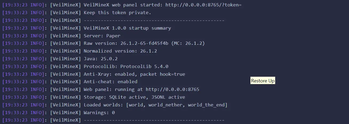
The admin token is generated on first startup. Check your console or plugins/VeilMineX/web.yml.
For security, the web panel is local-only by default. Change the host manually only if you know what you are doing.
Compatibility
VeilMineX is designed for:
- Paper
- Spigot
- Purpur
- Folia-style servers
- Minecraft 1.20.x
- Minecraft 1.21.x
- Minecraft 26.1.2
- Java 17+
Optional plugin support:
- ProtocolLib
- PlaceholderAPI
- LuckPerms
- DiscordSRV
- Floodgate / Geyser
- ViaVersion
- CoreProtect
Note: Packet-based Anti-Xray requires ProtocolLib or another supported packet provider. If no packet provider is installed, VeilMineX will still load, but Anti-Xray packet hiding will be disabled.
Commands
Main Commands
/veilmine
Shows the main help menu.
/veilmine status
Shows plugin status, Anti-Xray status, anti-cheat status, web panel status, cache information, and loaded modules.
/veilmine reload
Reloads configuration files safely.
/veilmine compat
Shows server compatibility information, including Minecraft version, Java version, server type, packet provider, and enabled features.
/veilmine panic
Toggles panic mode. Panic mode disables punishments but keeps logging and alerts active.
Alert Commands
/veilmine alerts
Toggles staff alerts for yourself.
/veilmine verbose
Toggles verbose alert mode.
Player Investigation Commands
/veilmine inspect <player>
Opens a player inspection GUI with violation history, mining data, suspicion score, and recent alerts.
/veilmine report <player>
Generates a mining and violation report for a player.
/veilmine clearvl <player> [check]
Clears a player’s violation level. You can clear all checks or only one specific check.
/veilmine exempt <player> <seconds> <reason>
Temporarily exempts a player from checks. Useful for testing, staff actions, or custom events.
Anti-Xray Commands
/veilmine antixray test
Runs an Anti-Xray diagnostic test. It checks packet support, hidden blocks, replacement palettes, world height, invalid materials, cache status, and reveal settings.
/veilmine cache clear
Clears the Anti-Xray cache.
/veilmine cache stats
Shows cache hit rate, cache size, and obfuscation performance.
Web Panel Commands
/veilmine web status
Shows whether the web panel is running.
/veilmine web url
Shows the local web panel URL.
/veilmine web token
Regenerates the admin web token.
/veilmine web restart
Restarts the web panel safely.
Debug Commands
/veilmine debug chunk
Shows Anti-Xray debug information for the chunk you are standing in.
/veilmine debug compatibility
Shows detailed compatibility debug information.
Permissions
veilmine.admin
Gives access to all admin features.
veilmine.command
Allows use of the main command.
veilmine.status
Allows /veilmine status.
veilmine.reload
Allows /veilmine reload.
veilmine.compat
Allows /veilmine compat.
veilmine.alerts
Allows receiving staff alerts.
veilmine.verbose
Allows verbose alert mode.
veilmine.inspect
Allows inspecting players.
veilmine.report
Allows generating player reports.
veilmine.cache
Allows cache commands.
veilmine.web
Allows web panel commands.
veilmine.web.token
Allows viewing or regenerating the web panel token.
veilmine.exempt
Allows temporary player exemptions.
veilmine.clearvl
Allows clearing violation levels.
veilmine.debug
Allows debug commands.
Bypass Permissions
veilmine.bypass
Bypasses all VeilMineX checks.
veilmine.bypass.antixray
Bypasses Anti-Xray protection.
veilmine.bypass.anticheat
Bypasses anti-cheat checks.
veilmine.bypass.mining-reach
Bypasses mining reach checks.
veilmine.bypass.fast-break
Bypasses fast break checks.
veilmine.bypass.nuker
Bypasses nuker checks.
veilmine.bypass.proximity
Bypasses proximity reveal restrictions.
veilmine.staff.see-real-blocks
Allows trusted staff to see real hidden blocks if enabled in config.
Configuration
VeilMineX includes several configuration files:
config.yml
Main plugin settings.
messages.yml
Custom messages and colors.
checks.yml
Anti-cheat check settings.
web.yml
Web panel settings.
logs/
Violation and mining logs.
reports/
Generated player reports.
Default Safety
VeilMineX is not designed to instantly ban players by default.
Default behavior:
- Low suspicion: log only
- Medium suspicion: staff alert
- High suspicion: cancel suspicious action
- Very high suspicion: optional punishment if configured
This makes the plugin safer for survival servers, SMPs, economy servers, and public communities where false positives must be avoided.
Installation
- Download the VeilMineX jar.
- Place it inside your server’s
pluginsfolder. - Install ProtocolLib if you want packet-based Anti-Xray.
- Restart the server.
- Run:
/veilmine status
- Run:
/veilmine antixray test
- Edit the config files if needed.
- Use the web panel or commands to monitor alerts.
Important Notes
VeilMineX is designed to make X-ray and suspicious mining much harder, but no Anti-Xray or anti-cheat plugin should be called “unbypassable.”
For best protection, use VeilMineX together with:
- Good staff moderation
- Backups
- CoreProtect or another rollback plugin
- Proper permissions
- Regular server updates
- Conservative punishment settings
Best For
VeilMineX is useful for:
- Survival servers
- SMP servers
- Economy servers
- Lifesteal servers
- Semi-anarchy servers
- Public community servers
- Mining-based servers
- Servers that need better X-ray investigation tools
Support
If something does not work correctly, run:
/veilmine compat
/veilmine antixray test
/veilmine status
Then check the console logs and the files inside:
plugins/VeilMineX/logs/
