

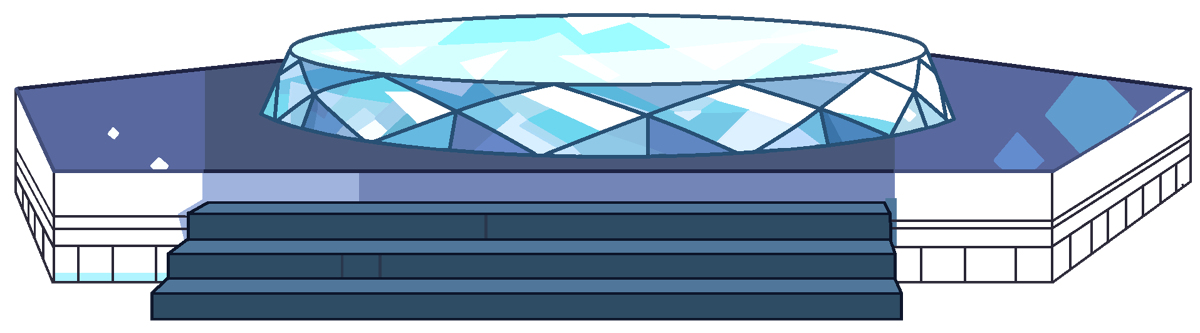
Ultimate Warp Pad ⬡ Inspired by Steven Universe
Turn your Minecraft world into a living teleportation network — where every warp pad isn't just a destination, it's a work of art.
Tired of the good old /warp command? Type, teleport, done. Soulless. Ultimate Warp Pad changes everything.
Instead of commands, place real warp pads in your world. Put them in your lobby, your base, your hub, your event worlds — anywhere. Players don't need to type a thing. They just step onto the pad, press Shift, and pick a destination from a GUI. It feels like using an actual teleportation device in an open world.
Inspired by Steven Universe, this plugin recreates the iconic warp pad experience of the Crystal Gems: dynamic block schematics that animate on use, particle effects, immersive sound cues, and a smooth launch-to-landing travel sequence.
✨ Features
| Feature | Description |
|---|---|
| Real Block Warp Pads | Warp pads are built with real in-game blocks across 6 schematic variants. They're not virtual items or menu buttons — you can see them, touch them, and interact with them. |
| Interactive GUI | A modern Warp Selection GUI with pagination, filter modes (Admin Warps / Your Warps / Public Warps / Trusted Warps), and full destination info — world, coordinates, cost. |
| Two Warp Types | WPA (Admin Warp): 7×7 structure for public destinations. WPP (Player Warp): 5×5 structure for players, with trust system and Private/Public visibility. |
| ️ Trust & Privacy System | Grant trusted players access to your private warp. Each warp can be Public (visible to all), Private (owner + trusted only), or part of a Trusted Network. |
| Cross-Navigation (Configurable) | Let trusted players travel across warps in the same network. Disable via connect-private-trusted: false to restrict to Trusted↔Trusted and Private↔Private only. |
| Cinematic Travel Animation | Levitation launch, converging particles, helix spiral, destination arrival, and landing sequence. Boss bar shows progress. Fully customizable sounds per phase. |
| 6 Animated Schematic Variants | Each warp pad has 6 block schematics that cycle on use — glow, rotate, shift. Separate idle, activation, and landing animation sequences. |
| Cost System | 3 cost types: FREE, XP, MONEY (Vault). Set a custom amount per warp. Players see the cost before teleporting. |
| Active Range | Control how far a warp appears in the selection GUI. Warps too far away won't show up — keeping the list clean and relevant. |
| Group Teleport | Teleport all nearby players standing on the warp pad together. Perfect for parties, events, or hub servers. |
| Warp Creator Item | A craftable item that lets survival players place warp pads in the world. Fully integrated with permission system. |
| Customizable Icons | 600+ materials to choose from as your warp's display icon in the GUI. |
| WorldGuard Integration | Auto-generates WorldGuard regions to protect warp pads. Custom flags uwp-use and uwp-place for per-region control. |
| ️ SQLite & MySQL | Both database backends supported. Stores warps, terrain snapshots (restored on warp deletion), and trusted player lists. |
🎯 How It Works
Admin — Create a Public Warp Pad:
/wpa create <warp_id>
Stand where you want it, run the command. The plugin builds a 7×3×7 warp pad structure at your location and teleports you on top. The pad is automatically protected by a WorldGuard region.
Player — Create a Personal Warp Pad: Two ways:
- Craft a Warp Creator item via the configured recipe, then place it on the ground.
- Run:
/wpp create <warp_id>
Using a Warp Pad:
- Walk onto the warp pad (3×3 area on the top platform)
- Press SHIFT
- The Warp Selection GUI opens
- Choose a destination — watch yourself launch into the sky with full particle effects!
📋 Commands
Admin Commands — Permission: uwp.admin
| Command | Description |
|---|---|
/wpa create <id> | Creates a new admin warp pad at your location |
/wpa delete <id> | Deletes an admin warp pad |
/wpa setting [id] | Opens the warp settings GUI (stand on a warp or provide an ID) |
/wpa give <player> [amount] | Gives a player the Warp Creator item |
/wpa info | Display information about the warp you're currently standing on. |
/wpa reload | Reloads the plugin configuration |
Player Commands — Permission: uwp.user.*
| Command | Description |
|---|---|
/wpp create <id> | Creates a new player warp pad at your location |
/wpp delete <id> | Deletes a player warp pad |
/wpp setting [id] | Opens the warp settings GUI |
/wpp trust <id> <player> | Adds/removes a player from your warp's trusted list |
🔐 Permissions
| Permission | Default | Description |
|---|---|---|
uwp.use | ✅ True | Allows using warp pads (shift + GUI) |
uwp.admin | ❌ OP | Full admin warp management |
uwp.user.create | ✅ True | Create personal warps |
uwp.user.delete | ✅ True | Delete personal warps |
uwp.user.setting | ✅ True | Open warp settings |
uwp.user.trust | ✅ True | Trust/untrust players |
uwp.craft | ❌ OP | Craft the Warp Creator item |
uwp.user.create.<n> | ❌ False | Override max warps. Example: uwp.user.create.10 allows 10 warps. |
uwp.user.range.<n> | ❌ False | Adds a custom range option. Example: uwp.user.range.10000 adds 10000 blocks. |
⚙️ Configuration (config.yml)
Database
database:
  type: sqlite           # sqlite or mysql
  mysql:
    host: localhost
    port: 3306
    database: ultimatewarpad
    username: root
    password: ""
Warp Mechanics
warp:
  launch-y: 250          # Y-level players are launched to during travel
  force-stay: true       # Prevents players from moving while warping
  cooldown: -1           # Cooldown in seconds (-1 = disabled)
  center: true           # Snaps player to center of the warp pad on launch
Sound System
warp:
  start-sounds:          # Played when travel begins
    - "BLOCK_BEACON_ACTIVATE:1.0:0.5"
    - "BLOCK_BEACON_POWER_SELECT:0.5:0.8"
    - "AMBIENT_BASALT_DELTAS_LOOP:1.0:0.5"
  warmup-sounds:         # Played during phase 2 (fast ascent)
    - "BLOCK_TRIAL_SPAWNER_ABOUT_TO_SPAWN_ITEM:1.0:0.9"
    - "BLOCK_PORTAL_AMBIENT:0.8:0.1"
  cancel-sounds:         # Played when travel is cancelled
    - "BLOCK_BEACON_DEACTIVATE:1.0:0.8"
Particle Effects
particle:
  enabled: true
  type: END_ROD          # Particle type
  idle-amount: 3         # Ambient particles while idle
  trigger-amount: 4      # Particles burst on warp trigger
Group Teleport
group-teleport:
  enable: true           # Teleport nearby players together
  collision: true        # Disable collision during group warp
  max-per-warp: -1       # Max players per group (-1 = unlimited)
  delay-in-tick: 5       # Delay between each player launch (ticks)
Message Channels
message:
  chat: true             # Send messages in chat
  action-bar: false      # Send in action bar
  boss-bar: false        # Show boss bar progress
  title: false           # Show title/subtitle
Cross-Navigation
# true:  trusted players can see and teleport to other warps in the network
# false: restricts travel to Trusted↔Trusted or Private↔Private only
connect-private-trusted: true
Effects
effect:
  apply-darkness: false
  apply-vanish: true     # Invisibility while warping
  apply-glowing: true    # Glowing effect while warping
  apply_regeneration: false
Limits
max-warps-per-player: 20
disabled-worlds: []      # Worlds where warp pads are disabled
📥 Installation
- Install WorldGuard (required) and Vault (optional, for economy support)
- Download UltimateWarpPad.jar from Modrinth or SpigotMC
- Place the
.jarfile in yourplugins/folder - Restart your server
- Configure
plugins/UltimateWarpPad/config.ymlif needed - Run
/wpa reloadto apply changes
Requirements
- Server: Minecraft 1.21+
- Required plugin: WorldGuard
- Optional plugin: Vault (for Money cost type)
- API: Paper API 1.21+
💡 Tips & Ideas
- Build a Server Warp Network: Place admin warp pads at key locations (spawn, shops, event worlds, minigames). Players step on and shift to travel.
- Roleplay & Immersion: Warp pads exist as part of the world — no chat commands, no abstract menus. Perfect for RPG, lore-heavy, or immersion servers.
- Builder Bases: Let builders create private warp networks connecting their bases, towns, or build sites.
- Custom Icons: Every warp gets its own icon — makes navigation easy and adds personality.
- Smart Range Usage: Set reasonable ranges so warps only appear when they're relevant to the player's current area.
⚠️ Notes
- Warp pads cannot be placed within 10 blocks of another warp pad.
- Warp pads require clear sky above — no blocks blocking the launch area.
- WorldGuard regions are automatically created and removed with the warp pad.
- Fall damage is suppressed during launch and landing.
- All messages, GUI texts, and lores are fully customizable in
messages.yml.
