
QWERTZ Core
QWERTZ Core is an all-in-one event management plugin for Minecraft servers.

Fixed
- Kits with special data (such as enchants or potions) not working
New Features
- Freeze and unfreeze commands
Reworked
- Reworked special blocks, now you dont place them, you bind block types to qwertz core special blocks
New Features
- Skull command to get anyones skull
- fixed kits not working
Removed
- removed PowerRanks support
New Features
- Pinging
- Scoreboard number color in themes (or remove em completely!), only if packetevents is installed
New Features
- ClearOnJoin and ClearOnTp permission
- Qwertzcore.staff.bypassclear permission
Fixed
- Fixed emojis not working at all
Changed
- Using Yml instead of JSON for kits, added a legacy adapter to continue supporting 3.x JSON kits
New Features
- Added a rejoining system
New Features
- added /visibility, an alias for /hide
- /hide now accepts a number, just like in Hypixel housing, e.g. /hide 10 only shows 10 players
- Added a /broadcast command
- FULL HEX COLOR SUPPORT FOR CHAT, TAB AND SCOREBOARD
Thats right! Just do the following format: &#ff00ff
- POLL GUI
Simply do /poll without arguments and you get a NICE GUI for creating polls!
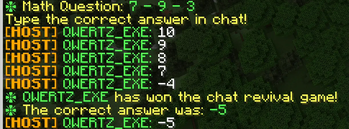
- Added /revival and /chatrevive as an alias for /chatrevival
- You can now use custom for custom chat revival questions
- CHATREVIVAL GUI
Simply do /chatrevival without arguments and you get a NICE GUI for creating polls!
Changes
- Increased the number in /revivelast to 5minutes (instead of 1min)
- /revivelast now takes minutes as an argument, not seconds (if no "sec" is provided, only number is now minutes default)
- Now shows WHO healed all alive/dead players
- Renamed chatrevive to chatrevival
- Kits can now load enchantments and way more!
Known issues
- :Potion: Potions dont work in kits
Regarding the Core Icon
The Core Icon always changes color in every major update. 1.x was green. 2.x was yellow. Since the release of 2.0 a lot changed. One of the changes was RGB color support. To show off this support, we chose a more catchy yellow, #FF6700
New Features
- Config option
coloredChat - Permission
qwertzcore.chat.color, IF color option is enabled AND player has permission, apply color codes in their /msgs and chat
Fixed
- everyone being able to write colors in chat :)
- Config option
New Features
- /speed
- /gm now works with numbers too
Fixed
- no commands usable on console
- /speed
New Features
- /config without arguments opens a beautiful GUI
- obsolete config keys from older versions now get garbage collected
Fixed
- minor spelling mistakes
Fixed
- fixed clearing
- fixed extreme lags on slow servers (added theme caching 5min)
Changed
- Warps and Kits are now in seperate files!
New Features
- /emojis
- Make your own emojis in theme config
- Each theme can have custom emojis
Fixed
- Core not reloading correctly
- Spawn not saving correctly
New features
- Add verbatim changelog
- /settheme
- /reloadcore
- /setserver
- /setevent
- /setspawn
Hex color codes are now supported in messages!
Version 2.0
New features:
- No longer revive Staff on /reviveall
- No longer corrupt the config on kit creation
- Customizable Scoreboard, Tab
- Customizable Messages
Release - Version: 1.4
Author: QWERTZ_EXE Website: https://qwertz.app
Features
- Event countdown and timer management
- Player revival system with tokens
- Gamemode management
- Inventory management for alive/dead players
- Player visibility controls
- Set and let players use warps
- Create and give out kits
- Inventory see (and edit)
- Custom event blocks
- A lot of Configuration options
- Optional Luckperms features
- Optional PowerRanks features
- Placeholder API support
- Database for tracking wins and revive tokens
Commands
General Commands
/core- Displays information about QWERTZ Core/config <key> <value>- Edit configuration values/hide <host|staff|all|off>- Hide other players based on their rank/spawn- Teleport to spawn location/discord- Displays the discord invite set in the config/message <player> <message>- Private messages a player/reply <message>- Reply to the last player who messaged you/togglemessage- Toggles incoming private messages/mutechat- Mute the chat/unmutechat- Unmute the chat/ad <platform>- Broadcast an advertisement/wins [player]- Check the wins of a player/revives [player]- Check the revive tokens of a player/warp <warp>- Warp to a warp/warps- List all available warps/vanish- Makes you completely invisible/unvanish- Removes the vanish effect/setwarp <warp>- Create a warp/delwarp <warp>- Delete a warp/createkit <kit>- Create a kit/delkit <kit>- Delete a kit/setad <platform> <advertisement>- Set an advertisement for a platform/eventblock <block> [material]- Get a QWERTZ Core event block/kitsLists all kits
Event Management
/timer <seconds|cancel>- Starts or cancels a countdown timer/eventcountdown <time|cancel>- Start or cancel a countdown for the event
Gamemode Commands
/gmc- Set gamemode to creative/gms- Set gamemode to survival/gmsp- Set gamemode to spectator/gma- Set gamemode to adventure/gm <creative|survival|adventure|spectator>- Set gamemode
Revival System
/chatrevive <math|typer|guess> [max]- Start a chat revival game/revive <player>- Revive a player/unrevive <player>- Mark a player as dead/reviveall- Revive all players/unreviveall- Unrevive all players/revivelast [seconds]- Revives all players who died in the last specified number of seconds/userevive- Request to use a revive token/reviveaccept <player>- Accept a player's revive request/revivedeny <player>- Deny a player's revive request/addrevive <player>- Add a revive token to a player/removerevive <player>- Remove a revive token from a player
Player Management
/listalive- List all alive players/listdead- List all dead players/givedead <item> [amount] [data]- Give an item to all dead players/givealive <item> [amount] [data]- Give an item to all alive players/tpalive- Teleport all alive players to you/tpdead- Teleport all dead players to you/tphere <player>- Teleport the selected player to you/clearalive- Clears the inventory of all alive players/cleardead- Clears the inventory of all dead players/healalive- Heals all alive players/healdead- Heals all dead players/kit <kit> <player|alive|dead|all>- Gives a kit to the selected group/invsee <player>- View and modify another player's inventory/poll <duration> <question> <answer1> <answer2> [answer3] ...- Create a poll, to use multiword parameters, use "-" instead of " "
WorldGuard Management
/pvp [region]- Toggle PVP in the selected region or globally/place [region]- Toggle Block Placing in the selected region or globally/break [region]- Toggle Block Breaking in the selected region or globally/hunger [region]- Toggle Hunger in the selected region or globally/falldamage [region]- Toggle Fall Damage in the selected region or globally/flow [region]- Toggle Lava / Water flow in the selected region or globally
Database Management
/addwin <player>- Add a win to a player's record/removewin <player>- Remove a win from a player's record
Permissions
Basic Permissions
qwertzcore.host.*- All host permissionsqwertzcore.staff.*- All staff permissionsqwertzcore.player.*- All player permissionsqwertzcore.gamemode.*- All gamemode permissionsqwertzcore.config.*- All config permissionsqwertzcore.database.*- All database permissions
Specific Permissions
Host Permissions
qwertzcore.host.timer- Manage timersqwertzcore.host.revival- Manage chat revivalsqwertzcore.host.revive- Revive playersqwertzcore.host.unrevive- Unrevive playersqwertzcore.host.reviveall- Revive all playersqwertzcore.host.unreviveall- Unrevive all playersqwertzcore.host.listalive- List alive playersqwertzcore.host.listdead- List dead playersqwertzcore.host.givedead- Give items to dead playersqwertzcore.host.givealive- Give items to alive playersqwertzcore.host.tpalive- Teleport alive playersqwertzcore.host.tpdead- Teleport dead playersqwertzcore.host.tphere- Teleport a playerqwertzcore.host.clearalive- Clear alive players' inventoriesqwertzcore.host.cleardead- Clear dead players' inventoriesqwertzcore.host.healalive- Heals alive playersqwertzcore.host.healdead- Heals dead playersqwertzcore.host.revivelast- Revive recently dead playersqwertzcore.host.eventcountdown- Manage event countdownsqwertzcore.host.reviveaccept- Accept revive requestsqwertzcore.host.revivedeny- Deny revive requestsqwertzcore.host.addrevive- Add revive tokensqwertzcore.host.removerevive- Remove revive tokensqwertzcore.host.mutechat- Mute the chatqwertzcore.host.unmutechat- Unmute the chatqwertzcore.host.ad- Broadcast an advertisementqwertzcore.host.eventblock- Get a QWERTZ Core event blockqwertzcore.host.kit- Give out kitsqwertzcore.host.kits- List all kitsqwertzcore.host.invsee- Allows the player to see other players' inventoryqwertzcore.host.vanish- Use vanishqwertzcore.host.unvanish- Use unvanishqwertzcore.host.pvp- Toggle PVP using /pvpqwertzcore.host.break- Toggle Block Breaking using /breakqwertzcore.host.place- Toggle Block Placing using /placeqwertzcore.host.hunger- Toggle Hunger using /hungerqwertzcore.host.falldamage- Toggle Fall Damage using /falldamageqwertzcore.host.poll- Create polls
Player Permissions
qwertzcore.player.spawn- Use spawn commandqwertzcore.player.hide- Use hide commandqwertzcore.player.discord- Use discord commandqwertzcore.player.userevive- Use revive tokensqwertzcore.player.checkrevives- Check revivesqwertzcore.player.checkwins- Check winsqwertzcore.player.message- Private message and reply to othersqwertzcore.player.togglemessage- Toggle incoming private messagesqwertzcore.player.listwarps- List all available warpsqwertzcore.player.warp- Use warpsqwertzcore.player.pollvote- Vote in polls
Gamemode Permissions
qwertzcore.gamemode.creative- Use creative modeqwertzcore.gamemode.survival- Use survival modeqwertzcore.gamemode.spectator- Use spectator modeqwertzcore.gamemode.adventure- Use adventure modeqwertzcore.gamemode- Use general gamemode command
Config Permissions
qwertzcore.config- Edit plugin configurationqwertzcore.config.setad- Set an advertisementqwertzcore.config.setwarp- Set a warpqwertzcore.config.delwarp- Delete a warpqwertzcore.config.createkit- Create a kitqwertzcore.config.delkit- Delete a kit
Database Permissions
qwertzcore.database.addwin- Add wins to players' recordsqwertzcore.database.removewin- Remove wins from players' records
Other Permissions
qwertzcore.chat.bypass- Bypass a muted chatqwertzcore.chat.bypasstm- Bypass the disabled vanilla commands /tm and /teammsgqwertzcore.chat.bypassme- Bypass the disabled vanilla command /me
Event Blocks
DAMAGE_BLOCK- Constant damage while standing on itINSTANT_DEATH_BLOCK- Instant death when standing on itRANDOM_DROP_BLOCK- Drops a random block on breakGRAVITY_FLIP_BLOCK- Inverts gravity for 5 seconds upon standing on it
Placeholders
%qwertzcore_alive%- Amount of alive players%qwertzcore_dead%- Amount of dead players%qwertzcore_isalive%- "true" if the player is alive, else "false"%qwertzcore_isdead%- "true" if the player is dead, else "false"%qwertzcore_revives%- Amount of revives the player has%qwertzcore_wins%- Amount of wins the player has%qwertzcore_server%- Server name configured in the config%qwertzcore_event%- Current event%qwertzcore_startingin%- Formatted string displaying the time until the event starts
Release - Version: 1.3
Author: QWERTZ_EXE Website: https://qwertz.app
Features
- Event countdown and timer management
- Player revival system with tokens
- Gamemode management
- Inventory management for alive/dead players
- Player visibility controls
- Set and let players use warps
- Create and give out kits
- Inventory see (and edit)
- Custom event blocks
- A lot of Configuration options
- Optional Luckperms features
- Placeholder API support
- Database for tracking wins and revive tokens
Commands
General Commands
/core- Displays information about QWERTZ Core/config <key> <value>- Edit configuration values/hide <host|staff|all|off>- Hide other players based on their rank/spawn- Teleport to spawn location/discord- Displays the discord invite set in the config/message <player> <message>- Private messages a player/reply <message>- Reply to the last player who messaged you/togglemessage- Toggles incoming private messages/mutechat- Mute the chat/unmutechat- Unmute the chat/ad <platform>- Broadcast an advertisement/wins [player]- Check the wins of a player/revives [player]- Check the revive tokens of a player/warp <warp>- Warp to a warp/warps- List all available warps/vanish- Makes you completely invisible/unvanish- Removes the vanish effect/setwarp <warp>- Create a warp/delwarp <warp>- Delete a warp/createkit <kit>- Create a kit/delkit <kit>- Delete a kit/setad <platform> <advertisement>- Set an advertisement for a platform/eventblock <block> [material]- Get a QWERTZ Core event block/kitsLists all kits
Event Management
/timer <seconds|cancel>- Starts or cancels a countdown timer/eventcountdown <time|cancel>- Start or cancel a countdown for the event
Gamemode Commands
/gmc- Set gamemode to creative/gms- Set gamemode to survival/gmsp- Set gamemode to spectator/gma- Set gamemode to adventure/gm <creative|survival|adventure|spectator>- Set gamemode
Revival System
/chatrevive <math|typer|guess> [max]- Start a chat revival game/revive <player>- Revive a player/unrevive <player>- Mark a player as dead/reviveall- Revive all players/unreviveall- Unrevive all players/revivelast [seconds]- Revives all players who died in the last specified number of seconds/userevive- Request to use a revive token/reviveaccept <player>- Accept a player's revive request/revivedeny <player>- Deny a player's revive request/addrevive <player>- Add a revive token to a player/removerevive <player>- Remove a revive token from a player
Player Management
/listalive- List all alive players/listdead- List all dead players/givedead <item> [amount] [data]- Give an item to all dead players/givealive <item> [amount] [data]- Give an item to all alive players/tpalive- Teleport all alive players to you/tpdead- Teleport all dead players to you/tphere <player>- Teleport the selected player to you/clearalive- Clears the inventory of all alive players/cleardead- Clears the inventory of all dead players/healalive- Heals all alive players/healdead- Heals all dead players/kit <kit> <player|alive|dead|all>- Gives a kit to the selected group/invsee <player>- View and modify another player's inventory/poll <duration> <question> <answer1> <answer2> [answer3] ...- Create a poll, to use multiword parameters, use "-" instead of " "
WorldGuard Management
/pvp [region]- Toggle PVP in the selected region or globally/place [region]- Toggle Block Placing in the selected region or globally/break [region]- Toggle Block Breaking in the selected region or globally/hunger [region]- Toggle Hunger in the selected region or globally/falldamage [region]- Toggle Fall Damage in the selected region or globally
Database Management
/addwin <player>- Add a win to a player's record/removewin <player>- Remove a win from a player's record
Permissions
Basic Permissions
qwertzcore.host.*- All host permissionsqwertzcore.staff.*- All staff permissionsqwertzcore.player.*- All player permissionsqwertzcore.gamemode.*- All gamemode permissionsqwertzcore.config.*- All config permissionsqwertzcore.database.*- All database permissions
Specific Permissions
Host Permissions
qwertzcore.host.timer- Manage timersqwertzcore.host.revival- Manage chat revivalsqwertzcore.host.revive- Revive playersqwertzcore.host.unrevive- Unrevive playersqwertzcore.host.reviveall- Revive all playersqwertzcore.host.unreviveall- Unrevive all playersqwertzcore.host.listalive- List alive playersqwertzcore.host.listdead- List dead playersqwertzcore.host.givedead- Give items to dead playersqwertzcore.host.givealive- Give items to alive playersqwertzcore.host.tpalive- Teleport alive playersqwertzcore.host.tpdead- Teleport dead playersqwertzcore.host.tphere- Teleport a playerqwertzcore.host.clearalive- Clear alive players' inventoriesqwertzcore.host.cleardead- Clear dead players' inventoriesqwertzcore.host.healalive- Heals alive playersqwertzcore.host.healdead- Heals dead playersqwertzcore.host.revivelast- Revive recently dead playersqwertzcore.host.eventcountdown- Manage event countdownsqwertzcore.host.reviveaccept- Accept revive requestsqwertzcore.host.revivedeny- Deny revive requestsqwertzcore.host.addrevive- Add revive tokensqwertzcore.host.removerevive- Remove revive tokensqwertzcore.host.mutechat- Mute the chatqwertzcore.host.unmutechat- Unmute the chatqwertzcore.host.ad- Broadcast an advertisementqwertzcore.host.eventblock- Get a QWERTZ Core event blockqwertzcore.host.kit- Give out kitsqwertzcore.host.kits- List all kitsqwertzcore.host.invsee- Allows the player to see other players' inventoryqwertzcore.host.vanish- Use vanishqwertzcore.host.unvanish- Use unvanishqwertzcore.host.pvp- Toggle PVP using /pvpqwertzcore.host.break- Toggle Block Breaking using /breakqwertzcore.host.place- Toggle Block Placing using /placeqwertzcore.host.hunger- Toggle Hunger using /hungerqwertzcore.host.falldamage- Toggle Fall Damage using /falldamageqwertzcore.host.poll- Create polls
Player Permissions
qwertzcore.player.spawn- Use spawn commandqwertzcore.player.hide- Use hide commandqwertzcore.player.discord- Use discord commandqwertzcore.player.userevive- Use revive tokensqwertzcore.player.checkrevives- Check revivesqwertzcore.player.checkwins- Check winsqwertzcore.player.message- Private message and reply to othersqwertzcore.player.togglemessage- Toggle incoming private messagesqwertzcore.player.listwarps- List all available warpsqwertzcore.player.warp- Use warpsqwertzcore.player.pollvote- Vote in polls
Gamemode Permissions
qwertzcore.gamemode.creative- Use creative modeqwertzcore.gamemode.survival- Use survival modeqwertzcore.gamemode.spectator- Use spectator modeqwertzcore.gamemode.adventure- Use adventure modeqwertzcore.gamemode- Use general gamemode command
Config Permissions
qwertzcore.config- Edit plugin configurationqwertzcore.config.setad- Set an advertisementqwertzcore.config.setwarp- Set a warpqwertzcore.config.delwarp- Delete a warpqwertzcore.config.createkit- Create a kitqwertzcore.config.delkit- Delete a kit
Database Permissions
qwertzcore.database.addwin- Add wins to players' recordsqwertzcore.database.removewin- Remove wins from players' records
Other Permissions
qwertzcore.chat.bypass- Bypass a muted chatqwertzcore.chat.bypasstm- Bypass the disabled vanilla commands /tm and /teammsgqwertzcore.chat.bypassme- Bypass the disabled vanilla command /me
Event Blocks
DAMAGE_BLOCK- Constant damage while standing on itINSTANT_DEATH_BLOCK- Instant death when standing on itRANDOM_DROP_BLOCK- Drops a random block on breakGRAVITY_FLIP_BLOCK- Inverts gravity for 5 seconds upon standing on it
Placeholders
%qwertzcore_alive%- Amount of alive players%qwertzcore_dead%- Amount of dead players%qwertzcore_isalive%- "true" if the player is alive, else "false"%qwertzcore_isdead%- "true" if the player is dead, else "false"%qwertzcore_revives%- Amount of revives the player has%qwertzcore_wins%- Amount of wins the player has%qwertzcore_server%- Server name configured in the config%qwertzcore_event%- Current event%qwertzcore_startingin%- Formatted string displaying the time until the event starts
Release - Version: 1.2
Author: QWERTZ_EXE Website: https://qwertz.app
Features
- Event countdown and timer management
- Player revival system with tokens
- Gamemode management
- Inventory management for alive/dead players
- Player visibility controls
- Set and let players use warps
- Create and give out kits
- Inventory see (and edit)
- Custom event blocks
- A lot of Configuration options
- Optional Luckperms features
- Placeholder API support
- Database for tracking wins and revive tokens
Commands
General Commands
/core- Displays information about QWERTZ Core/config <key> <value>- Edit configuration values/hide <host|staff|all|off>- Hide other players based on their rank/spawn- Teleport to spawn location/discord- Displays the discord invite set in the config/message <player> <message>- Private messages a player/reply <message>- Reply to the last player who messaged you/togglemessage- Toggles incoming private messages/mutechat- Mute the chat/unmutechat- Unmute the chat/ad <platform>- Broadcast an advertisement/wins [player]- Check the wins of a player/revives [player]- Check the revive tokens of a player/warp <warp>- Warp to a warp/warps- List all available warps/setwarp <warp>- Create a warp/delwarp <warp>- Delete a warp/createkit <kit>- Create a kit/delkit <kit>- Delete a kit/setad <platform> <advertisement>- Set an advertisement for a platform/eventblock <block> [material]- Get a QWERTZ Core event block/kitsLists all kits
Event Management
/timer <seconds|cancel>- Starts or cancels a countdown timer/eventcountdown <time|cancel>- Start or cancel a countdown for the event
Gamemode Commands
/gmc- Set gamemode to creative/gms- Set gamemode to survival/gmsp- Set gamemode to spectator/gma- Set gamemode to adventure/gm <creative|survival|adventure|spectator>- Set gamemode
Revival System
/chatrevive <math|typer|guess> [max]- Start a chat revival game/revive <player>- Revive a player/unrevive <player>- Mark a player as dead/reviveall- Revive all players/unreviveall- Unrevive all players/revivelast [seconds]- Revives all players who died in the last specified number of seconds/userevive- Request to use a revive token/reviveaccept <player>- Accept a player's revive request/revivedeny <player>- Deny a player's revive request/addrevive <player>- Add a revive token to a player/removerevive <player>- Remove a revive token from a player
Player Management
/listalive- List all alive players/listdead- List all dead players/givedead <item> [amount] [data]- Give an item to all dead players/givealive <item> [amount] [data]- Give an item to all alive players/tpalive- Teleport all alive players to you/tpdead- Teleport all dead players to you/tphere <player>- Teleport the selected player to you/clearalive- Clears the inventory of all alive players/cleardead- Clears the inventory of all dead players/healalive- Heals all alive players/healdead- Heals all dead players/kit <kit> <player|alive|dead|all>Gives a kit to the selected group
Database Management
/addwin <player>- Add a win to a player's record/removewin <player>- Remove a win from a player's record
Permissions
Basic Permissions
qwertzcore.host.*- All host permissionsqwertzcore.staff.*- All staff permissionsqwertzcore.player.*- All player permissionsqwertzcore.gamemode.*- All gamemode permissionsqwertzcore.config.*- All config permissionsqwertzcore.database.*- All database permissions
Specific Permissions
Host Permissions
qwertzcore.host.timer- Manage timersqwertzcore.host.revival- Manage chat revivalsqwertzcore.host.revive- Revive playersqwertzcore.host.unrevive- Unrevive playersqwertzcore.host.reviveall- Revive all playersqwertzcore.host.unreviveall- Unrevive all playersqwertzcore.host.listalive- List alive playersqwertzcore.host.listdead- List dead playersqwertzcore.host.givedead- Give items to dead playersqwertzcore.host.givealive- Give items to alive playersqwertzcore.host.tpalive- Teleport alive playersqwertzcore.host.tpdead- Teleport dead playersqwertzcore.host.tphere- Teleport a playerqwertzcore.host.clearalive- Clear alive players' inventoriesqwertzcore.host.cleardead- Clear dead players' inventoriesqwertzcore.host.healalive- Heals alive playersqwertzcore.host.healdead- Heals dead playersqwertzcore.host.revivelast- Revive recently dead playersqwertzcore.host.eventcountdown- Manage event countdownsqwertzcore.host.reviveaccept- Accept revive requestsqwertzcore.host.revivedeny- Deny revive requestsqwertzcore.host.addrevive- Add revive tokensqwertzcore.host.removerevive- Remove revive tokensqwertzcore.host.mutechat- Mute the chatqwertzcore.host.unmutechat- Unmute the chatqwertzcore.host.ad- Broadcast an advertisementqwertzcore.host.eventblock- Get a QWERTZ Core event blockqwertzcore.host.kit- Give out kitsqwertzcore.host.kits- List all kits
Player Permissions
qwertzcore.player.spawn- Use spawn commandqwertzcore.player.hide- Use hide commandqwertzcore.player.discord- Use discord commandqwertzcore.player.userevive- Use revive tokensqwertzcore.player.checkrevives- Check revivesqwertzcore.player.checkwins- Check winsqwertzcore.player.message- Private message and reply to othersqwertzcore.player.togglemessage- Toggle incoming private messagesqwertzcore.player.listwarps- List all available warpsqwertzcore.player.warp- Use warps
Gamemode Permissions
qwertzcore.gamemode.creative- Use creative modeqwertzcore.gamemode.survival- Use survival modeqwertzcore.gamemode.spectator- Use spectator modeqwertzcore.gamemode.adventure- Use adventure modeqwertzcore.gamemode- Use general gamemode command
Config Permissions
qwertzcore.config- Edit plugin configurationqwertzcore.config.setad- Set an advertisementqwertzcore.config.setwarp- Set a warpqwertzcore.config.delwarp- Delete a warpqwertzcore.config.createkit- Create a kitqwertzcore.config.delkit- Delete a kit
Database Permissions
qwertzcore.database.addwin- Add wins to players' recordsqwertzcore.database.removewin- Remove wins from players' records
Other Permissions
qwertzcore.chat.bypass- Bypass a muted chatqwertzcore.chat.bypasstm- Bypass the disabled vanilla commands /tm and /teammsgqwertzcore.chat.bypassme- Bypass the disabled vanilla command /me
Event Blocks
DAMAGE_BLOCK- Constant damage while standing on itINSTANT_DEATH_BLOCK- Instant death when standing on itRANDOM_DROP_BLOCK- Drops a random block on breakGRAVITY_FLIP_BLOCK- Inverts gravity for 5 seconds upon standing on it
Placeholders
%qwertzcore_alive%- Amount of alive players%qwertzcore_dead%- Amount of dead players%qwertzcore_isalive%- "true" if the player is alive, else "false"%qwertzcore_isdead%- "true" if the player is dead, else "false"%qwertzcore_revives%- Amount of revives the player has%qwertzcore_wins%- Amount of wins the player has%qwertzcore_server%- Server name configured in the config%qwertzcore_event%- Current event%qwertzcore_startingin%- Formatted string displaying the time until the event starts
Release - Version: 1.1
Author: QWERTZ_EXE Website: https://qwertz.app
Features
- Event countdown and timer management
- Player revival system with tokens
- Gamemode management
- Inventory management for alive/dead players
- Player visibility controls
- Set and let players use warps
- A lot of Configuration options
- Optional Luckperms features
- Placeholder API support
- Database for tracking wins and revive tokens
Commands
General Commands
/core- Displays information about QWERTZ Core/config <key> <value>- Edit configuration values/hide <host|staff|all|off>- Hide other players based on their rank/spawn- Teleport to spawn location/discord- Displays the discord invite set in the config/message <player> <message>- Private messages a player/reply <message>- Reply to the last player who messaged you/togglemessage- Toggles incoming private messages/mutechat- Mute the chat/unmutechat- Unmute the chat/ad <platform>- Broadcast an advertisement/wins [player]- Check the wins of a player/revives [player]- Check the revive tokens of a player/warp <warp>- Warp to a warp/warps- List all available warps/setwarp <warp>- Create a warp/delwarp <warp>- Delete a warp/setad <platform> <advertisement>- Set an advertisement for a platform
Event Management
/timer <seconds|cancel>- Starts or cancels a countdown timer/eventcountdown <time|cancel>- Start or cancel a countdown for the event
Gamemode Commands
/gmc- Set gamemode to creative/gms- Set gamemode to survival/gmsp- Set gamemode to spectator/gma- Set gamemode to adventure/gm <creative|survival|adventure|spectator>- Set gamemode
Revival System
/chatrevive <math|typer|guess> [max]- Start a chat revival game/revive <player>- Revive a player/unrevive <player>- Mark a player as dead/reviveall- Revive all players/revivelast [seconds]- Revives all players who died in the last specified number of seconds/userevive- Request to use a revive token/reviveaccept <player>- Accept a player's revive request/revivedeny <player>- Deny a player's revive request/addrevive <player>- Add a revive token to a player/removerevive <player>- Remove a revive token from a player
Player Management
/listalive- List all alive players/listdead- List all dead players/givedead <item> [amount] [data]- Give an item to all dead players/givealive <item> [amount] [data]- Give an item to all alive players/tpalive- Teleport all alive players to you/tpdead- Teleport all dead players to you/tphere <player>- Teleport the selected player to you/clearalive- Clears the inventory of all alive players/cleardead- Clears the inventory of all dead players/healalive- Heals all alive players/healdead- Heals all dead players
Database Management
/addwin <player>- Add a win to a player's record/removewin <player>- Remove a win from a player's record
Permissions
Basic Permissions
qwertzcore.host.*- All host permissionsqwertzcore.staff.*- All staff permissionsqwertzcore.player.*- All player permissionsqwertzcore.gamemode.*- All gamemode permissionsqwertzcore.config.*- All config permissionsqwertzcore.database.*- All database permissions
Specific Permissions
Host Permissions
qwertzcore.host.timer- Manage timersqwertzcore.host.revival- Manage chat revivalsqwertzcore.host.revive- Revive playersqwertzcore.host.unrevive- Unrevive playersqwertzcore.host.reviveall- Revive all playersqwertzcore.host.listalive- List alive playersqwertzcore.host.listdead- List dead playersqwertzcore.host.givedead- Give items to dead playersqwertzcore.host.givealive- Give items to alive playersqwertzcore.host.tpalive- Teleport alive playersqwertzcore.host.tpdead- Teleport dead playersqwertzcore.host.tphere- Teleport a playerqwertzcore.host.clearalive- Clear alive players' inventoriesqwertzcore.host.cleardead- Clear dead players' inventoriesqwertzcore.host.healalive- Heals alive playersqwertzcore.host.healdead- Heals dead playersqwertzcore.host.revivelast- Revive recently dead playersqwertzcore.host.eventcountdown- Manage event countdownsqwertzcore.host.reviveaccept- Accept revive requestsqwertzcore.host.revivedeny- Deny revive requestsqwertzcore.host.addrevive- Add revive tokensqwertzcore.host.removerevive- Remove revive tokensqwertzcore.host.mutechat- Mute the chatqwertzcore.host.unmutechat- Unmute the chatqwertzcore.host.ad- Broadcast an advertisement
Player Permissions
qwertzcore.player.spawn- Use spawn commandqwertzcore.player.hide- Use hide commandqwertzcore.player.discord- Use discord commandqwertzcore.player.userevive- Use revive tokensqwertzcore.player.checkrevives- Check revivesqwertzcore.player.checkwins- Check winsqwertzcore.player.message- Private message and reply to othersqwertzcore.player.togglemessage- Toggle incoming private messagesqwertzcore.player.listwarps- List all available warpsqwertzcore.player.warp- Use warps
Gamemode Permissions
qwertzcore.gamemode.creative- Use creative modeqwertzcore.gamemode.survival- Use survival modeqwertzcore.gamemode.spectator- Use spectator modeqwertzcore.gamemode.adventure- Use adventure modeqwertzcore.gamemode- Use general gamemode command
Config Permissions
qwertzcore.config- Edit plugin configurationqwertzcore.config.setad- Set an advertisementqwertzcore.config.setwarp- Set a warpqwertzcore.config.delwarp- Delete a warp
Database Permissions
qwertzcore.database.addwin- Add wins to players' recordsqwertzcore.database.removewin- Remove wins from players' records
Other Permissions
qwertzcore.chat.bypass- Bypass a muted chatqwertzcore.chat.bypasstm- Bypass the disabled vanilla commands /tm and /teammsgqwertzcore.chat.bypassme- Bypass the disabled vanilla command /me
Placeholders
%qwertzcore_alive%- Amount of alive players%qwertzcore_dead%- Amount of dead players%qwertzcore_isalive%- "true" if the player is alive, else "false"%qwertzcore_isdead%- "true" if the player is dead, else "false"%qwertzcore_revives%- Amount of revives the player has%qwertzcore_wins%- Amount of wins the player has%qwertzcore_server%- Server name configured in the config%qwertzcore_event%- Current event%qwertzcore_startingin%- Formatted string displaying the time until the event starts
Beta - Version: 1.0
Author: QWERTZ_EXE Website: https://qwertz.app
Features
- Event countdown and timer management
- Player revival system with tokens
- Gamemode management
- Inventory management for alive/dead players
- Player visibility controls
- Configuration management
- Database for tracking wins and revive tokens
Commands
General Commands
/core- Displays information about QWERTZ Core/config <key> <value>- Edit configuration values/spawn- Teleport to spawn location/discord- Displays the discord invite set in the config/mutechat- Mute the chat/unmutechat- Unmute the chat
Event Management
/timer <seconds|cancel>- Starts or cancels a countdown timer/eventcountdown <time|cancel>- Start or cancel a countdown for the event
Gamemode Commands
/gmc- Set gamemode to creative/gms- Set gamemode to survival/gmsp- Set gamemode to spectator/gma- Set gamemode to adventure/gm <creative|survival|adventure|spectator>- Set gamemode
Revival System
/chatrevive <math|typer|guess> [max]- Start a chat revival game/revive <player>- Revive a player/unrevive <player>- Mark a player as dead/reviveall- Revive all players/revivelast [seconds]- Revives all players who died in the last specified number of seconds/userevive- Request to use a revive token/reviveaccept <player>- Accept a player's revive request/revivedeny <player>- Deny a player's revive request/addrevive <player>- Add a revive token to a player/removerevive <player>- Remove a revive token from a player
Player Management
/listalive- List all alive players/listdead- List all dead players/givedead <item> [amount] [data]- Give an item to all dead players/givealive <item> [amount] [data]- Give an item to all alive players/tpalive- Teleport all alive players to you/tpdead- Teleport all dead players to you/clearalive- Clears the inventory of all alive players/cleardead- Clears the inventory of all dead players/healalive- Heals all alive players/healdead- Heals all dead players/hide <host|staff|all|off>- Hide other players based on their rank
Database Management
/addwin <player>- Add a win to a player's record
Permissions
Basic Permissions
qwertzcore.host.*- All host permissionsqwertzcore.staff.*- All staff permissionsqwertzcore.player.*- All player permissionsqwertzcore.gamemode.*- All gamemode permissions
Specific Permissions
Host Permissions
qwertzcore.host.timer- Manage timersqwertzcore.host.revival- Manage chat revivalsqwertzcore.host.revive- Revive playersqwertzcore.host.unrevive- Unrevive playersqwertzcore.host.reviveall- Revive all playersqwertzcore.host.listalive- List alive playersqwertzcore.host.listdead- List dead playersqwertzcore.host.givedead- Give items to dead playersqwertzcore.host.givealive- Give items to alive playersqwertzcore.host.tpalive- Teleport alive playersqwertzcore.host.tpdead- Teleport dead playersqwertzcore.host.clearalive- Clear alive players' inventoriesqwertzcore.host.cleardead- Clear dead players' inventoriesqwertzcore.host.healalive- Heals alive playersqwertzcore.host.healdead- Heals dead playersqwertzcore.host.revivelast- Revive recently dead playersqwertzcore.host.eventcountdown- Manage event countdownsqwertzcore.host.reviveaccept- Accept revive requestsqwertzcore.host.revivedeny- Deny revive requestsqwertzcore.host.addrevive- Add revive tokensqwertzcore.host.removerevive- Remove revive tokensqwertzcore.host.mutechat- Mute the chatqwertzcore.host.unmutechat- Unmute the chat
Player Permissions
qwertzcore.player.spawn- Use spawn commandqwertzcore.player.hide- Use hide commandqwertzcore.player.discord- Use discord commandqwertzcore.player.userevive- Use revive tokens
Gamemode Permissions
qwertzcore.gamemode.creative- Use creative modeqwertzcore.gamemode.survival- Use survival modeqwertzcore.gamemode.spectator- Use spectator modeqwertzcore.gamemode.adventure- Use adventure modeqwertzcore.gamemode- Use general gamemode command
Other Permissions
qwertzcore.config- Edit plugin configurationqwertzcore.chat.bypass- Bypass a muted chatqwertzcore.database.addwin- Add wins to players' records
