
Open Inventory
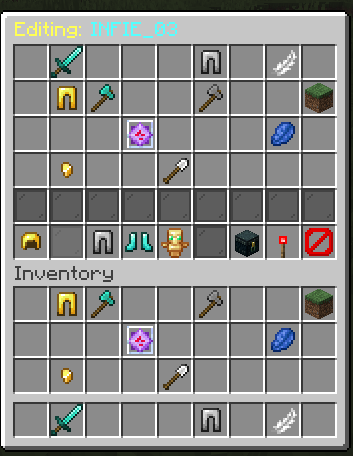
OpenInv is a powerful Minecraft admin plugin that lets staff view and edit player inventories and ender chests using /inv commands, featuring a modern GUI, database-backed inventory snapshots, rollback support, and multiple Minecraft version support.

✨ OpenInv v1.3 - Changelog
🌍 Different Worlds, Different Items
The plugin now perfectly supports servers with multiple worlds!
- Per-World Saving: If a player has different items in your "Survival" world and your "Creative" world, the plugin now remembers them separately.
- Auto-Save on Teleport: Whenever a player moves from one world to another, the plugin instantly saves their items so you always see the most recent data.
- Smart Editing: If you edit a player's inventory for a world they aren't currently in, the changes will "wait" for them and apply automatically the next time they enter that world.
🛠️ Smarter Commands
We’ve made the commands much easier to use:
- Unified
/inv: You can now use/inv <player> [world]to check anyone. If they are online, it shows their live items. If you want to check a specific world they aren't in, it automatically shows you their saved items for that world.
⌨️ Faster Typing (Tab-Complete)
Typing commands is now much faster:
- Online vs. Offline: When you type
/inv, it will only suggest players who are actually online. When you type/offlineinv, it will only suggest players who are offline. This keeps your list clean! - World Suggestions: When you are typing an inventory command, you can now press
TABto see a list of all your server's worlds (likeworld,world_nether, etc.) so you don't have to remember the exact names.
🚀 Other Improvements
- More Reliable: We fixed several small bugs to make sure player items are always saved safely and never get mixed up between worlds.
OpenInv — 1.2 Changelog
This update contains important stability fixes for modern Paper servers and SQLite database connections.
🐛 Bug Fixes & Improvements
-
Fixed Startup Errors on Modern Paper Servers 🔧 Resolved an issue where the plugin would completely fail to load on newer versions of PaperMC due to an "Unsupported API version" error. The plugin now properly recognizes and supports Minecraft 1.21+.
-
Fixed Database Errors During Server Shutdown 💾 Fixed a scary-looking database error (
SQLITE_READONLY_DBMOVED) that would sometimes appear in the console when stopping or restarting your server. This was caused by the plugin trying to save multiple players' inventories at the exact same time as the database was closing. We've smoothed out this shutdown process so all player data is saved safely, securely, and completely error-free!
-
OpenInv — 1.1 Changelog
This update focuses on fixing permission bugs, improving staff tools, and making the plugin more reliable for server owners.
✨ New Features & Improvements
-
Clean Console Experience 🛡️ Hidden all messy initialization logs (like database connections and module status lines). The console now only shows the premium dashboard and critical warnings, making it much cleaner for server owners.
-
Refined Command Security 🔐 To improve server safety, all the commands now require the base
openinv.usepermission as a prerequisite. This ensures staff have been granted fundamental access before using administrative tools. -
Hierarchical Modification System 🏗️ The modification permissions now follow a strict structure:
openinv.modify.*acts as a master wildcard (grants everything).- Specific edits now require the master key (
openinv.modify) plus a granular node (.invor.ec).
-
/openinv historyGUI Updates 🟢 Slots containing saved data now use Green Stained Glass Panes, providing immediate visual feedback on which backups are available. -
Translation Updates 🌍 Updated the success message for
/openinv reloadacross all 20+ supported languages. It now includes a clear reminder that some configuration changes require a server restart to apply.
🐛 Bug Fixes
-
Offline player protection now actually works. When a player was offline, their
openinv.exemptprotection was being ignored. This is now fixed — offline players are properly protected from unauthorized viewing. -
The
openinv.modify.*shortcut permission now works correctly. Giving a staff memberopeninv.modify.*in LuckPerms now correctly grants full edit access to both inventories and Ender Chests even without the basemodifynode. -
Resolve "No Perm" spam in chat. When clicking protected items, the error message now only shows once every 2 seconds to avoid flooding the player's chat.
-
Staff inventory locking issue. Fixed a bug where staff members in "View-Only" mode would find their own inventory locked after closing a target's GUI.
-
openinv.adminnow truly unlocks everything. Fixed several sub-commands that were still returning "no permission" errors even for players withopeninv.admin. It is now a complete bypass. -
Resolved a crash during startup (NPE). Fixed a rare issue where the plugin would crash if it tried to display the console logo before the configuration files were fully loaded.
📋 Full Permission Reference (What Changed)
Permission What it does openinv.adminFull access to everything — no other permissions needed openinv.useRequired to use viewing commands ( /inv,/offlineinv, etc.)openinv.exemptProtects YOUR inventory from being opened by others openinv.overrideLets staff bypass exemptprotectionopeninv.modifyMaster key required to edit ANY inventory openinv.modify.invAllows editing player inventories openinv.modify.ecAllows editing Ender Chests openinv.modify.*Shortcut — allows editing both inv and EC openinv.exempt.modifyProtects YOUR items from being moved openinv.override.modifyLets staff bypass edit protection openinv.freezeAllows using /openinv freezeopeninv.unfreezeAllows using /openinv unfreezeopeninv.historyAllows viewing inventory backup history -
🚀 OpenInv v1.0 – The Security Update
[Major Security Overhaul]
- Multi-Layered Permission Logic: Transitioned to a strict "Two-Key" system. Staff now require both the master
openinv.modifykey AND a target key (.invor.ec) to edit items. - Rank Exemption System: Introduced
openinv.exempt.modifyto allow Admins and Owners to protect their inventories from being edited by lower-ranking staff. - Administrative Overrides: Added
openinv.override.modifyto allow trusted high-level staff to bypass modification exemptions. - Bypass Permissions Hierarchy: Decoupled permission inheritance in
plugin.ymlto prevent accidental permission "leaks" fromopstatus.
[Bug Fixes & Security Hardening]
- Shulker Viewer Lockdown: Fixed a critical security leak where staff could still edit items inside an Admin's Shulker Box even if the Admin was protected.
- Drag Interaction Security: Fixed a bug where clicking and dragging items could bypass modification checks.
- Inventory Synchronization: Resolved an issue where offline edits didn't always reflect perfectly during a high-speed login event.
[UX & Performance Improvements]
- Message Throttling: Implemented a 2-second cooldown on permission denial messages to prevent chat spam during failed interactions.
- Dynamic Console Logging: Updated system startup logs to automatically pull the correct version from
plugin.yml(no more hardcoded version strings!). - Clear Inventory Confirmation: Refined the safe-clear GUI to ensure accidental clicks don't result in lost data.
- Wildcard Support: Fully populated
openinv.*andopeninv.modify.*in theplugin.ymlfor easier permissions setup.
- Multi-Layered Permission Logic: Transitioned to a strict "Two-Key" system. Staff now require both the master
🌟 OpenInv v0.9.1 Changelog Bug Fixes & Improvements:
- Fixed Ender Chest Saving: Resolved an issue that prevented offline player Ender Chest backups from saving correctly on servers using MySQL/MariaDB.
- Fixed Console Errors During Cleanup: Fixed a bug that would occasionally cause errors in the console when the plugin tried to automatically delete older, outdated inventory backups.
- Safe Upgrading: Upgrading to this version is perfectly safe! Any older inventory or Ender Chest backups you already have saved will continue to load without issues.
- Under-the-hood Improvements: Improved how the database stores tracking data behind the scenes to prevent future saving errors and crashes.
🚀 OpenInv v0.9 Changelog
💎 New Features & GUI Revamp
- Massive GUI Redesign: The
/openinv checkand/openinv offlineinvmenus have been beautifully redesigned! We built a clean dark glass divider row, and completely reorganized the armor and offhand equipment slots to fit perfectly in the bottom right corner! - Fast-Action Buttons: Added brand-new interactive buttons seamlessly integrated into the bottom-left of the player's inventory GUI:
- Ender Chest Shortcut: Instantly swap to viewing the player's Ender Chest without leaving the GUI!
- Auto-Update Notifier: OpenInv now talks directly to Modrinth! The plugin securely checks the Modrinth API on server startup and immediately alerts your console and any joining Admins via chat if a new plugin version is available, complete with the direct download link!
🛡️ Permissions & Security Upgrades
- Strict "View-Only" Mode: Major security buff! If a staff member does not have the
openinv.modifypermission, the plugin now locks them into a strict "View-Only" mode. They can see the full inventory, but dragging, dropping, adding, or stealing items is hardware-blocked! - The "Master Key" Perm: We completely revamped the internal command router. The
openinv.adminpermission now acts as a true global Master Key. Giving a player this single permission completely bypasses the need for the other 10 individual nodes (openinv.freeze,openinv.search, etc.)!
🧹 Cleanups
- Ghost Perm Scrubbing: Completely scrubbed the codebase of confusing, unused fallback permissions (like
openinv.silentandopeninv.container) and dead legacy commands to keep your LuckPerms editor incredibly organized and clean!
- Massive GUI Redesign: The
📝 OpenInv v0.8 Changelog
🌍 New Features
- Full Multi-Language Support! You can now translate the entire plugin into your preferred language! The plugin now fully supports external locale configurations. All in-game messages, alerts, and feedback can be customized or translated directly without touching the core code.
🐛 Critical Bug Fixes
- Server Shutdown Data Server Fix: Resolved a major issue where the plugin would fail to save player inventory snapshots during server restarts (
database connection closed). The backend system now correctly waits for all background auto-saves to seamlessly and safely finish before fully disconnecting from the server database, meaning zero data loss on shutdown!
⚙️ Under the Hood
- Modularized Messaging System: Re-engineered the central
MessageUtilsto dynamically support these new translation locales, paving the way for endless localization options.
🚀 New Features (The Fun Stuff)
- Seamless Shulker Editing
- You can now right-click a Shulker Box inside an inventory to open it immediately. No need to place it down!
- Works just like a regular chest, but inside another inventory.
🐛 Fixes
- Improved Performance: We made changes under the hood so the server runs smoother when using the plugin.
- Safety: Added safeguards to prevent mistakes when editing configuration files.
- Seamless Shulker Editing
[0.6]
Added
- Smart Config Updater: New configuration keys are now automatically added to
config.ymlandmessages.ymlupon update, while preserving your existing settings and comments. - Auto-Cleanup: The plugin now automatically removes unused legacy files (like
data.yml) to keep your plugin folder clean.
Changed
- Removed YAML Backups: The old file-based backup system (YAML files in
backups/) has been fully removed in favor of the more efficient SQLite/MySQL database storage. - Config Handling: Improved how lists (like
destinations) are handled in the config to prevent YAML parsing errors during updates.
Fixed
- Fixed an
InvalidConfigurationExceptionthat could occur when updatingconfig.ymldue to incorrect list formatting. - Corrected the console start-up message to display the accurate plugin version
- Smart Config Updater: New configuration keys are now automatically added to
Changelog - OpenInv v0.5
🚀 New Features: Offline Editing
Now you can manage inventories even when players are offline!
- Offline Inventory Editor: Command
/openinv offlineinv <player>allowing full read/write access. - Offline Ender Chest Editor: Command
/openinv offlineec <player>allowing full read/write access. - Sync on Join: Changes made offline are securely saved to the database and applied instantly when the player joins the server.
- Smart Notifications: Players receive a notification on join if their inventory or ender chest was modified while they were away (Configurable).
⚙️ Configuration & Logging Control
- Console Spam Control: Added
log-to-consoletoggles for both Auto-Save and Death Snapshots. You can now keep your console clean!auto-save-inventory.log-to-console(Default:true)death-snapshots.log-to-console(Default:true)
- Granular Notification Toggles: Added separate configs for offline update messages:
notify.offline-update.inventorynotify.offline-update.enderchest
🧹 Cleanup & Optimization
- Removed Deprecated Rollback: Completely removed the old temporary
/openinv rollbackcommand (RAM-only).- Why? The new
/openinv historycommand uses the database and is persistent across restarts, making the old command obsolete.
- Why? The new
- Message Cleanup: Removed redundant "Your inventory has been unfrozen by..." messages. Now significantly less spammy.
- Reload Fix: Fixed a bug where
/openinv reloaddidn't correctly update the Auto-Save timer interval.
🐛 Bug Fixes
- Fixed redundant unfreeze notifications.
- Improved handling of offline player data synchronization.
- Offline Inventory Editor: Command
Changelog - OpenInv v0.4
🚀 Major Feature: Database System (NEW)
- Database Persistence System: Introduced a fully database-driven architecture with support for MySQL and SQLite for permanent inventory snapshot storage.
- Database-Backed Systems:
- Auto-saved inventory snapshots
- Death inventory snapshots
- Feature Toggles: Added new toggles in
config.yml:auto-save-inventory.enableddeath-snapshots.enabled
🚀 New Commands & Shortcuts
- Intuitive Shortcuts: Added faster command aliases:
/inv <player>: Shortcut for/openinv check/invec <player>: Shortcut for/openinv echeck/invsee: Alias for/openinv
- Full Tab Completion: All new shortcuts support player name and subcommand suggestions.
🛠️ Snapshot & GUI Improvements
- Dynamic GUI Limits: Removed hardcoded labels; GUI limits are now read directly from
config.yml. - Expanded Rows: GUI now supports up to 8 snapshots.
- Type-Aware Cleanup: AUTO and DEATH snapshot deletion logic is separated to prevent cross-system data loss.
🧹 Streamlining & Optimization
- Save-on-Join Removal: Removed the redundant save-on-join feature to improve player join performance.
- Standardized Versioning: Configured for 1.16 - 1.21.x compatibility using Java 17 and Spigot API 1.16.5.
- Clean Logs: Reduced console output during startup and reload.
📖 Help & UI Polish
- Updated Help Menu:
/openinv helpnow includes all new Commands. - Refreshed Welcome: Modernized the OP join message.
Нет описания изменений
Version 0.2
Added Configuration Files:
- Created config.yml for customizable messages.
- Created data.yml for storing player-specific data.
Implemented Help Command:
- Added /openinv help command to display available commands and their descriptions.
- Tab completion for the help command now suggests available subcommands.
Enhanced Search Command:
- Updated /openinv search
- Added tab completion to suggest all Minecraft item names for the item argument and online player names for the player argument.
- Implemented error handling for invalid player names and item searches.
Implemented Freeze Functionality:
- Added /openinv freeze
command to prevent a specified player from modifying their inventory. - Players cannot drop or pick up items while their inventory is frozen.
- Added cooldown for messages to prevent spam when trying to drop or pick up items while frozen.
Implemented Unfreeze Functionality:
- Added /openinv unfreeze
command to allow a player to modify their inventory again.
Added Welcome Message for OP Players:
- When an OP player joins the game, a welcome message with available commands is sent in chat.
Console Messages:
- Added colored console messages when the plugin is enabled, using ANSI escape codes for better visibility.
Нет описания изменений

