
MCLocalAuth
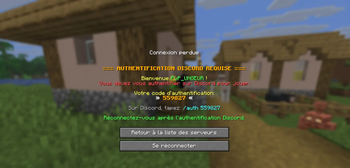
MCLocalAuth is a security plugin for Minecraft servers that uses Discord as an authentication system. Protect your server by limiting access to only members of your Discord community.

MCLocalAuth v1.4.0
Type: Major Update - BungeeCord Discord Bot + Discord Admin Commands
Date: May 13, 2026
Status: STABLE ✅
✨ Major New Features
🤖 Discord Bot on BungeeCord
The Discord bot is now fully functional on BungeeCord.
- Complete Discord module added for the proxy
- Clean startup and shutdown with the BungeeCord plugin
- Automatic bot status verification after connection
- Displays bot name, ping, Discord server name, and member count
Example startup logs:
§1[§6MCLocalAuth§1]§r §a§l[OK] §aDiscord bot connected: MyBot#1234
§1[§6MCLocalAuth§1]§r §7Ping: §f42ms
§1[§6MCLocalAuth§1]§r §7Discord server: §fMy Server
§1[§6MCLocalAuth§1]§r §7Members: §f150
🛡️ New Discord
/mcadminCommandYou can now manage player authorized IPs directly from Discord.
Subcommand Description /mcadmin showips <player>Show authorized IPs /mcadmin addip <player> <ip>Add an IP /mcadmin removeip <player> <ip>Remove an IP /mcadmin resetip <player>Reset all IPs /mcadmin setip <player> <ip>Set the primary IP Security:
- Restricted to the Discord ID set in
admin.discord_id - Unauthorized users receive an access denied message
📩 Discord Commands Available in DMs
Slash commands are now registered globally.
This means you can use them:
- On your Discord server
- In direct messages with the bot
🎨 Colored Console Output on Paper and BungeeCord
All important messages now use a colored prefix on both platforms:
§1[§6MCLocalAuth§1]§r- Brackets in dark blue
MCLocalAuthin orange- Works on Paper/Spigot and BungeeCord consoles
🌐
/authCommand on BungeeCordThe BungeeCord proxy now has its own
/authadmin command.Available subcommands:
/auth showips <player>/auth addip <player> <ip>/auth removeip <player> <ip>/auth resetip <player>/auth setip <player> <ip>
This allows managing authorized IPs from the proxy, across your entire network.
🐛 Important Fixes
⚠️ IP Commands Fixed
/auth setip <player> <ip>- Before: Added the IP instead of replacing the primary one ❌
- After: Properly sets the primary IP and removes others ✅
/auth resetip <player>- Before: Deleted ALL player data ❌
- After: Only clears the authorized IP list ✅
🔢 Guild ID Validation
The Discord bot now checks if
guild_idis a valid numeric Discord snowflake.- No more crash if
guild_idcontains an invalid value - The plugin shows a clear error message instead of failing silently
🔍 Improved Player Lookup
Discord admin commands can now find a player:
- by name
- by full UUID
Player names are also saved with authentication entries for better lookups.
📊 Compatibility
Supported Versions
Platform Versions Paper 1.8.9 → 26.1.1 ✅ Spigot 1.8.9 → 1.21.x ✅ Purpur 1.8.9 → 1.21.x ✅ BungeeCord Build 2068 ✅ Java: 8+
The plugin is compiled with Java 8 for maximum compatibility.
🔄 Migration from v1.3.x
- Stop the server / proxy
- Replace old JARs with the
v1.4.0versions - Configure
discord.bot_tokenif needed - Add your admin Discord ID:
admin: discord_id: "YOUR_DISCORD_ID"- Restart
✅ Configuration compatible
✅ Player data preserved
✅ Existing Discord commands still work
📦 Technical Details
New Files
BungeeDiscordBot.javaBungeeDiscordCommandListener.java
Modified Files
MCLocalAuthBungee.javaDiscordBot.javaDiscordCommandListener.javaStorage.javaBungeeStorage.javaBungeePendingManager.javaBungeeLoginListener.javaAuthAdminCommand.java
Technical Improvements
- Added
verifyBotStatus()to check actual bot state - Added
isOnline()to test if the bot is connected - Added player lookup by name/UUID
- Global Discord command registration
- Improved console messages and error handling
💡 Discord Commands
Command Description Access /mclogin <code>Authenticate with code Everyone /mctestTest bot/plugin connection Everyone /statusCheck your status Everyone /unlink <discord_id>Unlink an account Admin /mcadmin showips <player>View authorized IPs Admin /mcadmin addip <player> <ip>Add an IP Admin /mcadmin removeip <player> <ip>Remove an IP Admin /mcadmin resetip <player>Reset IPs Admin /mcadmin setip <player> <ip>Set primary IP Admin
⚙️ Minecraft Admin Commands
Command Spigot/Paper BungeeCord /auth showips <player>✅ ✅ /auth addip <player> <ip>✅ ✅ /auth removeip <player> <ip>✅ ✅ /auth resetip <player>✅ fixed ✅ /auth setip <player> <ip>✅ fixed ✅
🚀 Installation
Spigot / Paper
- Download
MCLocalAuth-Spigot-v1.4.0.jar - Place in
plugins/ - Configure the Discord bot
- Restart the server
BungeeCord
- Download
MCLocalAuth-Bungee-v1.4.0.jar - Place in
plugins/ - Configure the Discord bot
- Restart the proxy
🐛 Known Issues
No known bugs at this time.
If you encounter a problem, check:
- Plugin version
- Discord token
guild_idadmin.discord_idvalue
Build: Maven 3.9.9 + Java 8
Status: STABLE ✅Compatibility: Minecraft 1.8.9 → 26.1.1 (Paper & BungeeCord 2068)
MCLocalAuth v1.3.1 - Changelog
Type: Compatibility Update
Date: January 2, 2026
Status: STABLE ✅
✨ New Features
🎮 Extended Compatibility: 1.8.9 → 1.21.11
The plugin now officially supports all Minecraft versions from 1.8.9 to 1.21.11!
Main improvements:
- Added
VersionUtilutility class to automatically detect server version - Intelligent Minecraft version detection at startup
- Enhanced log messages with detected version
At plugin startup, you'll now see:
[MCLocalAuth] ================================
[MCLocalAuth] MCLocalAuth v1.3.1 - Starting...
[MCLocalAuth] Detected Minecraft version: v1_20_R3
[MCLocalAuth] Compatibility: 1.8.9 - 1.21.11
[MCLocalAuth] ================================
🐛 Bug Fixes
🏃 PlayerMoveEvent Fix (Multi-version compatibility)
Problem solved: NPE (NullPointerException) on some versions when blocking movement
Before:
if (e.getFrom().getX() != e.getTo().getX() || ...)
    e.setTo(e.getFrom());
❌ Crashes if
getTo()returnsnullon certain versionsAfter:
Location to = e.getTo();
Location from = e.getFrom();

if (to != null && (from.getX() != to.getX() || ...))
    e.setTo(from);
✅ Null check added to ensure compatibility
Impact: Unauthenticated players won't be able to move, without crash risk on any version
📊 Compatibility
Tested and Supported Versions
Minecraft Version Status 1.8.9 - 1.12.2 ✅ Compatible 1.13 - 1.16.5 ✅ Compatible 1.17 - 1.19.4 ✅ Compatible 1.20 - 1.21.11 ✅ Compatible Supported Servers: Spigot, Paper, Purpur, Pufferfish
Latest tested version: 1.21.11
Note: The plugin automatically detects your Minecraft version at startup
📦 Technical Changes
Modified Files
Java:
MCLocalAuthPlugin.java- Enhanced startup logs with version detectionRestrictListener.java- NPE fix on PlayerMoveEvent with null checkVersionUtil.java- NEW - Version detection utility class
Configuration:
plugin.yml- Version 1.3.1 + Updated descriptionpom.xml- Version 1.3.1 + Updated description
Documentation:
README.md- Updated badges and compatibility rangeCHANGELOG.md- Complete documentation of changes
🔄 Migration from v1.3.0
Simple and risk-free!
- Stop the server
- Replace the JAR with
MCLocalAuth-Spigot-v1.3.1.jar - Restart the server
No configuration changes required!
✅ Existing configuration remains 100% compatible
✅ Player data is preserved
✅ No action required on Discord side
🎯 Why Update?
If you're using an old version (1.8.9 - 1.12.2)
✅ Recommended - Important compatibility fix to avoid crashes
If you're using a recent version (1.20+)
✅ Recommended - Better version detection and clearer logs
If you're on v1.3.0
⚠️ Optional but recommended - Improves stability on all versions
🛡️ Core Features (Unchanged)
All v1.3.0 features are preserved:
- ✅ Integrated Discord bot
- ✅ Authentication via
/mclogin <code> - ✅ IP protection per account
- ✅ Discord commands:
/mclogin,/mctest,/status,/unlink(admin) - ✅ Admin commands: authorized IP management
- ✅ Restrictions for unauthenticated players
- ✅ IPv4 & IPv6 support
🔍 VersionUtil Class Details
The new utility class provides:
VersionUtil.getVersion()      // Ex: "v1_20_R3"
VersionUtil.getMajorVersion() // Ex: 1
VersionUtil.getMinorVersion() // Ex: 20
VersionUtil.isVersion(1, 13)  // true if >= 1.13
VersionUtil.is1_8()           // true if 1.8.x
VersionUtil.is1_13Plus()      // true if >= 1.13
VersionUtil.is1_20Plus()      // true if >= 1.20
VersionUtil.is1_21Plus()      // true if >= 1.21
Purpose: Allows future code adaptations based on server version
🐛 Known Issues
No known bugs at this time.
If you encounter a problem:
- Verify you're using v1.3.1
- Check server logs (Minecraft version detected is displayed at startup)
- Open an issue on GitHub with:
- Plugin version
- Minecraft version detected in logs
- Problem description
💡 Discord Commands (Unchanged)
Command Description Access /mclogin <code>Authenticate with code Everyone /mctestTest bot/plugin connection Everyone /statusCheck your status Everyone /unlink <discord_id>Unlink account Admin only
🚀 Installation
- Download
MCLocalAuth-Spigot-v1.3.1.jar - Place in
plugins/folder - Restart server
- Check logs: detected Minecraft version should be displayed
- Test functionality with
/mcteston Discord
File: MCLocalAuth-Spigot-v1.3.1.jar
Size: 11.20 MB
Build: Maven 3.9.9 + Java 8
Status: STABLE ✅Compatibility: Minecraft 1.8.9 → 1.21.11
- Added
MCLocalAuth v1.3.0 - Changelog
Type: Major Update
Date: October 22, 2025
Status: STABLE ✅
✨ New Features
1. Discord Command Renamed
- BEFORE:
/auth <code> - NOW:
/mclogin <code> - All messages and references updated throughout the plugin
2.
/unlinkCommand (Admin Only)- Usage:
/unlink <discord_id> - Reserved for admin configured in
config.yml(admin.discord_id) - All attempts are logged for security auditing
- Note: Basic feature implemented, persistent linking system coming soon
🐛 Bug Fixes
1. UTF-8 Encoding Fixed (In-Game)
Problem solved: In-game messages displayed garbled characters
Fixed messages:
- "reset" instead of "réinitialisé"
- "added" instead of "ajouté"
- "removed" instead of "supprimé"
- "set" instead of "défini"
- "authorized" instead of "autorisées"
Result: Clean, readable messages on all systems
2. IPv6 Support
- IPv4 AND IPv6 both accepted for authorized IPs
- Validation using
InetAddress.getByName() - Affected commands:
/auth addip,/auth setip
3. Current IP Displayed in Kick Messages
- Kick message now displays player's actual current IP
- Variable
%current_ip%is correctly replaced - Helps players identify their connection issues
🔧 Technical Changes
Modified files:
AuthAdminCommand.java: ASCII encoding + IPv6 validationLoginListener.java: Current IP display + encoding fixesDiscordBot.java: Renamed/auth→/mcloginDiscordCommandListener.java:/mclogin+/unlinkadmin handlerconfig.yml: Messages without accents +/mcloginreferencesplugin.yml: Version 1.3.0pom.xml: Version 1.3.0
📦 Migration from v1.2.x
Steps:
- Stop the server
- Replace JAR with
MCLocalAuth-Spigot-v1.3.0.jar - Configure admin in
config.yml:admin: discord_id: "YOUR_DISCORD_ID" minecraft_uuid: "" - Restart the server
- Inform players: command is now
/mclogin <code>
Note: Old configuration remains compatible
🎮 Changes for Players
On Discord:
- BEFORE:
/auth 123456 - NOW:
/mclogin 123456
In Minecraft:
- Connection message: "On Discord, type:
/mclogin 870600"- (instead of "
/auth PvP_UNGEUR 870600")
- (instead of "
🔒 Security
Admin logging:
- All admin actions are logged
- Example:
[ADMIN] PvP_UNGEUR#1234 attempted to unlink Discord ID: 987654321 - Useful for auditing sensitive actions
✅ Compatibility
- Minecraft: 1.8 → 1.21+
- Java: 8+
- IPv4 & IPv6: Fully supported
- Config: Compatible with v1.2.x (auto-adds admin section)
🐛 Known Issues
No known bugs at this time.
If you encounter a problem:
- Verify you're using v1.3.0
- Check server logs
- Open an issue on GitHub
📋 Discord Commands (Updated)
Command Description Access /mclogin <code>Authenticate with code Everyone /mctestTest bot/plugin connection Everyone /statusCheck your status Everyone /unlink <discord_id>Unlink account Admin only
🚀 Installation
- Download
MCLocalAuth-Spigot-v1.3.0.jar - Place in
plugins/folder - Restart server
- Configure
admin.discord_idinconfig.yml - Test with
/mctestand/mclogin
File: MCLocalAuth-Spigot-v1.3.0.jar
Size: 10.68 MB
Build: Maven 3.9.5 + Java 8
Status: STABLE ✅- BEFORE:
MCLocalAuth v1.2.3 - Changelog
Type: Critical Fixes
Date: October 21, 2025 - 22:06
Status: STABLE ✅
🐛 Bug Fixes
1. UTF-8 Encoding Fixed
Problem: Discord messages with garbled characters
Example:â„¹ï¸ Délier le compteSolution: All messages without accents/special emojis
- Discord titles: Simple ASCII text
- Server logs:
[OK],[ERROR],[WARN] - No more problematic emojis (✅ ❌ ⚠️)
Result: Clean and readable messages everywhere
2. Administrator Configuration Added
New in
config.yml:admin: discord_id: "YOUR_DISCORD_ID" minecraft_uuid: ""Allows storing admin identifiers for future features (reserved commands, etc.)
3.
/statusCommand Updated- Old text:
/auth <username> <code> - New text:
/auth <code>
Consistent with v1.2.2
🔧 Technical Details
Modified files:
-
config.yml- Added admin section (discord_id, minecraft_uuid)
-
DiscordBot.java- Logs without UTF-8 emojis
- Messages: "Starting", "connected", etc.
-
DiscordCommandListener.java- All Discord messages in simple ASCII
- Titles without emojis (✅❌ → text)
- "been" instead of "été", etc.
Reason: Java 8 + Windows Console = UTF-8 Issues
Solution: ASCII only for maximum stability
📦 Compatibility
- ✅ Minecraft: 1.8 → 1.21+
- ✅ Java: 8+
- ✅ Server: Spigot, Paper, Purpur
- ✅ Config: Compatible v1.2.0-1.2.2 (auto-adds admin section)
Migration from v1.2.2:
- No action required
- Admin section added automatically on first start
🎮 Usage
Admin Configuration (Optional)
- Open
plugins/MCLocalAuth/config.yml - Find the "admin" section
- Fill in:
discord_id: Your Discord ID (right-click > Copy ID)minecraft_uuid: (optional) Your Minecraft UUID
To get your UUID:
→ https://mcuuid.net/?q=YOUR_USERNAME
✅ Fixed Bugs
- ✅ Unreadable Discord messages (encoding)
- ✅ Broken emojis in logs
- ✅ Obsolete "/auth
" text
📋 Previous Versions
v1.2.2 (10/21/2025 19:53)
- Fixed code search (findByCode)
- Code works even after kick
v1.2.1 (10/21/2025 19:53)
- Force delete old Discord commands
- /auth without username parameter
v1.2.0 (10/21/2025 19:33)
- Added /mctest
- Simplified /auth (code only)
- Fixed "player not found"
v1.1.0 (10/21/2025 19:12)
- Fixed plugin.yml package
- Initial functional build
⚙️ Installation
- Stop the server
- Replace old JAR with
MCLocalAuth-Spigot-v1.2.3.jar - (Optional) Configure
admin.discord_idinconfig.yml - Restart the server
- Test with
/mcteston Discord
✨ Next Version (v1.3.0)
Planned features:
- Reserved admin commands (via discord_id)
- Persistent Discord linking system
- Functional /unlink
- Authentication statistics
- Multi-language support (FR/EN)
File: MCLocalAuth-Spigot-v1.2.3.jar
Size: 10.68 MB
Build: Maven 3.9.5 + Java 8 (1.8.0_432)
Status: STABLE ✅First version, several bugs may be present, they will be corrected in future updates.
