

EzShops
Advanced shop menus with smart pricing, sign trading, and API integrations

Through time we've made the stock market more stable, by doing this the documentation got outdated and configuration options that existed before got phased out. This version there was focus on updating the documentation and adding back options that got phased out in a more stable way.
Added
- Configurable stock price-engine parameters -
volatility-min,volatility-max,demand-multiplier,min-price, andupdate-intervalare now realconfig.ymloptions under thestock:section. The plugin reads them on startup and applies them to the price engine. All defaults match the previously hardcoded values so existing behaviour is preserved.
Fixed
- Incorrect stock-market configuration documented -
docs/configuration/main-settings.mdanddocs/shops/pricing/stock-market.mdpreviously documented a non-existentstock-market:config block. Both pages now document the realstock:section (enabled,cooldown-millis,blocked,overrides,categories). Price-engine parameters (volatility-min,volatility-max,demand-multiplier,min-price,update-interval) are now implemented as real config options (see Unreleased → Added). /sellcommand missing from documentation - the Quick Sell GUI command (/sell) is now documented in the Commands reference with its behavior and permission node./shopadmincommand missing from documentation -/shopadmin [browse|market]is now documented under Admin Commands including both the player-shops and team-market views./teamshop marketsubcommand missing from documentation - the team P2P market subcommand is now documented in Commands, the TeamsAPI integration page, and the tab-completion list for/teamshop.- Missing permission nodes in documentation - the following nodes were present in
plugin.ymlbut absent from the Permissions reference; they are now documented:ezshops.shop.admin(open/shopadminGUI)ezshops.teamshop.market(access team P2P market)ezshops.pricing.admin.set,ezshops.pricing.admin.disable,ezshops.pricing.admin.list(granular pricing-admin nodes)
- Configurable stock price-engine parameters -
Fixed
on-sellcommands not executing foritem-type: COMMANDitems —sell()no longer checks or removes physical items from the player's inventory when the item's delivery type isCOMMAND. Previously the transaction exited early with "insufficient items" because the player had no material to hand over, preventing sell commands from running at all.on-sell execute-asoverridden byon-buy execute-as—ShopPricingManagernow tracksexecute-asindependently for theon-buyandon-sellblocks. Previously a single shared flag meant that settingon-buy: execute-as: playerwould silently overrideon-sell: execute-as: console, causing sell commands to run as the player instead of the console.
Added
- Code coverage reporting — JaCoCo is now configured in the Maven build (
jacoco-maven-plugin 0.8.12). Coverage reports (jacoco.xml) are generated on everymvn testrun and uploaded to Codecov by the CI workflow for both unit-test and feature-test jobs.
Fixed
- Quick Sell GUI "Nothing to sell" after shift-click —
handleConfirmnow calls a newShopTransactionService.sellDirect()method that skips the player-inventory item count/removal steps. Previously, shift-clicking items into the GUI moved them out of the player's inventory, so the oldsell()path found zero items and reported nothing to sell. - Quick Sell GUI shows "Nothing to sell" when sell fails after shift-click —
handleConfirmnow distinguishes between a genuinely empty GUI and a GUI that has items but whosesellDirectcall failed (e.g. economy down, dynamic price driven to $0.00 by a previous sale, rotation expired). The actual failure reason is shown to the player instead of the misleading "No items to sell." message. Items that failed to sell remain in the GUI so the player can retry. - Quick Sell GUI rejects rotation items even when directly sellable —
sellDirectandisSellableboth applied a rotation-visibility check that belongs only in the main shop menu. The Quick Sell GUI is designed to accept any item with a configured sell price; rotation restrictions are now only enforced insell(), which is the path used when a player types/sellor/sellhand. - Legacy
shop.ymlitem keys not found when using lowercase material names —loadLegacyEntriesnow normalises every price key toMaterial.name()(e.g.BIRCH_LOG) before registering it in the price map. Previously, a config entry written asbirch_log:was stored under the lowercase key, sogetPrice(Material.BIRCH_LOG)could not find it, silently treating the item as unpriced.
Added
- Stripped log variants in the wood category — all 9 stripped log types (
STRIPPED_OAK_LOG,STRIPPED_SPRUCE_LOG,STRIPPED_BIRCH_LOG,STRIPPED_JUNGLE_LOG,STRIPPED_ACACIA_LOG,STRIPPED_DARK_OAK_LOG,STRIPPED_MANGROVE_LOG,STRIPPED_PALE_OAK_LOG,STRIPPED_CHERRY_LOG) are now included in the defaultwood.ymlconfig so players can sell stripped logs with/sellhandand the Quick Sell GUI out of the box. - Wood (all-bark) block variants in the wood category — all 9 wood block types (
OAK_WOOD,SPRUCE_WOOD,BIRCH_WOOD,JUNGLE_WOOD,ACACIA_WOOD,DARK_OAK_WOOD,MANGROVE_WOOD,PALE_OAK_WOOD,CHERRY_WOOD) are now included. Previously, attempting to/sellhanda "Birch Wood" block (as opposed to a "Birch Log") would return "That item is not configured in the shop." - Plank variants in the building category — all 9 plank types (
OAK_PLANKS,SPRUCE_PLANKS,BIRCH_PLANKS,JUNGLE_PLANKS,ACACIA_PLANKS,DARK_OAK_PLANKS,MANGROVE_PLANKS,PALE_OAK_PLANKS,CHERRY_PLANKS) are now included in the defaultbuilding.ymlconfig.
- Quick Sell GUI "Nothing to sell" after shift-click —
Fixed
- TeamTreasury transaction safety —
depositnow refunds the player's Vault balance if the YAML save fails, preventing money from being lost on a failed write.withdrawdebits the treasury before paying the player so a failed save aborts the operation without creating currency from nothing. - TeamStockManager negative-amount guard —
removeTeamStocknow returnsfalseimmediately whenamount <= 0, preventing invalid stock mutations.
- TeamTreasury transaction safety —
Fixed
- TeamsAPI optional integration —
NoClassDefFoundErrorno longer crashes plugin startup when TeamsAPI is absent from the classpath. The availability check is now wrapped in aNoClassDefFoundErrorcatch block so the integration degrades gracefully whether the JAR is missing entirely or the plugin is simply not loaded.
- TeamsAPI optional integration —
Added
- Folia support — EzShops now runs on Folia servers. All scheduler calls are routed through a new
SchedulerAdapterthat transparently delegates toGlobalRegionScheduler/AsyncScheduleron Folia and toBukkitScheduleron Paper/Spigot/Bukkit. Thefolia-supported: trueflag has been added toplugin.yml.
Changed
- EzBoost engine improvement — reflective access to EzBoost's price-multiplier API is now cached after the first lookup.
Class.forName,getMethod, andgetPluginare no longer called on every transaction; instead, resolvedMethodreferences are reused for the lifetime of the server.
- Folia support — EzShops now runs on Folia servers. All scheduler calls are routed through a new
Notes
🌙 Automated nightly beta build from
main(May 11, 2026).Built from
b711ac3This version we focussed on adding Team Shops, a full team-based economy layer built on top of TeamsAPI. Teams get their own market, shared treasury, stock pool, and role-based pricing, all accessible through a new
/teamshopcommand.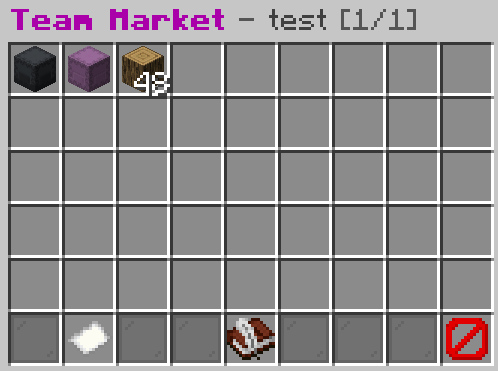
Added
- TeamsAPI integration — EzShops now integrates with TeamsAPI as a soft dependency; all features degrade gracefully when TeamsAPI is absent.
- Role-based sell multipliers — MEMBER, ADMIN and OWNER each receive a configurable sell price bonus when selling to the shop (
teams-integration.sell-multiplierinconfig.yml). - Role-based buy discounts — MEMBER, ADMIN and OWNER each receive a configurable buy price reduction when purchasing from the shop (
teams-integration.buy-discountinconfig.yml). - Team treasury — a shared balance funded automatically by a configurable percentage of every sell transaction (
teams-integration.treasury-split). Members can deposit and withdraw funds through the treasury GUI. - Shared team stock — stock quantities are pooled per team; all members draw from and contribute to the same pool (
teams-integration.shared-stock). /teamshopcommand — opens the team shop dashboard showing team info, current multipliers and quick links./teamshop treasury— opens the team treasury GUI (deposit / withdraw; requiresezshops.teamshop.treasury.withdraw)./teamshop stocks— browse all items your team currently has in stock.
- Permissions:
ezshops.teamshop(default: true) — access the team shop dashboard.ezshops.teamshop.treasury.withdraw(default: true) — withdraw from the team treasury.ezshops.teamshop.admin(default: op) — administrative team stock commands.
- Automatic data cleanup — team stock and treasury data are deleted automatically when a team is disbanded via the
TeamDeleteEvent.
- fix: solve configuration override in https://github.com/ez-plugins/EzShops/pull/55
- Fixed issue: Bukkit's
getMinecraftVersion() >= 14failed because of new26.1version format
- Fixed issue: Bukkit's
What's Changed
- Replaced hardcoded back-button config with configurable GUI button in https://github.com/ez-plugins/EzShops/pull/49
- Added
/sellquick sell GUI in https://github.com/ez-plugins/EzShops/pull/51

- Removed sell portal from default shop in https://github.com/ez-plugins/EzShops/pull/52
Full Changelog: https://github.com/ez-plugins/EzShops/compare/2.3.1...2.4.0
- Added Github Packages publish CI: https://github.com/ez-plugins/EzShops/packages/2933718
New
/pricingadmincommand- Added new
/pricingadmincommand for managing the shop prices- Added
/pricingadmin set <item> <price>subcommand withezshops.pricing.admin.setpermission for setting the price of an item in the shop - Added
/pricingadmin reset <item>subcommand withezshops.pricing.admin.resetpermission for resetting the dynamic pricing of an item in the shop - Added
/pricingadmin resetallsubcommand withezshops.pricing.admin.resetallpermission for resetting all dynamic prices of the shop
- Added
New
/shop <category>subcommand- Added
/shop <category>subcommand to open category GUIs directly - Added missing configurable messages
What's Changed
- Refactor monolithic configuration documentation into sections by @stefkotidis-prog in https://github.com/ez-plugins/EzShops/pull/39
- Shop API builder tools by @ez-plugins in https://github.com/ez-plugins/EzShops/pull/36
- Category gui subcommand by @ez-plugins in https://github.com/ez-plugins/EzShops/pull/42
- docs: add pricingadmin command docs and permissions by @ez-plugins in https://github.com/ez-plugins/EzShops/pull/45
New Contributors
- @stefkotidis-prog made their first contribution in https://github.com/ez-plugins/EzShops/pull/39
Full Changelog: https://github.com/ez-plugins/EzShops/compare/2.2.3...2.3.0
- Added new
This version is for so far untested. Use
2.2.2as stable version for now.Changes
- (#34) Added buy price discount boost for EzBoost integration (by matheusherman)
- (#35) Added multi language not-in-rotation message
- (#35) Added new check for each buy/sell feature and if item is not available, but sometimes is in rotation send this new message instead of actually still buy/selling.
- New NBT filter options for sell prevention ( by @matheusherman in #27 )
- Added NBT data whitelist
- Added NBT data blacklist
Default
config.ymlsettingssell: # Ignore items with NBT (custom tags/metadata) during /sellhand and /sellinventory # When enabled, only plain items without NBT will be sold. # For example: if you have a "Supreme Bone" (with NBT) and normal bones, # only the normal bones will be sold when using /sellinventory. # Default: false ignore-items-with-nbt: false # NBT tag filter for more granular control # Mode: 'off', 'whitelist', or 'blacklist' # - 'off' (default): Ignore the filter, use ignore-items-with-nbt setting only # - 'whitelist': Only allow items with NBT tags in the whitelist # - 'blacklist': Block items with NBT tags in the blacklist nbt-filter: mode: "off" whitelist: [] blacklist: []- New NBT filter options for sell prevention ( by @matheusherman in #27 )
- Added
item-typeoption to make it easier to prevent normal shop executionITEM— Default. The player receives the configured ItemStack when they buy the item.COMMAND— The player is charged and pricing/dynamic effects are applied, but no ItemStack is given. Any configuredon-buycommands (orbuy-commands) will be executed.NONE— The player is charged and pricing/dynamic effects are applied, but no ItemStack is given and no commands are executed. Useful for non-physical purchases (tokens, permissions, etc.).
- Added
- Added toggle in configuration to disable player-shop protection
# When true, other players cannot open or break player shop chests/signs. # Set to false to allow other players to open the chest and break the sign. protection-enabled: true- Added automated testing in Github project
- Added CI to run feature and unit tests when pull request is created in Github project
- Added CI to validate YML configuration files in Github project
- Fixed typing quantity in chat for creating new
/playershop - Fixed typing price in chat for creating new
/playershop
- Fixed typing quantity in chat for creating new
- Improved pagination logic
- Added
preserve-last-rowoption to preserve the row with actions for the actions only - Added pagination documentation
- Added command autocomplete for configured
price-ids to show when using/shop buy <material>and/shop sell <material>
Per-item price keys (
price-id) (optional)To allow multiple independent price entries for the same Minecraft
Material(for example two different shop items that both useEXPERIENCE_BOTTLE), items may declare an optionalprice-idstring in their configuration. When present, the plugin uses thisprice-idas the pricing key (and as the dynamic-pricing state key stored inshop-dynamic.yml) instead of the material name.Notes:
price-idis optional; if omitted the material name (e.g.DIAMOND,EXPERIENCE_BOTTLE) is used and pricing remains material-scoped (backwards compatible).price-idmust be unique across your shop configuration if you want independent pricing/multipliers for two items that share the same material.- Dynamic state (multipliers) are saved by
price-idinshop-dynamic.ymlwhen present; legacy material keys continue to be supported.
Example (category item):
my-exp-bottle-item:
material: EXPERIENCE_BOTTLE
price-id: exotic_exp_1   # optional unique key to separate pricing
buy: 10.0
sell: 5.0
dynamic-pricing:
  starting-multiplier: 1.0
  min-multiplier: 0.5
  max-multiplier: 3.0
  buy-change: 0.01
  sell-change: 0.01
