
WorldComment
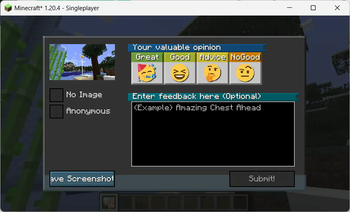
Post comments right into the game world, associated with certain locations - an idea similar to Danmaku in videos.

Нет описания изменений
Нет описания изменений
Нет описания изменений
Нет описания изменений
Version 0.5.0-rc.2
- Add: Server-side config for default comment visibility preference (defaults to hidden)
- Add: Per-server persistence at client-side for player's comment visibility preference
Version 0.5.0-rc.1
- Add: Proper support for uploading image to S3-compatible buckets
Implemented with pre-signed URL
See Github wiki
- Add: Proper support for uploading image to S3-compatible buckets
Version 0.4.0-rc.1
-
Add: Support uploading image with S3-compatible pre-signed URL, see Github wiki
-
Change: Comment visibility is now toggled globally in pause menu
-
Change: F2 is now taken over at all times (additional instruction are given for those who just want to take a screenshot)
-
Remove: Comment Projection Eyeglass
-
Change: A newly sent comment will be shown to their owner for 30 seconds regardless of their comment visibility setting
-
Version 0.3.3-rc.1
This update ports WorldComment to 1.21.8.
Functionally identical to 0.3.2.
Version 0.3.2
Bugfixes
- Fixed comments being invisible on Forge versions
- Comment projection eyeglass should be wearable on helmet slot on all versions
- Accessories face slot is still only supported on limited versions
- Fixed comments being placed on incorrect Y level when standing on blocks such as dirt path
- Fixed incorrect text rendering on 1.19.2
- Change: Submitting comments while not on ground is now allowed when using the comment tool item
Version 0.3.2
Bugfixes
- Fixed comments being invisible on Forge versions
- Comment projection eyeglass should be wearable on helmet slot on all versions
- Accessories face slot is still only supported on limited versions
- Fixed comments being placed on incorrect Y level when standing on blocks such as dirt path
- Fixed incorrect text rendering on 1.19.2
- Change: Submitting comments while not on ground is now allowed when using the comment tool item
Version 0.3.2
Bugfixes
- Fixed comments being invisible on Forge versions
- Comment projection eyeglass should be wearable on helmet slot on all versions
- Accessories face slot is still only supported on limited versions
- Fixed comments being placed on incorrect Y level when standing on blocks such as dirt path
- Fixed incorrect text rendering on 1.19.2
- Change: Submitting comments while not on ground is now allowed when using the comment tool item
Version 0.3.2
Bugfixes
- Fixed comments being invisible on Forge versions
- Comment projection eyeglass should be wearable on helmet slot on all versions
- Accessories face slot is still only supported on limited versions
- Fixed comments being placed on incorrect Y level when standing on blocks such as dirt path
- Fixed incorrect text rendering on 1.19.2
- Change: Submitting comments while not on ground is now allowed when using the comment tool item
Version 0.3.1
Additional functionalities to Lsky Pro uploader
When using S3/R2/OSS/COS etc. as storage backend at Lsky Pro, it still serves thumbnail image from local storage. Configuration entries were added to allow thumbnail images to be also served from CDN.
localThumbGeneration: If set totrue, generates a thumbnail locally and uploads two images separately, disregarding Lsky Pro's thumbnail response.cdnImageTransform: Specify a URL transform to your S3/R2/OSS/COS/whatever's image scaling endpoint, disregarding Lsky Pro's thumbnail response. Do check out their pricing before enabling this.- Example (Cloudflare): "/cdn-cgi/image/width={thumbWidth}/{path}"
- Available replacement variables:
{path}: the original path component of the URL of the uploaded file inside the bucket.{thumbWidth}: Currently always 256.{quality100}: Currently always 85.{quality1}: Currently always 0.85.
Version 0.3.0
Optional opt-in styled comment display preference
An item called "Comment Eyeglass" has been added. It can be worn on helmet slots or Accessories' "Face" slot if you have the mod installed. (Note that currently the slot integration only fully works in 1.21.1)
This item has no effect by default, but you can configure comments to only show when it is worn.Associated config item
commentVisibilityCriteriaandmarkerVisibilityCriteriahas been added. They can be set totool_toggle,glass_worn,alwaysornever.Commands
Several client commands has been added to allow accessing comment sending and list screen without in posession of an item.
/wcor/wc send: Opens the sending screen. When opened this way, comments are posted at the player's standing position, skipping the "putting down" phase./wc list: Opens the list screen
Image Global Kill
Server operators can use the command
/wcs imageGlobalKill trueto globally prevent clients from viewing any image, as a moderation measure.Version 0.3.1
Additional functionalities to Lsky Pro uploader
When using S3/R2/OSS/COS etc. as storage backend at Lsky Pro, it still serves thumbnail image from local storage. Configuration entries were added to allow thumbnail images to be also served from CDN.
localThumbGeneration: If set totrue, generates a thumbnail locally and uploads two images separately, disregarding Lsky Pro's thumbnail response.cdnImageTransform: Specify a URL transform to your S3/R2/OSS/COS/whatever's image scaling endpoint, disregarding Lsky Pro's thumbnail response. Do check out their pricing before enabling this.- Example (Cloudflare): "/cdn-cgi/image/width={thumbWidth}/{path}"
- Available replacement variables:
{path}: the original path component of the URL of the uploaded file inside the bucket.{thumbWidth}: Currently always 256.{quality100}: Currently always 85.{quality1}: Currently always 0.85.
Version 0.3.0
Optional opt-in styled comment display preference
An item called "Comment Eyeglass" has been added. It can be worn on helmet slots or Accessories' "Face" slot if you have the mod installed. (Note that currently the slot integration only fully works in 1.21.1)
This item has no effect by default, but you can configure comments to only show when it is worn.Associated config item
commentVisibilityCriteriaandmarkerVisibilityCriteriahas been added. They can be set totool_toggle,glass_worn,alwaysornever.Commands
Several client commands has been added to allow accessing comment sending and list screen without in posession of an item.
/wcor/wc send: Opens the sending screen. When opened this way, comments are posted at the player's standing position, skipping the "putting down" phase./wc list: Opens the list screen
Image Global Kill
Server operators can use the command
/wcs imageGlobalKill trueto globally prevent clients from viewing any image, as a moderation measure.Version 0.3.1
Additional functionalities to Lsky Pro uploader
When using S3/R2/OSS/COS etc. as storage backend at Lsky Pro, it still serves thumbnail image from local storage. Configuration entries were added to allow thumbnail images to be also served from CDN.
localThumbGeneration: If set totrue, generates a thumbnail locally and uploads two images separately, disregarding Lsky Pro's thumbnail response.cdnImageTransform: Specify a URL transform to your S3/R2/OSS/COS/whatever's image scaling endpoint, disregarding Lsky Pro's thumbnail response. Do check out their pricing before enabling this.- Example (Cloudflare): "/cdn-cgi/image/width={thumbWidth}/{path}"
- Available replacement variables:
{path}: the original path component of the URL of the uploaded file inside the bucket.{thumbWidth}: Currently always 256.{quality100}: Currently always 85.{quality1}: Currently always 0.85.
Version 0.3.0
Optional opt-in styled comment display preference
An item called "Comment Eyeglass" has been added. It can be worn on helmet slots or Accessories' "Face" slot if you have the mod installed. (Note that currently the slot integration only fully works in 1.21.1)
This item has no effect by default, but you can configure comments to only show when it is worn.Associated config item
commentVisibilityCriteriaandmarkerVisibilityCriteriahas been added. They can be set totool_toggle,glass_worn,alwaysornever.Commands
Several client commands has been added to allow accessing comment sending and list screen without in posession of an item.
/wcor/wc send: Opens the sending screen. When opened this way, comments are posted at the player's standing position, skipping the "putting down" phase./wc list: Opens the list screen
Image Global Kill
Server operators can use the command
/wcs imageGlobalKill trueto globally prevent clients from viewing any image, as a moderation measure.Version 0.3.1
Additional functionalities to Lsky Pro uploader
When using S3/R2/OSS/COS etc. as storage backend at Lsky Pro, it still serves thumbnail image from local storage. Configuration entries were added to allow thumbnail images to be also served from CDN.
localThumbGeneration: If set totrue, generates a thumbnail locally and uploads two images separately, disregarding Lsky Pro's thumbnail response.cdnImageTransform: Specify a URL transform to your S3/R2/OSS/COS/whatever's image scaling endpoint, disregarding Lsky Pro's thumbnail response. Do check out their pricing before enabling this.- Example (Cloudflare): "/cdn-cgi/image/width={thumbWidth}/{path}"
- Available replacement variables:
{path}: the original path component of the URL of the uploaded file inside the bucket.{thumbWidth}: Currently always 256.{quality100}: Currently always 85.{quality1}: Currently always 0.85.
Version 0.3.0
Optional opt-in styled comment display preference
An item called "Comment Eyeglass" has been added. It can be worn on helmet slots or Accessories' "Face" slot if you have the mod installed. (Note that currently the slot integration only fully works in 1.21.1)
This item has no effect by default, but you can configure comments to only show when it is worn.Associated config item
commentVisibilityCriteriaandmarkerVisibilityCriteriahas been added. They can be set totool_toggle,glass_worn,alwaysornever.Commands
Several client commands has been added to allow accessing comment sending and list screen without in posession of an item.
/wcor/wc send: Opens the sending screen. When opened this way, comments are posted at the player's standing position, skipping the "putting down" phase./wc list: Opens the list screen
Image Global Kill
Server operators can use the command
/wcs imageGlobalKill trueto globally prevent clients from viewing any image, as a moderation measure.Version 0.3.0
Optional opt-in styled comment display preference
An item called "Comment Eyeglass" has been added. It can be worn on helmet slots or Accessories' "Face" slot if you have the mod installed. (Note that currently the slot integration only fully works in 1.21.1)
This item has no effect by default, but you can configure comments to only show when it is worn.Associated config item
commentVisibilityCriteriaandmarkerVisibilityCriteriahas been added. They can be set totool_toggle,glass_worn,alwaysornever.Commands
Several client commands has been added to allow accessing comment sending and list screen without in posession of an item.
/wcor/wc send: Opens the sending screen. When opened this way, comments are posted at the player's standing position, skipping the "putting down" phase./wc list: Opens the list screen
Image Global Kill
Server operators can use the command
/wcs imageGlobalKill trueto globally prevent clients from viewing any image, as a moderation measure.Version 0.3.0
Optional opt-in styled comment display preference
An item called "Comment Eyeglass" has been added. It can be worn on helmet slots or Accessories' "Face" slot if you have the mod installed. (Note that currently the slot integration only fully works in 1.21.1)
This item has no effect by default, but you can configure comments to only show when it is worn.Associated config item
commentVisibilityCriteriaandmarkerVisibilityCriteriahas been added. They can be set totool_toggle,glass_worn,alwaysornever.Commands
Several client commands has been added to allow accessing comment sending and list screen without in posession of an item.
/wcor/wc send: Opens the sending screen. When opened this way, comments are posted at the player's standing position, skipping the "putting down" phase./wc list: Opens the list screen
Image Global Kill
Server operators can use the command
/wcs imageGlobalKill trueto globally prevent clients from viewing any image, as a moderation measure.Version 0.3.0
Optional opt-in styled comment display preference
An item called "Comment Eyeglass" has been added. It can be worn on helmet slots or Accessories' "Face" slot if you have the mod installed. (Note that currently the slot integration only fully works in 1.21.1)
This item has no effect by default, but you can configure comments to only show when it is worn.Associated config item
commentVisibilityCriteriaandmarkerVisibilityCriteriahas been added. They can be set totool_toggle,glass_worn,alwaysornever.Commands
Several client commands has been added to allow accessing comment sending and list screen without in posession of an item.
/wcor/wc send: Opens the sending screen. When opened this way, comments are posted at the player's standing position, skipping the "putting down" phase./wc list: Opens the list screen
Image Global Kill
Server operators can use the command
/wcs imageGlobalKill trueto globally prevent clients from viewing any image, as a moderation measure.
