
Vivecraft Theater Mode
Brings back Bedrock VR theater mode to Minecraft: Java Edition, powered by Vivecraft!

Vivecraft Theater Mode
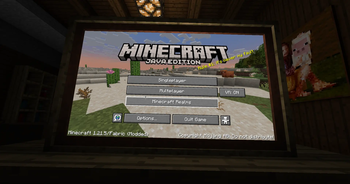
Vivecraft Theater Mode brings back the GearVR Editions-style Theater view for Vivecraft. Instead of floating menus and a standard VR layout, it recreates a more cinematic panel in front of you, closer to the Theater mode shown in the GearVR editions era:
This mod is made for players who want Vivecraft to feel more like a flat, front-facing cinema screen while still keeping VR support and Vivecraft's normal menu flow.
What It Does
- Adds a Theater play mode to Vivecraft
- Renders the game on a large front-facing screen
- Keeps the view comfortable and centered for seated-style play
- Preserves normal gameplay and menu interaction
- Includes controller-friendly GUI support
Controller Mod Support
This mod is tested with Controlify, so you can navigate Theater menus with a controller—not just mouse and keyboard.
Other controller mods may work too, but Controlify is the one I have tested against.
Requirements
- Minecraft
1.21.5 - Fabric Loader
- Fabric API
- Vivecraft
How To Use
- Install the mod alongside Vivecraft.
- Start the game and open Vivecraft's VR settings.
- Use the play mode button until it reaches Theater.
- Play normally in VR with the Theater view enabled.
The selected play mode is saved between launches.
Notes
- This mod is a compatibility/add-on mod for Vivecraft, not a standalone VR replacement.
- If you use Controlify, make sure it is configured and actively controlling input when you want controller cursor behavior in Theater screens.
