
Add min, max format for paper 1.21.10
Add min, max format for paper 1.21.10
fix: backpack overrided the another at the same position.
fix: the backpack equipment didn't upgradefix: backpack overrided the another at the same position.
fix: the backpack equipment didn't upgradeUpgrade to Minecraft 1.21
Upgrade to Minecraft 1.21
- Fixed: Custom blocks can't be opened in caves.
- Improved: Dropped-type custom blocks can be created when there are no other items dropped within a 1-block range, instead of 5.
- Simplified: Removed the credit link display.
- Custom Craft Version: 5 (compatible with the same version)
- Fixed: Custom blocks can't be opened in caves.
- Improved: Dropped-type custom blocks can be created when there are no other items dropped within a 1-block range, instead of 5.
- Simplified: Removed the credit link display.
- Custom Craft Version: 5 (compatible with the same version)
README
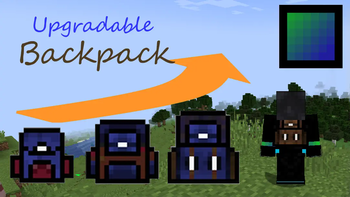
I made the backpack, which is
- Craft a 9-slot backpack, upgradable to 18 and 26 slots.
- Dyeable through the crafting table.
- Easily renamable using an anvil.
How to Use Backpacks
- To store or retrieve items, simply drop the backpack on the ground. It will transform into a barrel, allowing you to manage your items. Click the "Exit" button slot to revert it to a backpack item.
These backpacks can be placed in your chest slot for decorative purposes.
Crafting Recipes
-
Spawning a Working Table:
To craft the backpacks, start by creating the essential "Working Table". Simply drop a stone pickaxe onto a crafting table block. -
Crafting a 9-Slot Backpack:
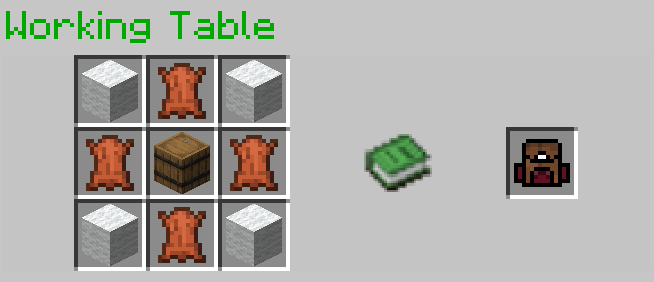
-
Upgrading to an 18-Slot Backpack:
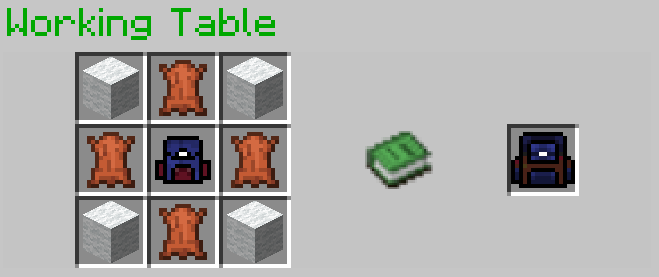
-
Upgrading to a 26-Slot Backpack:
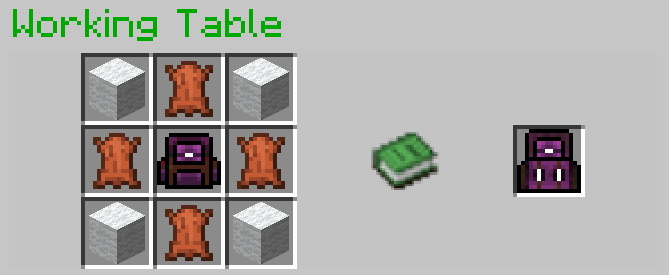
Optional Installation
- To see the backpack on your character's back when placed in the chest slot, you may install Optifine; it's optional.
References
- GUI code is generated by Easy GUI
- The Working Table is a crafting block in Custom Craft.
- ChatGPT for gramma improving
Demo Video
Watch this video to see the backpacks in action!
change the item base of the GUI item of the working table to a clay ball, which means you need to change a new resource pack if you want to play this version.
If you are the old player in v9 and you don't play my other data packs, nothing will change if you upgrade to v9.1.
If you want to play my other data packs, you need to upgrade to v9.1 for the compatibility of my other data packs because they share the same resource pack.
the resource pack is at the dependencieschange the item base of the GUI item of the working table to a clay ball, which means you need to change a new resource pack if you want to play this version.
If you are the old player in v9 and you don't play my other data packs, nothing will change if you upgrade to v9.1.
If you want to play my other data packs, you need to upgrade to v9.1 for the compatibility of my other data packs because they share the same resource pack.
the resource pack is at the dependenciesUpdate to 1.20.1, May work in 1.19.* ~ 1.17.*
There is a resource pack needed to install.
Need to install Optifine 1.20.1
Don't need Custom Craft like v8.* any more.This is the version that I beautify the GUI, the armor texture (backpack on your back). I add the texture of the largest backpack. This datapack works only when installing Custom Craft v3.1 or above.
This is the version that I beautify the GUI, the armor texture (backpack on your back). I add the texture of the largest backpack. This datapack works only when installing Custom Craft v3.1 or above.
Нет описания изменений
Нет описания изменений
