

UIWeaver
UIWeaver is an experimental Minecraft UI framework for building mod screens from reusable layout components instead of hand-positioning every widget.
It is currently a prototype. The main focus right now is making screens easier to structure, keep synced with the server, and debug when something ends up in the wrong place.
Why this exists
Minecraft screens can get messy fast. A lot of UI code ends up being a mix of rendering, slot positioning, button handling, sync packets, tooltips, and hardcoded coordinates.
That works for small menus, but it becomes painful once a screen has tabs, inventories, progress bars, server actions, or resizable layouts.
UIWeaver tries to make that workflow less brittle by letting a screen be described as a component tree:
ui.column()
    .padding(8)
    .gap(6)
    .add(ui.label(Component.literal("Machine Dashboard")))
    .add(ui.row()
        .gap(4)
        .add(ui.button(Component.literal("Start")).action("start"))
        .add(ui.button(Component.literal("Stop")).action("stop"))
    )
    .add(ui.progressBar().bind("progress"));
Instead of calculating every x and y by hand, the layout decides where each child should go.
Components
UIWeaver includes basic building blocks for common Minecraft mod screens:
columnrowgridtabsscrollPanellabelbuttontogglecheckboxslidertextInputprogressBarenergyBarfluidBarslotGrid
The goal is not to hide Minecraft's UI system completely. Slots, tooltips, GUI scale, and server validation still matter. UIWeaver is meant to make those pieces easier to organize.
Layout
Containers handle spacing and child placement:
ui.column().padding(8).gap(4)
ui.row().gap(8).fillWidth()
ui.grid(3, 3)
This keeps most screens from turning into a long list of manual coordinates.
Server actions
Buttons can send named actions to the server:
ui.button(Component.literal("Start"))
    .id("btnStart")
    .action("start");
The server decides what the action actually does and whether it is allowed. This avoids putting machine logic or trusted state changes on the client.
Synced state
A screen can read values from a UIViewModel:
energy = 100
maxEnergy = 10000
working = false
progress = 42
Bars, labels, toggles, and other widgets can use those values for display without each widget needing its own packet handling.
Debug tools
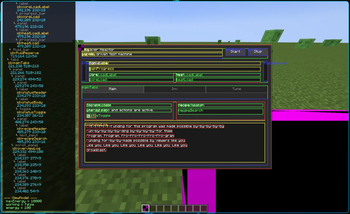
UIWeaver has a debug overlay and inspector for layout problems.
They are useful when:
- a component is outside its parent
- inactive tabs are still being checked
- child bounds are stale after a relayout
- slot visuals do not match real Minecraft
Slotpositions - a panel is clipped or appears too high
The overlay can draw visible component bounds, while the inspector can show type, id, size, position, visibility, and synced values.
Example
A basic machine screen can be written like this:
.root(ui.column().padding(10).gap(8).size(530, 340)

    .add(ui.row().gap(8).fillWidth().height(28)
        .add(ui.column().gap(2).grow().height(28)
            .add(ui.label(Component.literal("UIWeaver Reactor"))
                .id("title"))
            .add(ui.label(Component.literal("Server driven test machine"))
                .id("subtitle"))
        )
        .add(ui.button(Component.literal("Start"))
            .id("btnStart")
            .action("start")
            .size(54, 20))
        .add(ui.button(Component.literal("Stop"))
            .id("btnStop")
            .action("stop")
            .size(54, 20))
    )

    .add(ui.row().gap(8).fillWidth().height(58)
        .add(ui.energyBar()
            .id("energyBar")
            .bind("energy", "maxEnergy")
            .size(12, 54))

        .add(ui.column().gap(5).grow().height(58)
            .add(ui.label(Component.literal("Main cycle")))
            .add(ui.progressBar()
                .id("mainProgress")
                .fillWidth()
                .height(12))
        )

        .add(ui.fluidBar()
            .id("fluidReserve")
            .size(12, 54))
    )

    .add(ui.tabs().id("mainTabs").fillWidth().grow()
        .tab("Main", ui.column().padding(8).gap(6)
            .add(ui.label(Component.literal("Machine State")))
            .add(ui.toggle().id("statusToggle"))
        )

        .tab("Inv", ui.column().padding(8).gap(6)
            .add(ui.slotGrid(3, 3)
                .id("slots")
                .bind("machineInv"))
        )

        .tab("Tune", ui.column().padding(8).gap(7)
            .add(ui.slider(0, 100)
                .id("speedSlider")
                .value(40))
            .add(ui.button(Component.literal("Apply tuning"))
                .id("applyTuning"))
        )
    )
)
Current features
- Component tree screen definitions
- Rows, columns, grids, tabs, and scroll panels
- Labels, buttons, toggles, checkboxes, sliders, and text inputs
- Progress, energy, and fluid bars
- Basic inventory slot grids
- Synced ViewModel values
- Named server actions
- Forge client renderer integration
- Component bounds overlay
- UI inspector for layout and state debugging
Current limitations
UIWeaver is still early, so some parts are not stable yet.
Slot placement
The rendered slot grid and the real Minecraft Slot objects must line up exactly. This is one of the most important things to stabilize before using the framework for larger inventories.
Tabs
Only the active tab should render, receive input, and appear in normal inspection. Inactive tab contents need stricter handling so they do not affect visible layout by accident.
Styling
The styling system is still basic. Panels, borders, hover states, active states, spacing presets, and reusable themes are planned but not finished.
Direction
The long-term goal is to make Minecraft mod screens easier to build without losing control over the parts that matter.
UIWeaver should help with:
- building screens from smaller pieces
- avoiding hardcoded pixel math where possible
- keeping client interaction server-validated
- making layout bugs easier to see
- supporting Minecraft-specific UI needs like slots, tooltips, GUI scale, and synced data
Roadmap
Possible future work:
- style and theme API
- reusable panel/card components
- stronger slot binding
- tab-aware layout pass
- animation support
- tooltip helpers
- validated form inputs
- screen editor
- drag-and-drop layout debugging
- reusable screen templates
- Fabric support
- NeoForge support
Project status
UIWeaver is a prototype. It already proves the basic approach: screens can be built from a component tree with layout, synced values, actions, and debugging tools.
The next priority is making tabs and inventory slots reliable, then improving styling so screens can look polished instead of just functional.
Community
Join the UIWeaver Discord server for discussion, feedback, development updates, and support.
License
UIWeaver is licensed under the GNU Lesser General Public License v3.0.
You may use UIWeaver as a library in your own mods, including closed-source or commercial projects, as long as changes made to UIWeaver itself remain available under the LGPL-3.0 license.
See the LICENSE file for the full license text.
