
TotemSound
This Minecraft mod lets you replace the default totem sound with a custom audio file up to ten seconds long.
152
1

TotemSound
A client-side Fabric mod for Minecraft 1.21.1 that allows you to replace the Totem of Undying pop sound with a custom local audio file directly in-game.
Features
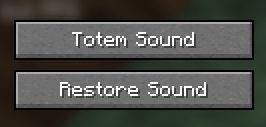
- In-Game Menu: Adds a new button to the pause menu to easily change the sound while playing.
- Local Files: Allows you to select a custom audio file directly from your PC using a file browser.
- Time Limit: The system automatically checks if the selected sound complies with the maximum limit of 10 seconds.
- Restore Function: Clicking "Restore Sound" immediately brings back the original vanilla totem sound.
- Client-Side Only: The mod only needs to be installed on the client and works perfectly on any multiplayer server.
Installation
- Install the Fabric Loader for Minecraft 1.21.1.
- Download the mod file (
totemsound.jar). - Place the file into your
%appdata%\.minecraft\modsfolder. - Launch the game using the Fabric profile.
Usage
- Open the pause menu (ESC) in-game.
- Click the Totem Sound button.
- Select your desired audio file on your PC (It has to be a .wav file you can convert your sound on some websites for example https://cloudconvert.com/audio-converter ).
- Use a totem in the game to hear the new sound.
- To get the original sound back, simply press Restore Sound in the pause menu.
Author: Petar
Platform: Fabric (Minecraft 1.21.1)
Ссылки


Сведения
Лицензия:
Опубликован:2 недели назад
Обновлён:2 недели назад
ID проекта: