

Modern Advancements Screen
Improved Advancements screen with a more modern feel and modern features

- Added "Guide" feature
- A new handling has been added to the detail panel to display a spoiler type box that can be opened by players to display a guide when avaliable.
For creators: When adding new advancements that have translation keys, the mod will now check for an addon to the description key via
.guide. All you have to do is include this extra key and the mod will apply it. The new line function (\n) is included for formatting needs.For example:
"advancements.adventure.very_very_frightening.description": "Strike a Villager with lightning",
"advancements.adventure.very_very_frightening.description.guide": "Strike a Villager with lightning to earn this advancement.\n\nCommon methods:\n§7Trident (Channeling)§r - Hold a trident enchanted with Channeling and throw it at a Villager during a thunderstorm. The trident will summon a lightning bolt on impact.\n\n§7Lightning Rod§r - Place a Lightning Rod near a Villager and wait for a thunderstorm. If lightning naturally strikes the rod, any Villager within 3 blocks will count.\n\n§7/summon§r - In a world with cheats enabled, use §o/summon minecraft:lightning_bolt§r while targeting a Villager to instantly complete the advancement.\n\n§8Tip: Thunderstorms are rare. You can use a Weather command or keep a Channeling trident on hand so you're ready when one occurs. Be careful - lightning will convert a Villager into a Witch!§r"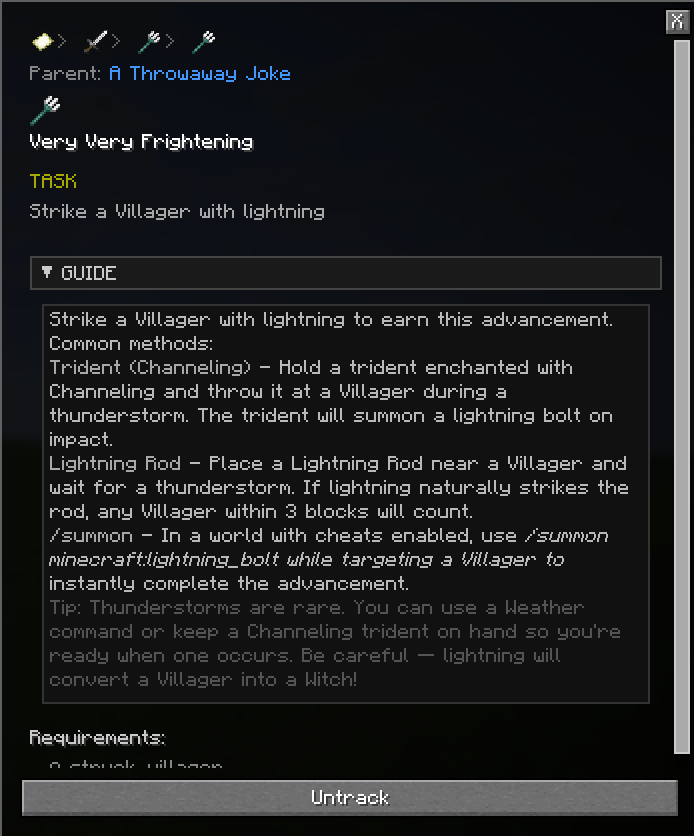
- Added "Guide" feature
- Added "Guide" feature
- A new handling has been added to the detail panel to display a spoiler type box that can be opened by players to display a guide when avaliable.
For creators: When adding new advancements that have translation keys, the mod will now check for an addon to the description key via
.guide. All you have to do is include this extra key and the mod will apply it. The new line function (\n) is included for formatting needs.For example:
"advancements.adventure.very_very_frightening.description": "Strike a Villager with lightning", "advancements.adventure.very_very_frightening.description.guide": "Strike a Villager with lightning to earn this advancement.\n\nCommon methods:\n§7Trident (Channeling)§r - Hold a trident enchanted with Channeling and throw it at a Villager during a thunderstorm. The trident will summon a lightning bolt on impact.\n\n§7Lightning Rod§r - Place a Lightning Rod near a Villager and wait for a thunderstorm. If lightning naturally strikes the rod, any Villager within 3 blocks will count.\n\n§7/summon§r - In a world with cheats enabled, use §o/summon minecraft:lightning_bolt§r while targeting a Villager to instantly complete the advancement.\n\n§8Tip: Thunderstorms are rare. You can use a Weather command or keep a Channeling trident on hand so you're ready when one occurs. Be careful - lightning will convert a Villager into a Witch!§r"- Added "Guide" feature
- Fix a crash when opening the Tracker Edit Screen
- Clicking on an advancement in chat will now open and focus on the Advancement in the Advancement Screen
- This should work client-side but does have a server-side function as well.
- The usage of clicking on another player's advancement that the client doesn't know about is unknown and may cause issues.
- Fix a crash when opening the Tracker Edit Screen
- Clicking on an advancement in chat will now open and focus on the Advancement in the Advancement Screen
- This should work client-side but does have a server-side function as well.
- The usage of clicking on another player's advancement that the client doesn't know about is unknown and may cause issues.
- Re-did the Tracking HUD Editor
- New options for tracking HUD. Changing Size and Detail displays
- Added keybinds for opening Tracking and Toast Edit screens
- Moved API files into a subfolder in the config
- Fixed small issue with the edit button appearing outside custom mode
- Re-did the Tracking HUD Editor
- Re-did the Tracking HUD Editor
- New options for tracking HUD. Changing Size and Detail displays
- Added keybinds for opening Tracking and Toast Edit screens
- Moved API files into a subfolder in the config
- Fixed small issue with the edit button appearing outside custom mode
- Re-did the Tracking HUD Editor
- A 1.21.11 release
- Fix taking screenshots of skipped Advancements if the setting was turned off then back on.
I forgot to include this in the last update
- #58 - Added Russian translation
- Adjusted Detail panel sizing based on GUI Scale
- Adjusted Timestamp in detail panel to match the games selected langauge
- Adjusted Config Popup element width to size to the text
- Added Screenshot feature
- Will now automatically take screenshots when Advancements earned and display them in the details menu. (Can be turned off in settings)
- Screenshots are taken with a fixed image size of 1920x1080 (Can be set to use window size instead in settings)
- Screenshos are saved to a sub-folder in the normal screenshots folder.
There is a minor issue with Advancements earned while the option is disabled. If re-enabled it will take screenshots of the menu for those missing.
- Added Screenshot feature
New Layout Mode - Custom
- Let's you edit the placement of the Advancement Icons and save them to an override file.
The connection lines will be improved in future versions (If I can manage to get to work right)
- Added "Modern" Layout, can be changed in Settings menu
- Modern layout is a custom layout that places the advancement icons in the screen differently to vanilla. It maintains the pathways while giving a more clean view as well as keeping them in the same location through instances (They are also sorted alphabetically because I can)
- Added Toast Settings
- New feature that overrides the vanilla Advancement Toast with different options. Including the ability to position it anywhere on the screen. You can use the quick movement points or drag the box to your desired location (the movement points also set the offset location which can affect certain animations)
- Toast Box Size (Small, Medium, Large)
- Toast Animation (Slide, Fade, Pop, None)
- Toast Frame (Per-type, Uniform, None)
- Toast Background Style (Solid, Gradient, Transparent)
- Toast Icon Size (Small, Large)
- Toast Display (Single, Stacking, Disabled, Vanilla)
- Toast Duration (Slider, 0s - 60s)
- Toast Sound (Multi-choice, Task, Challenge)
- New feature that overrides the vanilla Advancement Toast with different options. Including the ability to position it anywhere on the screen. You can use the quick movement points or drag the box to your desired location (the movement points also set the offset location which can affect certain animations)
- Updated the main screen button layout
- Added Rewards to the detail panel
- this will mostly be empty, only a few vanilla advancements give rewards (XP). Mainly to add support for datapacks that do include rewards.
- Updated how connectors are rendered
- Added and updated more text translations
- Massive General Code Cleaning
Note some features like Frame & Background are mainly placeholders but do have functions. They will be improved in later versions
- Added "Modern" Layout, can be changed in Settings menu
- Added HTTP API for servers
- Lets you access advancements, players, stats and a feed
- See description for detailed explanations
- Added Activity Feed and Leaderboards
- Fixed a non-issue with completed requirements not progressing in the Tracking HUD
- Improve the Tracking HUD display on requirements
- Moved Tracking HUD render layer + fixed a scissor leak that prevented other HUD elements from rendering
A lot of this is work in progress and will be changed/improved. Right now it's rough layout to test for any issues I've missed
- Added HTTP API for servers
- Added progress statistics
- Total progress under each Tab and Tooltip update
- Total progress overall viewable through a new button
- Rearranged the buttons
- Session saving
- Screen will now re-open to how it was left when closed (resets through game restarts)
- Fixed some of the custom buttons not having click sounds
- Added progress statistics
- Fix button alignment in HUD Tracking Editor
- Convert HUD Tracking Editor text to translation keys
- Fix detail panel scroll bar overlapping the close button
- Fix detail panel progress bar overlapping the close button when scrolling
- Fix requirement text not wrapping when reaching the end of the panel
- Fix HUD edit screen unpausing the game
- Fix Parent Navigation leaking into the entire detail panel
- Updated Tracking HUD box display
- Added Keybinds for Tracking HUD
- Toggle Tracking HUD:
\- Hide/Show HUD - Next Tracked Selection:
[- Cycle through to the next Tracked Advancment on the list - Previous Tracked Selection:
Not Bound- As above, but backwards - Next Tracked Requirement:
]- Cycles through the Selected Advancment Requirement list - Previous Tracked Requirement:
Not Bound- As above, but backwards
- Toggle Tracking HUD:
First-second release
