
Gatekeeper
A Fabric mod for Minecraft that replaces username/password login with cryptographic key authentication.

Gatekeeper replaces username/password login on offline-mode servers with cryptographic key authentication. Every player holds a unique digital key that the server recognises — no password to guess, share, or steal.
Designed for small offline-mode servers where the operator personally knows every player.
How it works
When you connect to a Gatekeeper server for the first time, the mod silently generates a unique key pair for that server and stores it on your computer. Every subsequent connection your game proves — cryptographically — that it holds the right key, without ever transmitting it over the network. The server checks your key against its approved list and lets you in.
No passwords. No shared secrets. Nothing to forget or leak.
Requirements
- The Fabric mod loader
- Fabric API
- Both the server and every connecting client must have the mod installed
- The server must run with
online-mode=falseinserver.properties
Installation
Server
- Install Fabric and Fabric API.
- Drop
gatekeeper-<version>.jarinto themods/folder. - Set
online-mode=falseinserver.properties. - Start the server — a
config/mcgatekeeper/directory is created automatically.
Important:
online-mode=falsewithout Gatekeeper means anyone who knows a player's username can impersonate them. Gatekeeper eliminates that risk, but it means you must approve every new player before they can join.
Client
- Install Fabric and Fabric API.
- Drop
gatekeeper-<version>.jarinto yourmods/folder. - That's it — keys are generated and stored automatically.
First connection
The first time a player connects:
- A key pair is generated for that server in the background.
- The connection screen shows a message saying the server is waiting for admin approval.
- An operator (level 3+) runs
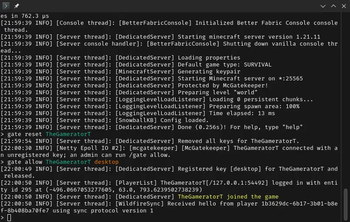
/gate allow <username> <label>to approve the player and register their key.
The player is let in immediately and their key is remembered for all future connections from that device.
Admin commands
| Command | What it does |
|---|---|
/gate allow <player> <label> | Approves a waiting player and registers their key |
/gate list <player> | Lists all registered keys for a player with fingerprints |
/gate reset <player> | Removes all keys for a player |
/gate reset <player> <label> | Removes a single key (e.g. a lost device) |
Tab-complete on /gate allow suggests players currently awaiting approval.
Key management
You can view and manage your stored keys via Mods → Gatekeeper → Manage Keys (requires Mod Menu). Each entry shows the server address the key was last used with, plus short fingerprints for both the server and client keys.
For full technical documentation, the security model, and source code, see the GitHub repository.
