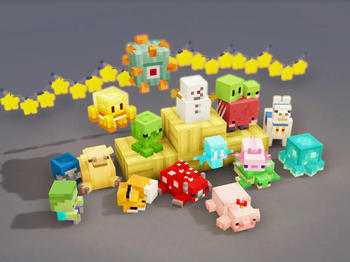

- Added two new dolls.
- Fixed an item duplication bug.
- Fixed models for some dolls.
- Added two new dolls.
- Fixed an item duplication bug.
- Fixed models for some dolls.
- Added 62 new dolls
- Players can place held items on entity dolls by sneaking and right-clicking
- The Pointing Tool can now modify the position, orientation, and scale of items
- When entity dolls are hit by arrows or other ranged weapons, they will play a bouncing animation
Credits: @梦露鱼 @Lonya0
- Added 62 new dolls
- Players can place held items on entity dolls by sneaking and right-clicking
- The Pointing Tool can now modify the position, orientation, and scale of items
- When entity dolls are hit by arrows or other ranged weapons, they will play a bouncing animation
Credits: @梦露鱼 @Lonya0
Kaleidoscope Doll v1.3.1 Changelog
- Completed Curios compatibility (NeoForge 1.21.1)
- Fixed custom dolls not dropping correctly
- Updated Japanese localization
Kaleidoscope Doll v1.3.1 Changelog
- Completed Curios compatibility (NeoForge 1.21.1)
- Fixed custom dolls not dropping correctly
- Updated Japanese localization
Kaleidoscope Doll 1.3.0 Changelog
Updates
- Optimized some doll models
- Updated Japanese localization (Thanks to @ink091411)
- Added sponsor doll disable feature
- When disabled, sponsor dolls will no longer appear in Creative Mode tabs or JEI/EMI item lists
- When disabled, sponsor dolls cannot be obtained through the computer interface
- When disabled, Phantoms will no longer drop sponsor dolls
- When disabled, sponsor dolls already owned by players will not be lost
- Added new doll models
- Models contributed by Aike
- Cardboard Fox and Conch doll models contributed by Cardboard
- Jiuhu fox form doll
- New dolls added in November/December (+8)
- Added custom doll feature
- Custom dolls use Bedrock Edition entity model format with fewer restrictions
- Custom dolls have the same functionality as regular dolls, can be crafted via computer, and can obtain entity versions with identical features
- Servers will automatically sync custom doll data, but clients still need to manually install the client-side resource pack
Custom Doll Pack Creation
1. Basic Information
Two ways to load custom doll packs:
- Place in the
config/kaleidoscope_doll/customdirectory, supports zip archive or folder format - Define through vanilla resource packs and data packs
Hot reload methods:
- Doll packs in the
config/kaleidoscope_doll/customdirectory can be quickly reloaded via the/kaleidoscope_doll reloadcommand - Dolls defined through vanilla resource packs and data packs can be reloaded via the
/reloadcommand orF3 + Tshortcut
Model format:
- Custom doll packs use Bedrock Edition entity model format version 1.12.0+
- Compared to Java Edition item/block model format, this format has no angle or rotation axis restrictions, offering more flexibility, but only supports a single texture file
2. Creating Model Packs in the Config Directory
Model packs should be placed in the
config/kaleidoscope_doll/customdirectory (server-side also requires a copy).Both zip archive and folder formats are supported. The zip format is convenient for sharing with others.
The zip format is compatible with both top-level folder and non-top-level folder packaging methods.
Below is an example using the folder format. The directory structure is as follows:
The folder name (e.g.,
Example Model Pack) can be named arbitrarily without any restrictions. The folder must contain three subfolders:lang,models, andtextures.The
modelsfolder stores Bedrock Edition model files. File names have no restrictions and can be named freely.The unique identifier of the model depends on the
identifierfield in the file content.The
identifierfield has no naming restrictions and can use any characters (including non-ASCII characters).The game will use it as the doll's unique ID and also as the corresponding texture's identification name.
Note:
identifiermust be unique. If duplicate IDs exist, only the last model will be loaded.The
texturesfolder stores texture files. Texture file names must match the corresponding model'sidentifierfield.The
langfolder stores language files. The content in these files will be displayed as the doll's tooltip text.The language file key also uses the
identifierfield, and the value supports newline characters.3. Creating Resource Packs and Data Packs
Custom dolls also support definition through resource packs and data packs.
First, for the data pack part, create a
data/<namespace>/custom_dolls.jsonfile in the data pack, and fill in the doll ID list (i.e., the model'sidentifierfield).Then, for the resource pack part, create an
assets/<namespace>/custom_dollsfolder in the resource pack. The directory structure inside the folder is the same as the model pack in the config directory described above.The mechanism is identical to the model pack in the config directory and will not be repeated here.
4. FAQ
Q: I'm a server owner. How should I install custom doll model packs?
A: If installing via the config directory method, you need to place a copy of the doll pack in the server's config directory, and each player also needs to place a copy in their client's config directory. If using the resource pack and data pack method, simply install the data pack on the server and distribute the resource pack to players.
Q: What happens if only the server-side doll pack is installed without distributing to players?
A: Players can still play normally and craft/obtain custom dolls. However, models missing on the client side will display as Steve dolls by default. They will display correctly after players install the client-side doll pack.
Q: Regular dolls have many features. Does custom dolls support all of them?
A: Yes, all features are supported. This includes crafting with slime balls/clay to obtain entity dolls, obtaining through computer, Phantom random doll drops, wearing on head, etc. Currently, the only issue is that dolls placed in the maid decoration slot don't display. All other behaviors are identical to regular dolls.
Kaleidoscope Doll 1.3.0 Changelog
Updates
- Optimized some doll models
- Updated Japanese localization (Thanks to @ink091411)
- Added sponsor doll disable feature
- When disabled, sponsor dolls will no longer appear in Creative Mode tabs or JEI/EMI item lists
- When disabled, sponsor dolls cannot be obtained through the computer interface
- When disabled, Phantoms will no longer drop sponsor dolls
- When disabled, sponsor dolls already owned by players will not be lost
- Added new doll models
- Models contributed by Aike
- Cardboard Fox and Conch doll models contributed by Cardboard
- Jiuhu fox form doll
- New dolls added in November/December (+8)
- Added custom doll feature
- Custom dolls use Bedrock Edition entity model format with fewer restrictions
- Custom dolls have the same functionality as regular dolls, can be crafted via computer, and can obtain entity versions with identical features
- Servers will automatically sync custom doll data, but clients still need to manually install the client-side resource pack
Custom Doll Pack Creation
1. Basic Information
Two ways to load custom doll packs:
- Place in the
config/kaleidoscope_doll/customdirectory, supports zip archive or folder format - Define through vanilla resource packs and data packs
Hot reload methods:
- Doll packs in the
config/kaleidoscope_doll/customdirectory can be quickly reloaded via the/kaleidoscope_doll reloadcommand - Dolls defined through vanilla resource packs and data packs can be reloaded via the
/reloadcommand orF3 + Tshortcut
Model format:
- Custom doll packs use Bedrock Edition entity model format version 1.12.0+
- Compared to Java Edition item/block model format, this format has no angle or rotation axis restrictions, offering more flexibility, but only supports a single texture file
2. Creating Model Packs in the Config Directory
Model packs should be placed in the
config/kaleidoscope_doll/customdirectory (server-side also requires a copy).Both zip archive and folder formats are supported. The zip format is convenient for sharing with others.
The zip format is compatible with both top-level folder and non-top-level folder packaging methods.
Below is an example using the folder format. The directory structure is as follows:
The folder name (e.g.,
Example Model Pack) can be named arbitrarily without any restrictions. The folder must contain three subfolders:lang,models, andtextures.The
modelsfolder stores Bedrock Edition model files. File names have no restrictions and can be named freely.The unique identifier of the model depends on the
identifierfield in the file content.The
identifierfield has no naming restrictions and can use any characters (including non-ASCII characters).The game will use it as the doll's unique ID and also as the corresponding texture's identification name.
Note:
identifiermust be unique. If duplicate IDs exist, only the last model will be loaded.The
texturesfolder stores texture files. Texture file names must match the corresponding model'sidentifierfield.The
langfolder stores language files. The content in these files will be displayed as the doll's tooltip text.The language file key also uses the
identifierfield, and the value supports newline characters.3. Creating Resource Packs and Data Packs
Custom dolls also support definition through resource packs and data packs.
First, for the data pack part, create a
data/<namespace>/custom_dolls.jsonfile in the data pack, and fill in the doll ID list (i.e., the model'sidentifierfield).Then, for the resource pack part, create an
assets/<namespace>/custom_dollsfolder in the resource pack. The directory structure inside the folder is the same as the model pack in the config directory described above.The mechanism is identical to the model pack in the config directory and will not be repeated here.
4. FAQ
Q: I'm a server owner. How should I install custom doll model packs?
A: If installing via the config directory method, you need to place a copy of the doll pack in the server's config directory, and each player also needs to place a copy in their client's config directory. If using the resource pack and data pack method, simply install the data pack on the server and distribute the resource pack to players.
Q: What happens if only the server-side doll pack is installed without distributing to players?
A: Players can still play normally and craft/obtain custom dolls. However, models missing on the client side will display as Steve dolls by default. They will display correctly after players install the client-side doll pack.
Q: Regular dolls have many features. Does custom dolls support all of them?
A: Yes, all features are supported. This includes crafting with slime balls/clay to obtain entity dolls, obtaining through computer, Phantom random doll drops, wearing on head, etc. Currently, the only issue is that dolls placed in the maid decoration slot don't display. All other behaviors are identical to regular dolls.
- Fixed the issue where wool was not deducted when shift-clicking on the computer interface
- Added Japanese translation: Thanks to @ink091411
- Completed doll updates for September and October (added 128 new doll models)
- Fixed issues with some existing models
- 修正电脑界面下 shift 点击时,羊毛不扣除的问题
- 添加日语翻译:感谢 @ink091411
- 完成九月、十月的玩偶更新(新增 128 玩偶模型)
- 修正部分已有模型的问题
- Fixed the issue where wool was not deducted when shift-clicking on the computer interface
- Added Japanese translation: Thanks to @ink091411
- Completed doll updates for September and October (added 128 new doll models)
- Fixed issues with some existing models
- 修正电脑界面下 shift 点击时,羊毛不扣除的问题
- 添加日语翻译:感谢 @ink091411
- 完成九月、十月的玩偶更新(新增 128 玩偶模型)
- 修正部分已有模型的问题
- Fixed an issue where computer couldn't craft dolls when playing on a server.
- Added some new doll
- Fixed an issue where computer couldn't craft dolls when playing on a server.
- Added some new doll
fix 2 crash error
fix 2 crash error
Doll 1.2.0 Changelog
-
Added July and August player dolls (200+)
-
Modified doll acquisition methods
- Removed stonecutter doll recipes, changed to right-clicking computer blocks to open GUI and obtain through wool, also supports search functionality
- Entity doll recipes can now be crafted with both slimeballs and clay
-
Lottery machine mechanism modifications
- Lottery now uses a shuffle mechanism, eliminating the possibility of not getting items or duplicates
- Lottery is now divided into three tiers, with different gift boxes and tokens for creatures from different dimensions
-
Dolls spawned by phantoms now naturally despawn, preventing excessive entity accumulation
-
Added tool:Tweakers Item. Right-click dolls to adjust their scaling, rotation, and position
-
Physics mechanism optimization
- Optimized AABB mechanism, doll collision boxes now change according to doll size
- Improved physical collision, small dolls hitting large dolls now follow conservation of momentum
- Maximum collision speed limit (maximum 1m/tick)
- Continuous collision maximum count and cooldown time limit (5 times in 20 ticks)
-
Data pack support: The following content can now be modified through item tags
- Lottery tokens
- Dolls obtainable from lottery
- Dolls obtainable from computers
- Materials required for crafting entity dolls from block dolls
-
Added Classical Chinese translation: Thanks to @Beidou114514
-
Doll 1.2.0 Changelog
-
Added July and August player dolls (200+)
-
Modified doll acquisition methods
- Removed stonecutter doll recipes, changed to right-clicking computer blocks to open GUI and obtain through wool, also supports search functionality
- Entity doll recipes can now be crafted with both slimeballs and clay
-
Lottery machine mechanism modifications
- Lottery now uses a shuffle mechanism, eliminating the possibility of not getting items or duplicates
- Lottery is now divided into three tiers, with different gift boxes and tokens for creatures from different dimensions
-
Dolls spawned by phantoms now naturally despawn, preventing excessive entity accumulation
-
Added tool:Tweakers Item. Right-click dolls to adjust their scaling, rotation, and position
-
Physics mechanism optimization
- Optimized AABB mechanism, doll collision boxes now change according to doll size
- Improved physical collision, small dolls hitting large dolls now follow conservation of momentum
- Maximum collision speed limit (maximum 1m/tick)
- Continuous collision maximum count and cooldown time limit (5 times in 20 ticks)
-
Data pack support: The following content can now be modified through item tags
- Lottery tokens
- Dolls obtainable from lottery
- Dolls obtainable from computers
- Materials required for crafting entity dolls from block dolls
-
Added Classical Chinese translation: Thanks to @Beidou114514
-
Fixed the Stonecutter recipe issue for the Doll
Fixed the Stonecutter recipe issue for the Doll
Fixed the Stonecutter recipe issue for the Doll
Fixed the Stonecutter recipe issue for the Doll