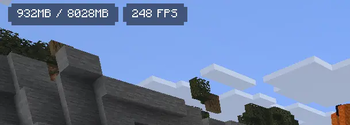

Info Overlay
🖥️ Displays your FPS and other information on the screen. Supports large customization and new versions of Minecraft.
[!NOTE] Migrating to 26.1 was a real struggle for me. I apologize for the long wait. I even had to cut functionality from the new update because the site moderators didn't like the use of harmless scripts. Several months have passed, and I've made significant changes to the project's source code. This may introduce bugs. Please report any issues in Issues.
Info Overlay update, redesign, and media widget ✅
-
Final rename to Info Overlay. The mod is no longer called FPS Overlay.
-
Major code refactoring and optimization. The codebase was restructured and cleaned up for better performance and future updates.
-
New overlay design with improved layout, spacing, and visuals.
- Added an option to switch back to the classic overlay style.
- Added an option to switch back to the classic overlay style.
-
Added a setting for vertical widget layout.
-
Localization updated and improved for multiple languages.
-
Migrated to a new configuration system (YACL).
- ⚠️ This system is experimental and may contain bugs.
Thank you for downloading this mod! Thanks to you, I have the motivation to keep working. You can always help with development, for example by helping with translation on Crowdin! 🎉
Full Changelog: https://github.com/iquldev/Info-Overlay/compare/1.9.1…2.0
-
- Mod configurations via ModMenu should work correctly again
- Simplified Chinese language has been corrected
- Portuguese language has been corrected
New placeholders, settings, and more ✅
- Added support for Minecraft 1.21.10 (The Copper Age). Versions below 1.21.6 will no longer receive updates with new features.
- New partially translated languages:
- Chinese (Simplified)
- Arabic (Saudi Arabia)
- Catalan (Spain)
- Czech
- Danish
- German
- Greek
- Spanish (Spain)
- Finnish
- French
- Italian
- Japanese
- Dutch
- Norwegian
- Polish
- Portuguese (Brazil)
- Portuguese (Portugal)
- Romanian
- Swedish
- Vietnamese
- Code optimization and restructuring performed.
- Added a setting that allows highlighting in red if the FPS drops below a certain value.

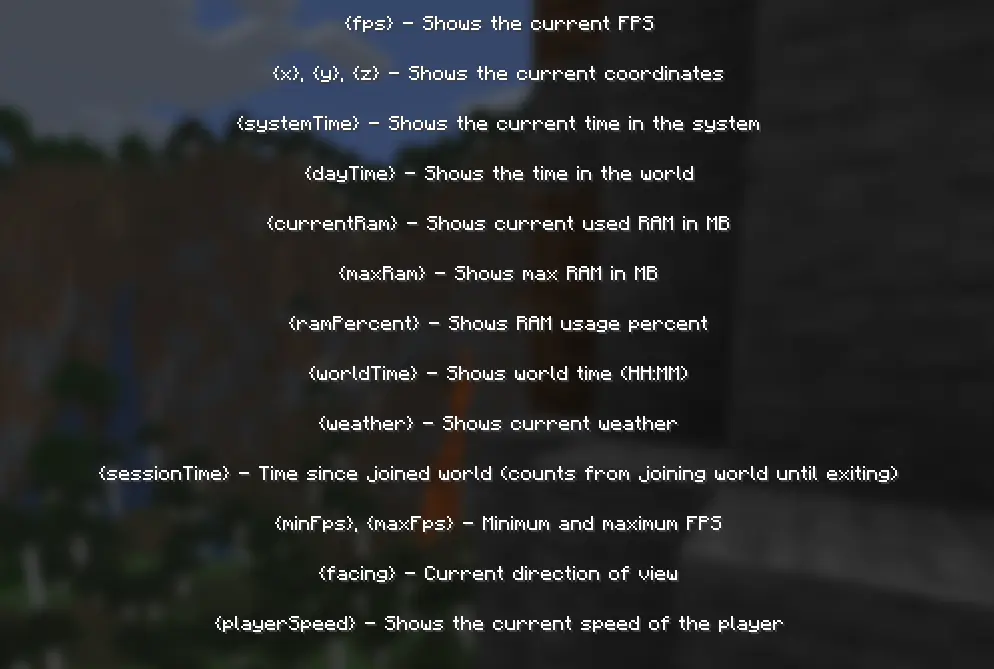
- New placeholders: {currentRam}, {maxRam}, {ramPercent}, {worldTime}, {weather}, {sessionTime}
Thank you for downloading this mod! Thanks to you, I have the motivation to keep working. You can always help with development, for example by helping with translation on Crowdin! 🎉
New placeholders, settings, and more ✅
- New partially translated languages:
- Chinese (Simplified)
- Arabic (Saudi Arabia)
- Catalan (Spain)
- Czech
- Danish
- German
- Greek
- Spanish (Spain)
- Finnish
- French
- Italian
- Japanese
- Dutch
- Norwegian
- Polish
- Portuguese (Brazil)
- Portuguese (Portugal)
- Romanian
- Swedish
- Vietnamese
- Code optimization and restructuring performed.
- Added a setting that allows highlighting in red if the FPS drops below a certain value.
- New placeholders: {currentRam}, {maxRam}, {ramPercent}, {worldTime}, {weather}, {sessionTime}
Thank you for downloading this mod! Thanks to you, I have the motivation to keep working. You can always help with development, for example by helping with translation on Crowdin! 🎉
- New partially translated languages:
- Fixes #3
- Support 1.21.6 (Chase the Skies)
UPD 01.07.2025 The mod works fine on 1.21.7, no update required
- Fixes #2
- Nothing
- Fixes #2
- Nothing
Нет описания изменений
Info Overlay 1.8
- ⚙️ Updated to version 1.21.5 (Spring to Life)
- ✨ [NEW] Dynamic Text
- ℹ️ Updated placeholders
- 🌐 Partial zh_tw localization. Help us on Crowdin!
- 🔃 Small corrections and improvements
FPS Overlay 1.7
- ✨ Updated overlay design
- ⚙️ Updated to 1.21.4 (The Garden Awakens)
FPS Overlay 1.7
- ✨ Updated overlay design
Idk update
- 🌍 Updated localization (ua, by)
- 🎨 Text color setting
- ⚙️ Code optimizations
Idk update
- 🌍 Updated localization (ua, by)
- 🎨 Text color setting
- ⚙️ Code optimizations
Custom text update
- Updated to 1.21.1
- Now you can set custom text to display. Supports placeholders such as {fps}, {minFps}, {maxFps}, {systemTime}, {x}, {y}, {z}.
Custom text update
- Updated to 1.21.1
- Now you can set custom text to display. Supports placeholders such as {fps}, {minFps}, {maxFps}, {systemTime}, {x}, {y}, {z}.
Сustomization update
- Fixed bug with localization for 1.20.
- Added settings to change the color and transparency of widgets. Each widget can be changed individually.
Сustomization update
- Fixed bug with localization for 1.20.
- Added settings to change the color and transparency of widgets. Each widget can be changed individually.
Positioning update
- Added settings for changing overlay position.
Positioning update
- Added settings for changing overlay position.
Hotkeys Update
- Added F1 hotkey that hides the overlay. The hotkey can be reassigned in the settings.