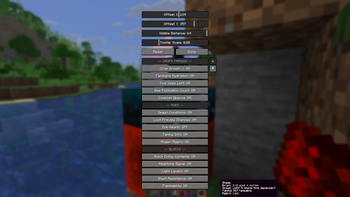


EnhancedTooltips 1.1.0
Drag your tooltip wherever you want
Placing the tooltip is no longer a guessing game with two number sliders. Open the settings screen and hit Set Position… — now you just drag the tooltip around and drop it where you like. It snaps to the nearest anchor (corners, edges, centre), so it stays put and looks right on any screen size or GUI scale.
Customize how the tooltip looks
A new Customize Look… button lets you restyle the tooltip box: pick the background, border, and text colours, set the background opacity, toggle the text shadow, and adjust the padding — all with a live preview.
Visible Distance now works for blocks too
Previously the distance slider only affected mob tooltips; block tooltips were stuck at vanilla reach. Now both honour your configured distance.
Now powered by CodxLib
EnhancedTooltips now runs on CodxLib, a small companion library shared across my mods. The common, behind-the-scenes parts (update notices and shared helpers) now live in one place, so EnhancedTooltips stays lightweight and improves alongside my other mods.
New required dependency
EnhancedTooltips now needs CodxLib installed alongside it — just like Fabric API. It's listed under Dependencies, so most launchers will install it for you automatically.
Your tooltip settings carry over.
EnhancedTooltips 1.1.0
Drag your tooltip wherever you want
Placing the tooltip is no longer a guessing game with two number sliders. Open the settings screen and hit Set Position… — now you just drag the tooltip around and drop it where you like. It snaps to the nearest anchor (corners, edges, centre), so it stays put and looks right on any screen size or GUI scale.
Customize how the tooltip looks
A new Customize Look… button lets you restyle the tooltip box: pick the background, border, and text colours, set the background opacity, toggle the text shadow, and adjust the padding — all with a live preview.
Visible Distance now works for blocks too
Previously the distance slider only affected mob tooltips; block tooltips were stuck at vanilla reach. Now both honour your configured distance.
Now powered by CodxLib
EnhancedTooltips now runs on CodxLib, a small companion library shared across my mods. The common, behind-the-scenes parts (update notices and shared helpers) now live in one place, so EnhancedTooltips stays lightweight and improves alongside my other mods.
New required dependency
EnhancedTooltips now needs CodxLib installed alongside it — just like Fabric API. It's listed under Dependencies, so most launchers will install it for you automatically.
Your tooltip settings carry over.
EnhancedTooltips 1.1.0
Drag your tooltip wherever you want
Placing the tooltip is no longer a guessing game with two number sliders. Open the settings screen and hit Set Position… — now you just drag the tooltip around and drop it where you like. It snaps to the nearest anchor (corners, edges, centre), so it stays put and looks right on any screen size or GUI scale.
Customize how the tooltip looks
A new Customize Look… button lets you restyle the tooltip box: pick the background, border, and text colours, set the background opacity, toggle the text shadow, and adjust the padding — all with a live preview.
Visible Distance now works for blocks too
Previously the distance slider only affected mob tooltips; block tooltips were stuck at vanilla reach. Now both honour your configured distance.
Now powered by CodxLib
EnhancedTooltips now runs on CodxLib, a small companion library shared across my mods. The common, behind-the-scenes parts (update notices and shared helpers) now live in one place, so EnhancedTooltips stays lightweight and improves alongside my other mods.
New required dependency
EnhancedTooltips now needs CodxLib installed alongside it — just like Fabric API. It's listed under Dependencies, so most launchers will install it for you automatically.
Your tooltip settings carry over.
Version 1!
Version 1!
Version 1!
