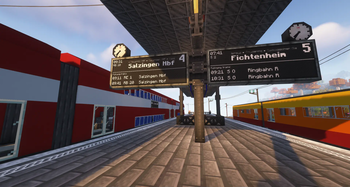

Create Railways Navigator
A Minecraft Create Mod addon that adds several new features related to train navigation, such as improved display boards, a navigator for searching routes, new schedule entries, and more.
2026-05-31
- Added: Option to prevent scale and pos reset on display link update #181
- Added:
%via:<custom delimiter>%and%trainN.via:<custom delimiter>%placeholder options to use custom delimiter #181 - Changed:
%title%(on-board) shows the schedule title/last stop only #181 - Changed: All wiki links now point to the new wiki https://wiki.mrjulsen.net/createrailwaysnavigator/
- Fixed: Crash when rich text is updated and rendered simultaneously #179
- Fixed: Leading comma in the
%via%placeholder #188 - Fixed: Delay approx text from the
%delay_time%placeholder #188 - Updated translations from Crowdin
2026-05-31
- Added: Option to prevent scale and pos reset on display link update #181
- Added:
%via:<custom delimiter>%and%trainN.via:<custom delimiter>%placeholder options to use custom delimiter #181 - Changed:
%title%(on-board) shows the schedule title/last stop only #181 - Changed: All wiki links now point to the new wiki https://wiki.mrjulsen.net/createrailwaysnavigator/
- Fixed: Crash when rich text is updated and rendered simultaneously #179
- Fixed: Leading comma in the
%via%placeholder #188 - Fixed: Delay approx text from the
%delay_time%placeholder #188 - Updated translations from Crowdin
2026-05-31
- Added: Option to prevent scale and pos reset on display link update #181
- Added:
%via:<custom delimiter>%and%trainN.via:<custom delimiter>%placeholder options to use custom delimiter #181 - Changed:
%title%(on-board) shows the schedule title/last stop only #181 - Changed: All wiki links now point to the new wiki https://wiki.mrjulsen.net/createrailwaysnavigator/
- Fixed: Crash when rich text is updated and rendered simultaneously #179
- Fixed: Leading comma in the
%via%placeholder #188 - Fixed: Delay approx text from the
%delay_time%placeholder #188 - Updated translations from Crowdin
2026-04-30
- Added: New placeholders for train, platform and elevator displays #156 #166 #170
- Fixed: Using wildcards only in Prioritized Destination Instructions crashes the world
- Fixed: Prioritized Destination Instruction does not work with wildcards
- Fixed: Crash when removing the train schedule
- Fixed: Rare crash in dev environment #171
- Fixed: Rare crash when trying to access config values while loading the game
- Updated translations from Crowdin
2026-04-30
- Added: New placeholders for train, platform and elevator displays #156 #166 #170
- Fixed: Using wildcards only in Prioritized Destination Instructions crashes the world
- Fixed: Prioritized Destination Instruction does not work with wildcards
- Fixed: Crash when removing the train schedule
- Fixed: Rare crash in dev environment #171
- Fixed: Rare crash when trying to access config values while loading the game
- Updated translations from Crowdin
2026-04-30
- Added: New placeholders for train, platform and elevator displays #156 #166 #170
- Fixed: Using wildcards only in Prioritized Destination Instructions crashes the world
- Fixed: Prioritized Destination Instruction does not work with wildcards
- Fixed: Crash when removing the train schedule
- Fixed: Rare crash in dev environment #171
- Fixed: Rare crash when trying to access config values while loading the game
- Updated translations from Crowdin
2026-03-14
- 1.21.1 Port
2026-02-20
- Added: Train Debug screen
- Added: The swap button has been added back to the navigation screen
- Added: Train Separation now allows to set a custom station filter
- Added: Displays now act as copycat blocks (except the sloped display)
- Added: New Option to configure whether displays should show only arrivals, departures, or both
- Fixed: Display data errors are spammed in the console, that a value is not present
- Fixed: The formatting of time values is incorrect sometimes
- Fixed: Items already added to a list or duplicates are not removed from autocompletion
- Fixed: Part of some windows is cut off
- Fixed: Number picker components do not render text shadow
- Fixed: The conversion of train separation time between real time and game time in the settings screen is not working correctly
- Fixed: Display text is flickering
- Fixed: Platform Focus Displays show the wrong platform if wildcards are used in the display link and a train changes the platform
- Fixed: Platform Focus Display shows wrong arrival time
- Fixed: Display Panels cannot be placed in the center of a block
- Fixed: Display Settings are not saved when edited on contraptions
- Fixed: Train carriage index is cut off on some displays
- Fixed: Trains show the wrong line, especially at terminus stations
- Fixed: Passenger information and Train destination displays show the wrong destination while waiting at the terminus
- Fixed: The buttons of the Advanced Display Settings Screen cannot be used
- Changed: Moved some config settings from the Client to the Common config
- Changed: Now using Create 6's new wildcard system
- Changed: Improved performance of the networking code and the GUI (especially the autocompletion popups)
- Changed: Trains on the displays are now sorted by their real departure time
- Changed: New option to display a train multiple times on a display (for each stop)
- Removed: Displays no longer automatically change their type, to avoid confusion
- Requires DragonLib 3.0.21
2026-02-20
- Added: Train Debug screen
- Added: The swap button has been added back to the navigation screen
- Added: Train Separation now allows to set a custom station filter
- Added: Displays now act as copycat blocks (except the sloped display)
- Added: New Option to configure whether displays should show only arrivals, departures, or both
- Fixed: Display data errors are spammed in the console, that a value is not present
- Fixed: The formatting of time values is incorrect sometimes
- Fixed: Items already added to a list or duplicates are not removed from autocompletion
- Fixed: Part of some windows is cut off
- Fixed: Number picker components do not render text shadow
- Fixed: The conversion of train separation time between real time and game time in the settings screen is not working correctly
- Fixed: Display text is flickering
- Fixed: Platform Focus Displays show the wrong platform if wildcards are used in the display link and a train changes the platform
- Fixed: Platform Focus Display shows wrong arrival time
- Fixed: Display Panels cannot be placed in the center of a block
- Fixed: Display Settings are not saved when edited on contraptions
- Fixed: Train carriage index is cut off on some displays
- Fixed: Trains show the wrong line, especially at terminus stations
- Fixed: Passenger information and Train destination displays show the wrong destination while waiting at the terminus
- Fixed: The buttons of the Advanced Display Settings Screen cannot be used
- Changed: Moved some config settings from the Client to the Common config
- Changed: Now using Create 6's new wildcard system
- Changed: Improved performance of the networking code and the GUI (especially the autocompletion popups)
- Changed: Trains on the displays are now sorted by their real departure time
- Changed: New option to display a train multiple times on a display (for each stop)
- Removed: Displays no longer automatically change their type, to avoid confusion
- Requires DragonLib 3.0.21
- Now using DragonLib 3
- Fixed: Fonts get corrupted when reloading resources while Advanced Displays are visible on the screen
- Fixed: Display content may render out of bounds
- Fixed: Some text components on displays may overlap
- Fixed: The GUI is displayed incorrectly while scrolling if the current version of Pantographs & Wires is installed
- Fixed: DragonLib's Networking System can be softlocked, preventing data exchange with the server
Currently unavailable
- Debug screen (Client only feature)
- Train Overview Screen
- Now using DragonLib 3
- Fixed: Fonts get corrupted when reloading resources while Advanced Displays are visible on the screen
- Fixed: Display content may render out of bounds
- Fixed: Some text components on displays may overlap
- Fixed: The GUI is displayed incorrectly while scrolling if the current version of Pantographs & Wires is installed
- Fixed: DragonLib's Networking System can be softlocked, preventing data exchange with the server
Currently unavailable
- Debug screen (Client only feature)
- Train Overview Screen
- Support for Create 6.0.7+
- Changed: Allow simple text as display targets for external display links data
- Fixed issues with Advanced Displays and external display link data
- Fixed crash while calculating median
- Updated Chinese (simplified), Japanese (community contributions)
⚠️ This version is only compatible with Create 6.0.7 or newer! Versions 6.0.0 - 6.0.6 are no longer supported! ⚠️ This is NOT the announced DragonLib 3 update, but only a minor compatibility update! That's why there are no new features or major bug fixes. The DragonLib 3 version of CRN is in development.
- Support for Create 6.0.7+
- Changed: Allow simple text as display targets for external display links data
- Fixed issues with Advanced Displays and external display link data
- Fixed crash while calculating median
- Updated Chinese (simplified), Japanese (community contributions)
⚠️ This version is only compatible with Create 6.0.7 or newer! Versions 6.0.0 - 6.0.6 are no longer supported! ⚠️ This is NOT the announced DragonLib 3 update, but only a minor compatibility update! That's why there are no new features or major bug fixes. The DragonLib 3 version of CRN is in development.
- Support for Create 6.0.7+
- Changed: Allow simple text as display targets for external display links data
- Fixed issues with Advanced Displays and external display link data
- Fixed crash while calculating median
- Updated Chinese (simplified), Japanese (community contributions)
⚠️ This version is only compatible with Create 6.0.7 or newer! Versions 6.0.0 - 6.0.6 are no longer supported! ⚠️ This is NOT the announced DragonLib 3 update, but only a minor compatibility update! That's why there are no new features or major bug fixes. The DragonLib 3 version of CRN is in development.
- Added: Displays can now be edited directly on trains without having to disassemble them
- ⚠️ Trains that were built with previous versions of CRN have to be reassembled for this feature to work!
- Added: New setting to deactivate the text "Do not board" on train displays
- Added: New setting to deactivate the time label on Platform Table Displays
- Added: New config option to change the refresh rate of displays
- Changed: Displays now update faster (every 50 ticks)
- Fixed: Rare crash when a new train line or train category is created
- Fixed: Trains never initialize when the same destination has been added several times in a row in the schedule
- Fixed: The Travel Companion cannot be removed if the navigator is not in the inventory
- Fixed: Server crash if invalid regex are used as train destinations
- Fixed: The heading label in Passenger Displays with Schedule is too narrow
- Fixed: The train name may extend beyond the border of some displays
- Fixed: "Include Start of Next Section" does not work in Schedules with just one section
- Fixed: No target station is displayed when the train is between the last and first station of the schedule, and there is only one Schedule Section with "Include Start of Next Section" being activated
- Added: Displays can now be edited directly on trains without having to disassemble them
- Added: Displays can now be edited directly on trains without having to disassemble them
- ⚠️ Trains that were built with previous versions of CRN have to be reassembled for this feature to work!
- Added: New setting to deactivate the text "Do not board" on train displays
- Added: New setting to deactivate the time label on Platform Table Displays
- Added: New config option to change the refresh rate of displays
- Changed: Displays now update faster (every 50 ticks)
- Fixed: Rare crash when a new train line or train category is created
- Fixed: Trains never initialize when the same destination has been added several times in a row in the schedule
- Fixed: The Travel Companion cannot be removed if the navigator is not in the inventory
- Fixed: Server crash if invalid regex are used as train destinations
- Fixed: The heading label in Passenger Displays with Schedule is too narrow
- Fixed: The train name may extend beyond the border of some displays
- Fixed: "Include Start of Next Section" does not work in Schedules with just one section
- Fixed: No target station is displayed when the train is between the last and first station of the schedule, and there is only one Schedule Section with "Include Start of Next Section" being activated
- Added: Displays can now be edited directly on trains without having to disassemble them
- Added: Displays can now be edited directly on trains without having to disassemble them
- ⚠️ Trains that were built with previous versions of CRN have to be reassembled for this feature to work!
- Added: New setting to deactivate the text "Do not board" on train displays
- Added: New setting to deactivate the time label on Platform Table Displays
- Added: New config option to change the refresh rate of displays
- Changed: Displays now update faster (every 50 ticks)
- Fixed: Rare crash when a new train line or train category is created
- Fixed: Trains never initialize when the same destination has been added several times in a row in the schedule
- Fixed: The Travel Companion cannot be removed if the navigator is not in the inventory
- Fixed: Server crash if invalid regex are used as train destinations
- Fixed: The heading label in Passenger Displays with Schedule is too narrow
- Fixed: The train name may extend beyond the border of some displays
- Fixed: "Include Start of Next Section" does not work in Schedules with just one section
- Fixed: No target station is displayed when the train is between the last and first station of the schedule, and there is only one Schedule Section with "Include Start of Next Section" being activated
- Added: Displays can now be edited directly on trains without having to disassemble them
- Added: Displays can now be edited directly on trains without having to disassemble them
- ⚠️ Trains that were built with previous versions of CRN have to be reassembled for this feature to work!
- Added: New setting to deactivate the text "Do not board" on train displays
- Added: New setting to deactivate the time label on Platform Table Displays
- Added: New config option to change the refresh rate of displays
- Changed: Displays now update faster (every 50 ticks)
- Fixed: Rare crash when a new train line or train category is created
- Fixed: Trains never initialize when the same destination has been added several times in a row in the schedule
- Fixed: The Travel Companion cannot be removed if the navigator is not in the inventory
- Fixed: Server crash if invalid regex are used as train destinations
- Fixed: The heading label in Passenger Displays with Schedule is too narrow
- Fixed: The train name may extend beyond the border of some displays
- Fixed: "Include Start of Next Section" does not work in Schedules with just one section
- Fixed: No target station is displayed when the train is between the last and first station of the schedule, and there is only one Schedule Section with "Include Start of Next Section" being activated
- Added: Displays can now be edited directly on trains without having to disassemble them
- Added: Displays can now be edited directly on trains without having to disassemble them
- ⚠️ Trains that were built with previous versions of CRN have to be reassembled for this feature to work!
- Added: New setting to deactivate the text "Do not board" on train displays
- Added: New setting to deactivate the time label on Platform Table Displays
- Added: New config option to change the refresh rate of displays
- Changed: Displays now update faster (every 50 ticks)
- Fixed: Rare crash when a new train line or train category is created
- Fixed: Trains never initialize when the same destination has been added several times in a row in the schedule
- Fixed: The Travel Companion cannot be removed if the navigator is not in the inventory
- Fixed: Server crash if invalid regex are used as train destinations
- Fixed: The heading label in Passenger Displays with Schedule is too narrow
- Fixed: The train name may extend beyond the border of some displays
- Fixed: "Include Start of Next Section" does not work in Schedules with just one section
- Fixed: No target station is displayed when the train is between the last and first station of the schedule, and there is only one Schedule Section with "Include Start of Next Section" being activated
- Added: Displays can now be edited directly on trains without having to disassemble them
- Added: Displays can now be edited directly on trains without having to disassemble them
- ⚠️ Trains that were built with previous versions of CRN have to be reassembled for this feature to work!
- Added: New setting to deactivate the text "Do not board" on train displays
- Added: New setting to deactivate the time label on Platform Table Displays
- Added: New config option to change the refresh rate of displays
- Changed: Displays now update faster (every 50 ticks)
- Fixed: Rare crash when a new train line or train category is created
- Fixed: Trains never initialize when the same destination has been added several times in a row in the schedule
- Fixed: The Travel Companion cannot be removed if the navigator is not in the inventory
- Fixed: Server crash if invalid regex are used as train destinations
- Fixed: The heading label in Passenger Displays with Schedule is too narrow
- Fixed: The train name may extend beyond the border of some displays
- Fixed: "Include Start of Next Section" does not work in Schedules with just one section
- Fixed: No target station is displayed when the train is between the last and first station of the schedule, and there is only one Schedule Section with "Include Start of Next Section" being activated
- Added: Displays can now be edited directly on trains without having to disassemble them
