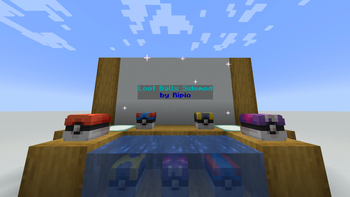

Cobbleloots: Loot Balls and More!
A side-mod for cobblemon that adds different ways to obtain items like in the original games.
Changes
- In-Game Creative GUI: Added a creative-mode GUI for editing loot ball properties (Type, Variant, Uses, Cooldowns, etc.) directly in the game.
- Documentation: Updated guide for using the Creative GUI under
docs/guides/how-to/creative.md. - Structure Filter Enhancement: The
structurefield in the loot ball source filter now supports multiple input formats (string ID, object ID, or array of IDs). - Localization: Updated English (
en_us), Brazilian Portuguese (pt_br) and Spanish (Ecuador) (es_ec) translations with new GUI strings. Spanish (Ecuador) contributed by wajo21x.
Technical Changes
- Networking Overhaul: Implemented cross-platform (Fabric/NeoForge) networking for loot ball updates and custom packet payloads.
- NeoForge Refactoring: Updated
CobblelootsNeoForgeto resolve@EventBusSubscriberdeprecations and correctly register payload handlers using NeoForge'sRegisterPayloadHandlersEvent.
Bug Fixes
- Fixed structure filter not working with non-tag inputs.
- Fixed biome filter not reading the
requiredfield.
Beta versions may contain bugs. Please report any issues you find on the Discord server.
Changes
- In-Game Creative GUI: Added a creative-mode GUI for editing loot ball properties (Type, Variant, Uses, Cooldowns, etc.) directly in the game.
- Documentation: Updated guide for using the Creative GUI under
docs/guides/how-to/creative.md. - Structure Filter Enhancement: The
structurefield in the loot ball source filter now supports multiple input formats (string ID, object ID, or array of IDs). - Localization: Updated English (
en_us), Brazilian Portuguese (pt_br) and Spanish (Ecuador) (es_ec) translations with new GUI strings. Spanish (Ecuador) contributed by wajo21x.
Technical Changes
- Networking Overhaul: Implemented cross-platform (Fabric/NeoForge) networking for loot ball updates and custom packet payloads.
- NeoForge Refactoring: Updated
CobblelootsNeoForgeto resolve@EventBusSubscriberdeprecations and correctly register payload handlers using NeoForge'sRegisterPayloadHandlersEvent.
Bug Fixes
- Fixed structure filter not working with non-tag inputs.
- Fixed biome filter not reading the
requiredfield.
Beta versions may contain bugs. Please report any issues you find on the Discord server.
Bug Fixes
- Fixed NeoForge dedicated server crash caused by client-only config screen registration (
IConfigScreenFactory) being loaded on the server side.
Beta versions may contain bugs. Please report any issues you find on the Discord server.
- Fixed NeoForge dedicated server crash caused by client-only config screen registration (
Bug Fixes
- Fixed NeoForge dedicated server crash caused by client-only config screen registration (
IConfigScreenFactory) being loaded on the server side.
Beta versions may contain bugs. Please report any issues you find on the Discord server.
- Fixed NeoForge dedicated server crash caused by client-only config screen registration (
Bug Fixes
- Fixed a NeoForge crash when another mod (e.g. Farming for Blockheads) also bundles MidnightLib, causing a split-package module resolution error.
Beta versions may contain bugs. Please report any issues you find on the Discord server.
Bug Fixes
- Fixed a NeoForge crash when another mod (e.g. Farming for Blockheads) also bundles MidnightLib, causing a split-package module resolution error.
Beta versions may contain bugs. Please report any issues you find on the Discord server.
Gameplay Changes
- Added Loot Ball Fishing:
- Implemented fishing as a new loot ball source.
- Players can now catch loot balls when fishing with Cobblemon Poké Rods.
- Different rods can catch different tiers of loot balls (e.g. Master Rod is required for Master Loot Balls).
- Using the Luck of the Sea enchantment increases the chance of finding a loot ball.
- Added configurable despawn delay for fished loot balls.
- Fished loot balls move towards the player (similar to items).
- Loot Ball Balance Overhaul: All loot tables and loot ball definitions were reworked to be more balanced.
- New tiers for loot balls were defined:
- Common: More frequent, with simpler loot tables.
- Uncommon: Less frequent, with more complex loot tables.
- Rare: Rare, with more valuable loot tables.
- Ultra Rare: Very rare, with the most valuable loot tables.
- Ball variants from Poké Ball were split into standalone files.
- Added 6 new loot balls; Lure, Dusk, Quick, Timer, Nest and Net.
- Common Loot Balls:
- Poké: Can now be found everywhere, spawns in all biomes and can be fished with any rod (or with a poké rod for higher chances).
- (NEW) Azure: Can now be found from generation and spawning sources in oceans, coasts and rivers. It can be fished with any rod in those biomes (or with an azure rod for higher chances).
- (NEW) Citrine: Can now be found from generation and spawning sources in deserts, badlands and savannas. It can be fished with any rod in those biomes (or with a citrine rod for higher chances).
- (NEW) Verdant: Can now be found from generation and spawning sources in forests and plains. It can be fished with any rod in those biomes (or with a verdant rod for higher chances).
- (NEW) Roseate: Can now be found from generation and spawning sources in floral and lush biomes. It can be fished with any rod in those biomes (or with a roseate rod for higher chances).
- (NEW) Slate: Can now be found from generation and spawning sources in caves and volcanic biomes. It can be fished with any rod in those biomes (or with a slate rod for higher chances).
- Premier: Can now be found from generation and spawning sources in mountains. It can be fished with any rod in those biomes (or with a premier rod for higher chances).
- Uncommon Loot Balls:
- Great: Can now be found everywhere, spawns in all biomes and can be fished with any rod (or with a great rod for higher chances).
- Dive: Can now be found from generation and spawning sources in oceans and deep oceans. It can be fished with any rod in those biomes (or with a dive rod for higher chances).
- Heal: Can now be found from generation and spawning sources everywhere in the overworld dimension. It can be fished with any rod in the overworld (or with a heal rod for higher chances).
- Safari: Can now be found from generation and spawning sources in savanna biomes. It can be fished with any rod in those biomes (or with a safari rod for higher chances).
- Pumpkin: Can now be found from generation and spawning sources in biomes defined in the pumpkin biome tag and in the nether dimension (It only spawns during night in the overworld biomes). It can be found only from october 1st to november 1st. It can be fished anywhere with any rod during the same date range.
- ✨: Can now be found from generation and spawning sources in biomes defined in the ✨ biome tag. It only spawns during day with "direct" sunlight (sky light level 7 or higher). It can be fished with any rod in those biomes.
- (NEW) Lure: Can be fished with any rod in deep ocean biomes (or with a lure rod for higher chances). It doesn't spawn naturally nor can be obtained from generation sources, as it is exclusively obtained from fishing.
- (NEW) Nest: Can be found from generation and spawning sources in forests and swamps. It can be fished with any rod in those biomes (or with a nest rod for higher chances).
- (NEW) Net: Can be found from generation and spawning sources in oceans, swamps and rivers. It can be fished with any rod in those biomes (or with a net rod for higher chances).
- (NEW) Quick: Can be found from generation and spawning sources in plains and sky biomes, and in the end dimension. It can be fished (only in the overworld) with any rod in those biomes (or with a quick rod for higher chances).
- (NEW) Timer: Can be found from generation and spawning sources in badlands biomes and in the nether dimension. It can be fished (only in the overworld) with any rod in those biomes (or with a timer rod for higher chances).
- Rare Loot Balls:
- Ultra: Can now be found everywhere, spawns in all biomes and can be fished with an ultra rod.
- Luxury: Can now be found everywhere in the end dimension from generation and spawning sources. It can't be fished.
- (NEW) Dusk: Can be found from generation sources in spooky and deep dark biomes. It can spawn in those biomes in dark places (low light level). It can be fished during night with any rod in those biomes (or with a dusk rod for higher chances).
- Ultra Rare Loot Balls:
- Master: Can now be found everywhere, spawns in all biomes and can be fished with a master rod.
- New tiers for loot balls were defined:
- Opening Effects: Added special effects when opening loot balls:
- Display the received item floating above the loot ball.
- Particle effects on open (customizable via config).
Technical Changes
- Configuration Overhaul: All configurations options were refactored to use a new configuration system.
- Implemented full in-game configuration support for Fabric via ModMenu and NeoForge via Mods menu.
- Server OPs can now edit the configuration in-game using
/midnightconfig cobbleloots <key> <value>. - On first launch with this version, old configuration values will be preserved and migrated to the new format.
- The old
cobbleloots.yamlfile will be renamed tocobbleloots.yaml.oldafter successful migration.
- The old
- Check the new Configuration docs for more information.
- Localization:
- Added full localization support for configuration keys (
en_us.json). - Added translation keys for new messages.
- Added Brazilian Portuguese (
pt_br.json) translation. Initial base keys contributed by PrincessStelllar via PR #21.
- Added full localization support for configuration keys (
- Dependencies:
- Switched internal configuration library to MidnightLib for better cross-platform support.
- Updated Biome Filters: Biome filters now accept:
- Biome keys:
"minecraft:swamp" - Biome tags:
"#cobblemon:is_swamp" - Biome dicts:
{"id": "#c:is_ocean", "required": false} - Lists: Mix of any of the above
- Biome keys:
- Updated Documentation: Updated the mod documentation.
- New and updated pages for all loot balls, showing general information, loot table and obtaining methods.
- Updated Reference page with updated biome tag information.
- Added a new Configuration page with updated information about the configuration system.
- Updated the mod guides and examples to reflect the new changes.
Bug Fixes
- Fixed a bug where disabled loot balls were not being disabled after a
/reloadcommand and only after a server restart. - Fixed a bug where reloading loot balls with
/reloadwould not refresh loot ball client data on existing entities.
Beta versions may contain bugs. Please report any issues you find on the Discord server.
- Added Loot Ball Fishing:
Gameplay Changes
- Added Loot Ball Fishing:
- Implemented fishing as a new loot ball source.
- Players can now catch loot balls when fishing with Cobblemon Poké Rods.
- Different rods can catch different tiers of loot balls (e.g. Master Rod is required for Master Loot Balls).
- Using the Luck of the Sea enchantment increases the chance of finding a loot ball.
- Added configurable despawn delay for fished loot balls.
- Fished loot balls move towards the player (similar to items).
- Loot Ball Balance Overhaul: All loot tables and loot ball definitions were reworked to be more balanced.
- New tiers for loot balls were defined:
- Common: More frequent, with simpler loot tables.
- Uncommon: Less frequent, with more complex loot tables.
- Rare: Rare, with more valuable loot tables.
- Ultra Rare: Very rare, with the most valuable loot tables.
- Ball variants from Poké Ball were split into standalone files.
- Added 6 new loot balls; Lure, Dusk, Quick, Timer, Nest and Net.
- Common Loot Balls:
- Poké: Can now be found everywhere, spawns in all biomes and can be fished with any rod (or with a poké rod for higher chances).
- (NEW) Azure: Can now be found from generation and spawning sources in oceans, coasts and rivers. It can be fished with any rod in those biomes (or with an azure rod for higher chances).
- (NEW) Citrine: Can now be found from generation and spawning sources in deserts, badlands and savannas. It can be fished with any rod in those biomes (or with a citrine rod for higher chances).
- (NEW) Verdant: Can now be found from generation and spawning sources in forests and plains. It can be fished with any rod in those biomes (or with a verdant rod for higher chances).
- (NEW) Roseate: Can now be found from generation and spawning sources in floral and lush biomes. It can be fished with any rod in those biomes (or with a roseate rod for higher chances).
- (NEW) Slate: Can now be found from generation and spawning sources in caves and volcanic biomes. It can be fished with any rod in those biomes (or with a slate rod for higher chances).
- Premier: Can now be found from generation and spawning sources in mountains. It can be fished with any rod in those biomes (or with a premier rod for higher chances).
- Uncommon Loot Balls:
- Great: Can now be found everywhere, spawns in all biomes and can be fished with any rod (or with a great rod for higher chances).
- Dive: Can now be found from generation and spawning sources in oceans and deep oceans. It can be fished with any rod in those biomes (or with a dive rod for higher chances).
- Heal: Can now be found from generation and spawning sources everywhere in the overworld dimension. It can be fished with any rod in the overworld (or with a heal rod for higher chances).
- Safari: Can now be found from generation and spawning sources in savanna biomes. It can be fished with any rod in those biomes (or with a safari rod for higher chances).
- Pumpkin: Can now be found from generation and spawning sources in biomes defined in the pumpkin biome tag and in the nether dimension (It only spawns during night in the overworld biomes). It can be found only from october 1st to november 1st. It can be fished anywhere with any rod during the same date range.
- ✨: Can now be found from generation and spawning sources in biomes defined in the ✨ biome tag. It only spawns during day with "direct" sunlight (sky light level 7 or higher). It can be fished with any rod in those biomes.
- (NEW) Lure: Can be fished with any rod in deep ocean biomes (or with a lure rod for higher chances). It doesn't spawn naturally nor can be obtained from generation sources, as it is exclusively obtained from fishing.
- (NEW) Nest: Can be found from generation and spawning sources in forests and swamps. It can be fished with any rod in those biomes (or with a nest rod for higher chances).
- (NEW) Net: Can be found from generation and spawning sources in oceans, swamps and rivers. It can be fished with any rod in those biomes (or with a net rod for higher chances).
- (NEW) Quick: Can be found from generation and spawning sources in plains and sky biomes, and in the end dimension. It can be fished (only in the overworld) with any rod in those biomes (or with a quick rod for higher chances).
- (NEW) Timer: Can be found from generation and spawning sources in badlands biomes and in the nether dimension. It can be fished (only in the overworld) with any rod in those biomes (or with a timer rod for higher chances).
- Rare Loot Balls:
- Ultra: Can now be found everywhere, spawns in all biomes and can be fished with an ultra rod.
- Luxury: Can now be found everywhere in the end dimension from generation and spawning sources. It can't be fished.
- (NEW) Dusk: Can be found from generation sources in spooky and deep dark biomes. It can spawn in those biomes in dark places (low light level). It can be fished during night with any rod in those biomes (or with a dusk rod for higher chances).
- Ultra Rare Loot Balls:
- Master: Can now be found everywhere, spawns in all biomes and can be fished with a master rod.
- New tiers for loot balls were defined:
- Opening Effects: Added special effects when opening loot balls:
- Display the received item floating above the loot ball.
- Particle effects on open (customizable via config).
Technical Changes
- Configuration Overhaul: All configurations options were refactored to use a new configuration system.
- Implemented full in-game configuration support for Fabric via ModMenu and NeoForge via Mods menu.
- Server OPs can now edit the configuration in-game using
/midnightconfig cobbleloots <key> <value>. - On first launch with this version, old configuration values will be preserved and migrated to the new format.
- The old
cobbleloots.yamlfile will be renamed tocobbleloots.yaml.oldafter successful migration.
- The old
- Check the new Configuration docs for more information.
- Localization:
- Added full localization support for configuration keys (
en_us.json). - Added translation keys for new messages.
- Added Brazilian Portuguese (
pt_br.json) translation. Initial base keys contributed by PrincessStelllar via PR #21.
- Added full localization support for configuration keys (
- Dependencies:
- Switched internal configuration library to MidnightLib for better cross-platform support.
- Updated Biome Filters: Biome filters now accept:
- Biome keys:
"minecraft:swamp" - Biome tags:
"#cobblemon:is_swamp" - Biome dicts:
{"id": "#c:is_ocean", "required": false} - Lists: Mix of any of the above
- Biome keys:
- Updated Documentation: Updated the mod documentation.
- New and updated pages for all loot balls, showing general information, loot table and obtaining methods.
- Updated Reference page with updated biome tag information.
- Added a new Configuration page with updated information about the configuration system.
- Updated the mod guides and examples to reflect the new changes.
Bug Fixes
- Fixed a bug where disabled loot balls were not being disabled after a
/reloadcommand and only after a server restart. - Fixed a bug where reloading loot balls with
/reloadwould not refresh loot ball client data on existing entities.
Beta versions may contain bugs. Please report any issues you find on the Discord server.
- Added Loot Ball Fishing:
- Updated the mod to be compatible with Cobblemon 1.7.
- Updated dependencies to the same versions used in the official Cobblemon 1.7 repository.
Alpha versions may contain bugs and unfinished features. Use them at your own risk. If you find any issues, please report them on the Discord server.
- Updated the mod to be compatible with Cobblemon 1.7.
- Updated the mod to be compatible with Cobblemon 1.7.
- Updated dependencies to the same versions used in the official Cobblemon 1.7 repository.
Alpha versions may contain bugs and unfinished features. Use them at your own risk. If you find any issues, please report them on the Discord server.
- Updated the mod to be compatible with Cobblemon 1.7.
Changes
- Added a new
datefilter to allow loot balls to spawn only during a specific date range.- Accepts
fromandtoparameters inMM-DDformat (e.g.,01-01for January 1st). Those are inclusive.
- Accepts
- Added a new seasonal Pumpkin Loot Ball for Halloween.
- Spawns from October 24th to November 2nd.
- Can be found in spooky biomes in the Overworld and also in the Nether.
- Contains exclusive Halloween-themed loot, including unique banners, candies, and other surprises.
- Updated documentation for loot balls to improve clarity and consistency.
- Updated the mod logo to a Halloween-themed version.
- Added a new configuration option to disable specific loot balls via the config file.
- This allows server admins to easily manage which loot balls are active without modifying data packs.
- The key for this config is
loot_ball.disabled.loot_balls, and it accepts a list of loot ball IDs or patterns (e.g.,cobbleloots:*to disable all CobbleLoots loot balls, orcobbleloots:loot_ball/poketo disable only the "poke" loot ball and its variants).
Alpha versions may contain bugs and unfinished features. Use them at your own risk. If you find any issues, please report them on the Discord server.
- Added a new
Changes
- Added a new
datefilter to allow loot balls to spawn only during a specific date range.- Accepts
fromandtoparameters inMM-DDformat (e.g.,01-01for January 1st). Those are inclusive.
- Accepts
- Added a new seasonal Pumpkin Loot Ball for Halloween.
- Spawns from October 24th to November 2nd.
- Can be found in spooky biomes in the Overworld and also in the Nether.
- Contains exclusive Halloween-themed loot, including unique banners, candies, and other surprises.
- Updated documentation for loot balls to improve clarity and consistency.
- Updated the mod logo to a Halloween-themed version.
- Added a new configuration option to disable specific loot balls via the config file.
- This allows server admins to easily manage which loot balls are active without modifying data packs.
- The key for this config is
loot_ball.disabled.loot_balls, and it accepts a list of loot ball IDs or patterns (e.g.,cobbleloots:*to disable all CobbleLoots loot balls, orcobbleloots:loot_ball/poketo disable only the "poke" loot ball and its variants).
Alpha versions may contain bugs and unfinished features. Use them at your own risk. If you find any issues, please report them on the Discord server.
- Added a new
Changes
- Updated the Creative Mode tab icon to use a Master Ball texture for better visual representation.
- Updated the default Loot Ball texture to use the Strange Ball texture when no specific texture is set for debugging purposes.
- If you encounter a Strange Ball, it indicates that the Loot Ball is not properly configured or has missing data.
- Added loot ball JSON definition for entity icon rendering in Xaero's Minimap.
- This allows the minimap to display loot balls with their respective textures, enhancing visibility and identification in-game. (Requires the player to enable the feature in Xaero's Minimap settings.)
- Added mod links for Discord, Modrinth, and CurseForge in the mod metadata for ModMenu integration.
Fixes
- Fixed an issue where the Loot Ball Item texture would not display correctly if the texture data was missing or invalid.
- Note that if the texture data is missing, the Loot Ball will now display the Strange Ball texture as a fallback. Be sure to configure your Loot Balls properly when using commands to obtain them.
REMEMBER: Alpha versions may contain bugs and unfinished features. Use them at your own risk. If you find any issues, please report them on the Discord server.
Changes
- Updated the Creative Mode tab icon to use a Master Ball texture for better visual representation.
- Updated the default Loot Ball texture to use the Strange Ball texture when no specific texture is set for debugging purposes.
- If you encounter a Strange Ball, it indicates that the Loot Ball is not properly configured or has missing data.
- Added loot ball JSON definition for entity icon rendering in Xaero's Minimap.
- This allows the minimap to display loot balls with their respective textures, enhancing visibility and identification in-game. (Requires the player to enable the feature in Xaero's Minimap settings.)
- Added mod links for Discord, Modrinth, and CurseForge in the mod metadata for ModMenu integration.
Fixes
- Fixed an issue where the Loot Ball Item texture would not display correctly if the texture data was missing or invalid.
- Note that if the texture data is missing, the Loot Ball will now display the Strange Ball texture as a fallback. Be sure to configure your Loot Balls properly when using commands to obtain them.
REMEMBER: Alpha versions may contain bugs and unfinished features. Use them at your own risk. If you find any issues, please report them on the Discord server.
Cobbleloots ALPHA-2.0.8
REMEMBER: Alpha versions may contain bugs and unfinished features. Use them at your own risk. If you find any issues, please report them on the Discord server.
Fixes
- Fixed a bug where the game would crash when trying to spawn a Loot Ball in a chunk with an invalid section index (like the void or above the world height limit).
Cobbleloots ALPHA-2.0.8
REMEMBER: Alpha versions may contain bugs and unfinished features. Use them at your own risk. If you find any issues, please report them on the Discord server.
Fixes
- Fixed a bug where the game would crash when trying to spawn a Loot Ball in a chunk with an invalid section index (like the void or above the world height limit).
Cobbleloots ALPHA-2.0.7
IMPORTANT: This update breaks compatibility with previous versions of the mod. You will need to update your data packs and configurations to match the new Loot Ball Data format.
REMEMBER: Alpha versions may contain bugs and unfinished features. Use them at your own risk. If you find any issues, please report them on the Discord server.
Changes
Loot Ball Changes
- Added the
✨ Loot Ball:- It has a cobbleloots exclusive ✨ texture.
- It gives
5XP when opened. - Loot table:
- 1 x ✨ Creeper Banner (Weight: 8)
- 16 x ✨ Fireworks (Weight: 8)
- 1 x Totem of Undying (Weight: 1)
- 1 x Exp. Candy XS (Weight: 1)
- 1 x Exp. Candy S (Weight: 1)
- 1 x Exp. Candy M (Weight: 1)
- Obtaining:
- Generation:
- Weight: 10
- Biomes: Can generate in mushroom fields, flower forests, meadows, sunflower plains, cherry groves, and warm ocean biomes.
- Spawning:
- Weight: 20
- Sky Light: 7-15
- Biomes: Same as generation.
- Generation:
- You can now place Loot Balls directly where you are looking at instead of placing them on a fixed position centered on the block you are looking at.
- Added the ability for Loot Balls to drop as decorative items in survival mode.
- When a loot ball has no remaining uses, you can destroy them in survival and the loot ball will drop as a decorative item.
- This change is currently work in progress, so expect some bugs.
- You can disable this behaviour in the config file.
- Changed
VariantNBT Tag type for Loot Balls toStringinstead ofInteger. It now represents a variant id instead of the position in the variants lists inside the Loot Ball definition JSON. - Added
PlayerTimerLoot Ball NBT Tag of typeLong.- It represents a value in
ticksthat the player must wait to reopen the Loot Ball. - A value of
0disables this behaviour. - A small value (like
1) indicates that the player can reopen the Loot Ball indefinitely.
- It represents a value in
- Added
XPLoot Ball NBT Tag of typeInteger.- It represents the amount of XP that the Loot Ball will give to the player when opened.
- The default values for Loot Balls are now configurable via the new
loot_ball.defaultsconfig section. Some default values may still be hardcoded, but most of them can now be changed in the config file. - Loot balls will now try to spawn on a solid block instead of midair, but they will still spawn midair if no solid block is found after a certain amount of attempts.
- Some default loot balls now have colours applied to their names to make them more distinguishable in the inventory.
- Updated Loot Ball definitions to use the new Loot Ball Data format, and some of the definitions have been changed to reflect the new data structure:
- Poké (and variants): Now gives
1XP when opened.- The definition serves as a example for data pack creators to create their own Loot Ball definitions. The values you see in the Poké Loot Ball definition are mostly the default values for all Loot Balls (some of exceptions are the
xporweightvalues).
- The definition serves as a example for data pack creators to create their own Loot Ball definitions. The values you see in the Poké Loot Ball definition are mostly the default values for all Loot Balls (some of exceptions are the
- Great: Now gives
3XP when opened. - Ultra: Now gives
10XP when opened. - Master:
- Now gives
50XP when opened. - Now it can spawn in all biomes with a weight of
1.
- Now gives
- Safari: Now gives
1XP when opened. - Luxury: Now gives
25XP when opened. - Dive:
- Now gives
5XP when opened. - Generation and Spawning:
- Now it only generates/spawn inside water
- Removed the below y-level 62 generation condition.
- It still generates/spawn in the Dive Loot Ball allowed biomes.
- Now gives
- Heal:
- Now gives
10XP when opened. - Generation and Spawning:
- Now it can generate and spawn in all overworld biomes.
- Reduced the weight to
10for all sources to make it rarer.
- Now gives
- Lure: Removed the
LureLoot Ball definition, as it was not used in the mod yet (until the fishing update).
- Poké (and variants): Now gives
- Opening a Loot Ball with a despawn timer will now extend the despawn timer during the time the player is opening it. This change is to prevent Loot Balls from despawning while the player is opening them, which could lead to losing the Loot Ball and its contents.
- Creative players can now middle-click Loot Balls to copy their data, allowing for easier use of Loot Balls in creative mode.
Loot Ball Data Rework
-
Reworked the Loot Ball Data format to be more flexible and easier to use.
-
The Loot Ball definition structure (
data/namespace/loot_ball/{name}.json) now contains:- (required)
name[Component]: The name of the Loot Ball, displayed in the inventory. It can be a simple string or a component with formatting. - (optional)
loot_table[ResourceLocation]: The loot table to use when opening the Loot Ball. - (optional)
texture[ResourceLocation]: The texture to use for the Loot Ball item. If not specified, the default texture will be used. - (optional)
sources[Map<String, List<SourceFilter>>]: A map of sources with filters to use for the Loot Ball.- (optional)
generation[List<SourceFilter>]: A list of filters for the Loot Ball to generate in the world. - (optional)
spawning[List<SourceFilter>]: A list of filters for the Loot Ball to spawn in the world.
- (optional)
- (optional)
variants[Map<String, VariantData>]: A map of variants for the Loot Ball. Each variant can have its ownname,texture, andloot_table. Each variant is identified by a uniqueid.- (optional)
{variant_id}[VariantData]: The data for the variant, where{variant_id}is a unique identifier for the variant.
- (optional)
- (required)
-
The Loot Ball definition structure now uses a new
SourceFilterformat, which allows for more flexible filtering of sources:- (optional)
weight[Integer]: The weight of the filter, used for random selection. Defaults to1. - (optional)
structure[Tag<Structure>]: A tag of structures that the filter applies to. If not specified, the filter passes for all structures. - (optional)
biome[Tag<Biome>]: A tag of biomes that the filter applies to. If not specified, the filter passes for all biomes. - (optional)
dimension[List<ResourceLocation>]: A list of dimensions that the filter applies to. If not specified, the filter passes for all dimensions. - (optional)
block[Map<String, Tag<Block>>]:- (optional)
spawn[Tag<Block>]: A tag of blocks that the filter applies to when checking the block the Loot Ball is spawned on. If not specified, the filter passes for all blocks. - (optional)
base[Tag<Block>]: A tag of blocks that the filter applies to when checking the base block of the Loot Ball. If not specified, the filter passes for all blocks.
- (optional)
- (optional)
fluid[Tag<Fluid>]: A tag of fluids that the filter applies to when checking the fluid the Loot Ball is spawned on. If not specified, the filter passes for all fluids. - (optional)
position[Map<String, MinMaxFilter>]:- (optional)
x[MinMaxFilter]: A filter for the x position of the Loot Ball. If not specified, the filter passes for all x positions. - (optional)
y[MinMaxFilter]: A filter for the y position of the Loot Ball. If not specified, the filter passes for all y positions. - (optional)
z[MinMaxFilter]: A filter for the z position of the Loot Ball. If not specified, the filter passes for all z positions.
- (optional)
- (optional) (exclusive to spawning filters)
light[Map<String, MinMaxFilter>]:- (optional)
block[MinMaxFilter]: A filter for the block light level of the Loot Ball. If not specified, the filter passes for all block light levels. - (optional)
sky[MinMaxFilter]: A filter for the sky light level of the Loot Ball. If not specified, the filter passes for all sky light levels.
- (optional)
- (optional)
time[Map<String, MinMaxFilter>]:- (optional)
value[MinMaxFilter]: A filter for the time of day in ticks when the Loot Ball can spawn. If not specified, the filter passes for all times. - (optional)
period[Integer]: The period of the time filter in ticks, which defines the modulus for the time value. If not specified, the filter does not apply a period.
- (optional)
- (optional)
weather[Map<String, Boolean>]:- (optional)
clear[Boolean]: Whether the filter passes when the weather is clear. Defaults totrue. - (optional)
rain[Boolean]: Whether the filter passes when it is raining. Defaults totrue. - (optional)
thunder[Boolean]: Whether the filter passes when it is thundering. Defaults totrue.
- (optional)
- (optional)
-
The Loot Ball definition structure now uses a new
MinMaxFilterformat, which allows for more flexible filtering of positions:- (optional)
min[Integer]: The minimum value for the filter. If not specified, the filter passes for all values. - (optional)
max[Integer]: The maximum value for the filter. If not specified, the filter passes for all values.
- (optional)
-
The Loot Ball definition structure now uses a new
VariantDataformat, which allows for more flexible variant data:- (optional)
name[Component]: The name of the variant, displayed in the inventory. If not specified, the parent name will be used. - (optional)
texture[ResourceLocation]: The texture to use for the variant item. If not specified, the parent texture will be used. - (optional)
loot_table[ResourceLocation]: The loot table to use when opening the variant Loot Ball. If not specified, the parent loot table will be used.
- (optional)
Creative Tab Changes
- Replaced all items in the Cobbleloots Creative Tab with:
Loot Balldefault item, without any specific data attached.Textured Loot Ballitems, which are the same as the default item but with a specific texture applied. All the cobblemon textures are now available as textured loot balls.
Config Changes
- Added new configs:
loot_ball.defaults.uses: Default amount of uses a Loot Ball has. Defaults to1.loot_ball.defaults.multiplier: Default loot multiplier for Loot Balls. Defaults to1.0.loot_ball.defaults.xp: Default XP amount for Loot Balls. Defaults to0.loot_ball.defaults.player_timer: Default player timer in ticks. Defaults to0.loot_ball.defaults.despawn_tick: Default despawn tick timer. Defaults to0.loot_ball.survival.drop.enabled: Enable Loot Balls to drop as decorative items in survival mode. Defaults totrue.loot_ball.survival.drop.automatic: Enable Loot Balls to drop automatically when they have no remaining uses. Defaults totrue.loot_ball.survival.destroy_looted: Enable Loot Balls to be destroyed in survival mode when looted. Defaults tofalse.loot_ball.disabled.dimensions.generation: A list of dimensions where Loot Balls will not generate in the world. Defaults to an empty list.loot_ball.disabled.dimensions.spawning: A list of dimensions where Loot Balls will not spawn in the world. Defaults to an empty list.loot_ball.disabled.dimensions.fishing: A list of dimensions where Loot Balls will not spawn when fishing. Defaults to an empty list.loot_ball.disabled.dimensions.archaeology: A list of dimensions where Loot Balls will not spawn when digging in archaeology sites. Defaults to an empty list.
- Removed configs:
loot_ball.xp.amount: This config was replaced by the newloot_ball.defaults.xpconfig.
Fixes
- Fixed a bug where wardens could target and attack loot balls; now wardens ignore loot balls as intended.
- Fixed loot balls not despawning when falling into the world void.
- Fixed loot balls not being killed using the
/killcommand. - Fixed a bug where, when a player in creative assigned an item to a loot ball, looting the loot ball caused the item to disappear from its inventory and prevented other players from claiming the loot.
Technical
- All codecs were reworked for the new loot ball data format.
- Optimized some internal game detections for loot ball entity targetting and damage.
- Add a limit to random chunk search to optimize loot ball generation.
- Removed internal block check for valid position when spawning a loot ball. This is replaced now by loot ball definition filters.
- Major rewrite of the loot ball code.
- Updated lang files.
- Updated some methods to better differentiate between client and server code.
- Added support for yaml lists in loot ball configs.
- Added the
Cobbleloots ALPHA-2.0.7
IMPORTANT: This update breaks compatibility with previous versions of the mod. You will need to update your data packs and configurations to match the new Loot Ball Data format.
REMEMBER: Alpha versions may contain bugs and unfinished features. Use them at your own risk. If you find any issues, please report them on the Discord server.
Changes
Loot Ball Changes
- Added the
✨ Loot Ball:- It has a cobbleloots exclusive ✨ texture.
- It gives
5XP when opened. - Loot table:
- 1 x ✨ Creeper Banner (Weight: 8)
- 16 x ✨ Fireworks (Weight: 8)
- 1 x Totem of Undying (Weight: 1)
- 1 x Exp. Candy XS (Weight: 1)
- 1 x Exp. Candy S (Weight: 1)
- 1 x Exp. Candy M (Weight: 1)
- Obtaining:
- Generation:
- Weight: 10
- Biomes: Can generate in mushroom fields, flower forests, meadows, sunflower plains, cherry groves, and warm ocean biomes.
- Spawning:
- Weight: 20
- Sky Light: 7-15
- Biomes: Same as generation.
- Generation:
- You can now place Loot Balls directly where you are looking at instead of placing them on a fixed position centered on the block you are looking at.
- Added the ability for Loot Balls to drop as decorative items in survival mode.
- When a loot ball has no remaining uses, you can destroy them in survival and the loot ball will drop as a decorative item.
- This change is currently work in progress, so expect some bugs.
- You can disable this behaviour in the config file.
- Changed
VariantNBT Tag type for Loot Balls toStringinstead ofInteger. It now represents a variant id instead of the position in the variants lists inside the Loot Ball definition JSON. - Added
PlayerTimerLoot Ball NBT Tag of typeLong.- It represents a value in
ticksthat the player must wait to reopen the Loot Ball. - A value of
0disables this behaviour. - A small value (like
1) indicates that the player can reopen the Loot Ball indefinitely.
- It represents a value in
- Added
XPLoot Ball NBT Tag of typeInteger.- It represents the amount of XP that the Loot Ball will give to the player when opened.
- The default values for Loot Balls are now configurable via the new
loot_ball.defaultsconfig section. Some default values may still be hardcoded, but most of them can now be changed in the config file. - Loot balls will now try to spawn on a solid block instead of midair, but they will still spawn midair if no solid block is found after a certain amount of attempts.
- Some default loot balls now have colours applied to their names to make them more distinguishable in the inventory.
- Updated Loot Ball definitions to use the new Loot Ball Data format, and some of the definitions have been changed to reflect the new data structure:
- Poké (and variants): Now gives
1XP when opened.- The definition serves as a example for data pack creators to create their own Loot Ball definitions. The values you see in the Poké Loot Ball definition are mostly the default values for all Loot Balls (some of exceptions are the
xporweightvalues).
- The definition serves as a example for data pack creators to create their own Loot Ball definitions. The values you see in the Poké Loot Ball definition are mostly the default values for all Loot Balls (some of exceptions are the
- Great: Now gives
3XP when opened. - Ultra: Now gives
10XP when opened. - Master:
- Now gives
50XP when opened. - Now it can spawn in all biomes with a weight of
1.
- Now gives
- Safari: Now gives
1XP when opened. - Luxury: Now gives
25XP when opened. - Dive:
- Now gives
5XP when opened. - Generation and Spawning:
- Now it only generates/spawn inside water
- Removed the below y-level 62 generation condition.
- It still generates/spawn in the Dive Loot Ball allowed biomes.
- Now gives
- Heal:
- Now gives
10XP when opened. - Generation and Spawning:
- Now it can generate and spawn in all overworld biomes.
- Reduced the weight to
10for all sources to make it rarer.
- Now gives
- Lure: Removed the
LureLoot Ball definition, as it was not used in the mod yet (until the fishing update).
- Poké (and variants): Now gives
- Opening a Loot Ball with a despawn timer will now extend the despawn timer during the time the player is opening it. This change is to prevent Loot Balls from despawning while the player is opening them, which could lead to losing the Loot Ball and its contents.
- Creative players can now middle-click Loot Balls to copy their data, allowing for easier use of Loot Balls in creative mode.
Loot Ball Data Rework
-
Reworked the Loot Ball Data format to be more flexible and easier to use.
-
The Loot Ball definition structure (
data/namespace/loot_ball/{name}.json) now contains:- (required)
name[Component]: The name of the Loot Ball, displayed in the inventory. It can be a simple string or a component with formatting. - (optional)
loot_table[ResourceLocation]: The loot table to use when opening the Loot Ball. - (optional)
texture[ResourceLocation]: The texture to use for the Loot Ball item. If not specified, the default texture will be used. - (optional)
sources[Map<String, List<SourceFilter>>]: A map of sources with filters to use for the Loot Ball.- (optional)
generation[List<SourceFilter>]: A list of filters for the Loot Ball to generate in the world. - (optional)
spawning[List<SourceFilter>]: A list of filters for the Loot Ball to spawn in the world.
- (optional)
- (optional)
variants[Map<String, VariantData>]: A map of variants for the Loot Ball. Each variant can have its ownname,texture, andloot_table. Each variant is identified by a uniqueid.- (optional)
{variant_id}[VariantData]: The data for the variant, where{variant_id}is a unique identifier for the variant.
- (optional)
- (required)
-
The Loot Ball definition structure now uses a new
SourceFilterformat, which allows for more flexible filtering of sources:- (optional)
weight[Integer]: The weight of the filter, used for random selection. Defaults to1. - (optional)
structure[Tag<Structure>]: A tag of structures that the filter applies to. If not specified, the filter passes for all structures. - (optional)
biome[Tag<Biome>]: A tag of biomes that the filter applies to. If not specified, the filter passes for all biomes. - (optional)
dimension[List<ResourceLocation>]: A list of dimensions that the filter applies to. If not specified, the filter passes for all dimensions. - (optional)
block[Map<String, Tag<Block>>]:- (optional)
spawn[Tag<Block>]: A tag of blocks that the filter applies to when checking the block the Loot Ball is spawned on. If not specified, the filter passes for all blocks. - (optional)
base[Tag<Block>]: A tag of blocks that the filter applies to when checking the base block of the Loot Ball. If not specified, the filter passes for all blocks.
- (optional)
- (optional)
fluid[Tag<Fluid>]: A tag of fluids that the filter applies to when checking the fluid the Loot Ball is spawned on. If not specified, the filter passes for all fluids. - (optional)
position[Map<String, MinMaxFilter>]:- (optional)
x[MinMaxFilter]: A filter for the x position of the Loot Ball. If not specified, the filter passes for all x positions. - (optional)
y[MinMaxFilter]: A filter for the y position of the Loot Ball. If not specified, the filter passes for all y positions. - (optional)
z[MinMaxFilter]: A filter for the z position of the Loot Ball. If not specified, the filter passes for all z positions.
- (optional)
- (optional) (exclusive to spawning filters)
light[Map<String, MinMaxFilter>]:- (optional)
block[MinMaxFilter]: A filter for the block light level of the Loot Ball. If not specified, the filter passes for all block light levels. - (optional)
sky[MinMaxFilter]: A filter for the sky light level of the Loot Ball. If not specified, the filter passes for all sky light levels.
- (optional)
- (optional)
time[Map<String, MinMaxFilter>]:- (optional)
value[MinMaxFilter]: A filter for the time of day in ticks when the Loot Ball can spawn. If not specified, the filter passes for all times. - (optional)
period[Integer]: The period of the time filter in ticks, which defines the modulus for the time value. If not specified, the filter does not apply a period.
- (optional)
- (optional)
weather[Map<String, Boolean>]:- (optional)
clear[Boolean]: Whether the filter passes when the weather is clear. Defaults totrue. - (optional)
rain[Boolean]: Whether the filter passes when it is raining. Defaults totrue. - (optional)
thunder[Boolean]: Whether the filter passes when it is thundering. Defaults totrue.
- (optional)
- (optional)
-
The Loot Ball definition structure now uses a new
MinMaxFilterformat, which allows for more flexible filtering of positions:- (optional)
min[Integer]: The minimum value for the filter. If not specified, the filter passes for all values. - (optional)
max[Integer]: The maximum value for the filter. If not specified, the filter passes for all values.
- (optional)
-
The Loot Ball definition structure now uses a new
VariantDataformat, which allows for more flexible variant data:- (optional)
name[Component]: The name of the variant, displayed in the inventory. If not specified, the parent name will be used. - (optional)
texture[ResourceLocation]: The texture to use for the variant item. If not specified, the parent texture will be used. - (optional)
loot_table[ResourceLocation]: The loot table to use when opening the variant Loot Ball. If not specified, the parent loot table will be used.
- (optional)
Creative Tab Changes
- Replaced all items in the Cobbleloots Creative Tab with:
Loot Balldefault item, without any specific data attached.Textured Loot Ballitems, which are the same as the default item but with a specific texture applied. All the cobblemon textures are now available as textured loot balls.
Config Changes
- Added new configs:
loot_ball.defaults.uses: Default amount of uses a Loot Ball has. Defaults to1.loot_ball.defaults.multiplier: Default loot multiplier for Loot Balls. Defaults to1.0.loot_ball.defaults.xp: Default XP amount for Loot Balls. Defaults to0.loot_ball.defaults.player_timer: Default player timer in ticks. Defaults to0.loot_ball.defaults.despawn_tick: Default despawn tick timer. Defaults to0.loot_ball.survival.drop.enabled: Enable Loot Balls to drop as decorative items in survival mode. Defaults totrue.loot_ball.survival.drop.automatic: Enable Loot Balls to drop automatically when they have no remaining uses. Defaults totrue.loot_ball.survival.destroy_looted: Enable Loot Balls to be destroyed in survival mode when looted. Defaults tofalse.loot_ball.disabled.dimensions.generation: A list of dimensions where Loot Balls will not generate in the world. Defaults to an empty list.loot_ball.disabled.dimensions.spawning: A list of dimensions where Loot Balls will not spawn in the world. Defaults to an empty list.loot_ball.disabled.dimensions.fishing: A list of dimensions where Loot Balls will not spawn when fishing. Defaults to an empty list.loot_ball.disabled.dimensions.archaeology: A list of dimensions where Loot Balls will not spawn when digging in archaeology sites. Defaults to an empty list.
- Removed configs:
loot_ball.xp.amount: This config was replaced by the newloot_ball.defaults.xpconfig.
Fixes
- Fixed a bug where wardens could target and attack loot balls; now wardens ignore loot balls as intended.
- Fixed loot balls not despawning when falling into the world void.
- Fixed loot balls not being killed using the
/killcommand. - Fixed a bug where, when a player in creative assigned an item to a loot ball, looting the loot ball caused the item to disappear from its inventory and prevented other players from claiming the loot.
Technical
- All codecs were reworked for the new loot ball data format.
- Optimized some internal game detections for loot ball entity targetting and damage.
- Add a limit to random chunk search to optimize loot ball generation.
- Removed internal block check for valid position when spawning a loot ball. This is replaced now by loot ball definition filters.
- Major rewrite of the loot ball code.
- Updated lang files.
- Updated some methods to better differentiate between client and server code.
- Added support for yaml lists in loot ball configs.
- Added the
Cobbleloots ALPHA-2.0.6
IMPORTANT: Alpha versions of the mod may contain bugs and unfinished features. Use them at your own risk. If you find any issues, please report them on the Discord server.
Changes
- Added new configurations:
loot_ball.xp.enabled: Whether to enable loot ball XP when a player opens a loot ball. Default:true.loot_ball.xp.amount: The amount of XP to give when a player opens a loot ball. Default:5.
- Changed configuration keys:
loot_ball.despawn.*configurations are now underloot_ball.spawning.despawn.*.
- Now, the boolean NBT tags for loot balls are always saved regardless of the value. This affects the
InvisibleandSparkstags. - Reduced the default configuration value for loot ball generation chance from
0.0625to0.0513.- This means that the chance for a chunk to generate a loot ball or more (with 2 attempts per chunk) is now
~10%instead of~12%.
- This means that the chance for a chunk to generate a loot ball or more (with 2 attempts per chunk) is now
- Updated loot balls weights:
- Heal:
25->20 - Great:
25->20 - Dive:
25->30
- Heal:
Fixes
- Fixed a bug where the loot ball despawn enabling/disabling configuration didn't work properly. The game would always use the default value of
trueregardless of the configuration. - Fixed a bug where the game would crash if the configurations were of the wrong type. Now the game will log an error message and use the default value instead.
- Fixed a bug where loot ball invisibility didn't work properly and were losing their tag on world reloads and generations.
- Fixed a bug where setting the loot ball uses to negative values (infinite uses) would not work properly, removing its contents and making it unusable. Now, negative values effectively make the loot ball infinite.
- Fixed a bug where loot balls would show a name tag when the language keys were different from default values. Now, it will only render its tag if a custom name is set with NBT.
- Added new configurations:
Cobbleloots ALPHA-2.0.6
IMPORTANT: Alpha versions of the mod may contain bugs and unfinished features. Use them at your own risk. If you find any issues, please report them on the Discord server.
Changes
- Added new configurations:
loot_ball.xp.enabled: Whether to enable loot ball XP when a player opens a loot ball. Default:true.loot_ball.xp.amount: The amount of XP to give when a player opens a loot ball. Default:5.
- Changed configuration keys:
loot_ball.despawn.*configurations are now underloot_ball.spawning.despawn.*.
- Now, the boolean NBT tags for loot balls are always saved regardless of the value. This affects the
InvisibleandSparkstags. - Reduced the default configuration value for loot ball generation chance from
0.0625to0.0513.- This means that the chance for a chunk to generate a loot ball or more (with 2 attempts per chunk) is now
~10%instead of~12%.
- This means that the chance for a chunk to generate a loot ball or more (with 2 attempts per chunk) is now
- Updated loot balls weights:
- Heal:
25->20 - Great:
25->20 - Dive:
25->30
- Heal:
Fixes
- Fixed a bug where the loot ball despawn enabling/disabling configuration didn't work properly. The game would always use the default value of
trueregardless of the configuration. - Fixed a bug where the game would crash if the configurations were of the wrong type. Now the game will log an error message and use the default value instead.
- Fixed a bug where loot ball invisibility didn't work properly and were losing their tag on world reloads and generations.
- Fixed a bug where setting the loot ball uses to negative values (infinite uses) would not work properly, removing its contents and making it unusable. Now, negative values effectively make the loot ball infinite.
- Fixed a bug where loot balls would show a name tag when the language keys were different from default values. Now, it will only render its tag if a custom name is set with NBT.
- Added new configurations:
