
Biome Replacer
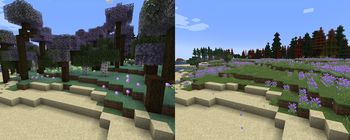
A quick way to get rid of a biome. Useful for tweaking datapack-based generators (like Terralith) that don't have a convenient configuration
3.9M
333
- Unbroke the mod on Neoforge 1.21.11
- Added support for replacing biomes from Blueprint-based mods
- Added per-dimension overrides
- Adding a header with dimension ID, like
[minecraft:overworld], will make following rules applied only to that. This way, you can have different rules per dimension.
- Adding a header with dimension ID, like
- If there are any issues with your configuration, you will now see a warning when loading into the world
- To prevent world corruption, using marker biomes from TerraBlender and Blueprint in rules is no longer possible
- Added support for replacing biomes from Blueprint-based mods
- Added per-dimension overrides
- Adding a header with dimension ID, like
[minecraft:overworld], will make following rules applied only to that. This way, you can have different rules per dimension.
- Adding a header with dimension ID, like
- If there are any issues with your configuration, you will now see a warning when loading into the world
- To prevent world corruption, using marker biomes from TerraBlender and Blueprint in rules is no longer possible
- Added support for replacing biomes from Blueprint-based mods
- Added per-dimension overrides
- Adding a header with dimension ID, like
[minecraft:overworld], will make following rules applied only to that. This way, you can have different rules per dimension.
- Adding a header with dimension ID, like
- If there are any issues with your configuration, you will now see a warning when loading into the world
- To prevent world corruption, using marker biomes from TerraBlender and Blueprint in rules is no longer possible
- Added support for replacing biomes from Blueprint-based mods
- Added per-dimension overrides
- Adding a header with dimension ID, like
[minecraft:overworld], will make following rules applied only to that. This way, you can have different rules per dimension.
- Adding a header with dimension ID, like
- If there are any issues with your configuration, you will now see a warning when loading into the world
- To prevent world corruption, using marker biomes from TerraBlender and Blueprint in rules is no longer possible
- Added support for replacing biomes from Blueprint-based mods
- Added per-dimension overrides
- Adding a header with dimension ID, like
[minecraft:overworld], will make following rules applied only to that. This way, you can have different rules per dimension.
- Adding a header with dimension ID, like
- If there are any issues with your configuration, you will now see a warning when loading into the world
- To prevent world corruption, using marker biomes from TerraBlender and Blueprint in rules is no longer possible
- Added support for replacing biomes from Blueprint-based mods
- Added per-dimension overrides
- Adding a header with dimension ID, like
[minecraft:overworld], will make following rules applied only to that. This way, you can have different rules per dimension.
- Adding a header with dimension ID, like
- If there are any issues with your configuration, you will now see a warning when loading into the world
- To prevent world corruption, using marker biomes from TerraBlender and Blueprint in rules is no longer possible
- Added support for replacing biomes from Blueprint-based mods
- Added per-dimension overrides
- Adding a header with dimension ID, like
[minecraft:overworld], will make following rules applied only to that. This way, you can have different rules per dimension.
- Adding a header with dimension ID, like
- If there are any issues with your configuration, you will now see a warning when loading into the world
- To prevent world corruption, using marker biomes from TerraBlender and Blueprint in rules is no longer possible
- Added support for replacing biomes from Blueprint-based mods
- Added per-dimension overrides
- Adding a header with dimension ID, like
[minecraft:overworld], will make following rules applied only to that. This way, you can have different rules per dimension.
- Adding a header with dimension ID, like
- If there are any issues with your configuration, you will now see a warning when loading into the world
- To prevent world corruption, using marker biomes from TerraBlender and Blueprint in rules is no longer possible
- Added support for replacing biomes from Blueprint-based mods
- Added per-dimension overrides
- Adding a header with dimension ID, like
[minecraft:overworld], will make following rules applied only to that. This way, you can have different rules per dimension.
- Adding a header with dimension ID, like
- If there are any issues with your configuration, you will now see a warning when loading into the world
- To prevent world corruption, using marker biomes from TerraBlender and Blueprint in rules is no longer possible
- Fixed compatibility issue with some TerraBlender-based mods (vanilla biomes weren't always replaced)
- As a side effect, we now have full TerraBlender support. It's now possible to replace or remove modded biomes added with it.
- You should still use mod configs whenever possible, but is now an option of you really want it
- Removed chance-based biome replacement, since it was causing problems
- This feature might come back in the future, but I make no promises
- Fixed missing logo on Forge
- Ported to 1.19.3
- Fixed compatibility issue with some TerraBlender-based mods (vanilla biomes weren't always replaced)
- As a side effect, we now have full TerraBlender support. It's now possible to replace or remove modded biomes added with it.
- You should still use mod configs whenever possible, but is now an option of you really want it
- Removed chance-based biome replacement, since it was causing problems
- This feature might come back in the future, but I make no promises
- Fixed missing logo on Forge
- Ported to 1.19.3
- Fixed compatibility issue with some TerraBlender-based mods (vanilla biomes weren't always replaced)
- As a side effect, we now have full TerraBlender support. It's now possible to replace or remove modded biomes added with it.
- You should still use mod configs whenever possible, but is now an option of you really want it
- Removed chance-based biome replacement, since it was causing problems
- This feature might come back in the future, but I make no promises
- Fixed missing logo on Forge
- Ported to 1.19.3
- Fixed compatibility issue with some TerraBlender-based mods (vanilla biomes weren't always replaced)
- As a side effect, we now have full TerraBlender support. It's now possible to replace or remove modded biomes added with it.
- You should still use mod configs whenever possible, but is now an option of you really want it
- Removed chance-based biome replacement, since it was causing problems
- This feature might come back in the future, but I make no promises
- Fixed missing logo on Forge
- Ported to 1.19.3
- Fixed compatibility issue with some TerraBlender-based mods (vanilla biomes weren't always replaced)
- As a side effect, we now have full TerraBlender support. It's now possible to replace or remove modded biomes added with it.
- You should still use mod configs whenever possible, but is now an option of you really want it
- Removed chance-based biome replacement, since it was causing problems
- This feature might come back in the future, but I make no promises
- Fixed missing logo on Forge
- Ported to 1.19.3
- Fixed compatibility issue with some TerraBlender-based mods (vanilla biomes weren't always replaced)
- As a side effect, we now have full TerraBlender support. It's now possible to replace or remove modded biomes added with it.
- You should still use mod configs whenever possible, but is now an option of you really want it
- Removed chance-based biome replacement, since it was causing problems
- This feature might come back in the future, but I make no promises
- Fixed missing logo on Forge
- Ported to 1.19.3
- Fixed compatibility issue with some TerraBlender-based mods (vanilla biomes weren't always replaced)
- As a side effect, we now have full TerraBlender support. It's now possible to replace or remove modded biomes added with it.
- You should still use mod configs whenever possible, but is now an option of you really want it
- Removed chance-based biome replacement, since it was causing problems
- This feature might come back in the future, but I make no promises
- Fixed missing logo on Forge
- Ported to 1.19.3
- Fixed compatibility issue with some TerraBlender-based mods (vanilla biomes weren't always replaced)
- As a side effect, we now have full TerraBlender support. It's now possible to replace or remove modded biomes added with it.
- You should still use mod configs whenever possible, but is now an option of you really want it
- Removed chance-based biome replacement, since it was causing problems
- This feature might come back in the future, but I make no promises
- Fixed missing logo on Forge
- Ported to 1.19.3
- Fixed compatibility issue with some TerraBlender-based mods (vanilla biomes weren't always replaced)
- As a side effect, we now have full TerraBlender support. It's now possible to replace or remove modded biomes added with it.
- You should still use mod configs whenever possible, but is now an option of you really want it
- Removed chance-based biome replacement, since it was causing problems
- This feature might come back in the future, but I make no promises
- Fixed missing logo on Forge
- Ported to 1.19.3
Biome replacer 2.0 - the Omniversion Update
- Now supports both Fabric and Neoforge/Forge, across every* version since 1.18.2! From now on, new mod releases will be available for all of them at the same time.
- New logo and banner, made by LegendarySpy
- Experimental feature: remove biomes with a random chance.
- Fabric: Removed Fabric API dependency (it wasn't used anyway)
* 1.19.3 has been skipped, for now
1
Совместимость
Ссылки


Сведения
Лицензия:
Опубликован:2 года назад
Обновлён:5 месяцев назад
ID проекта: