Fixed
- Config saving issue
Fixes
- Config saving issue
Changed
- Moved to 1.21.4
Added
- Chinese translation (@suoyukii)
Fixes
- Some audio files are not playing.
- Crash with Visual Overhaul when opening the audio cutter.
- Occasional crash when playing the sound, I have no idea what causes it, but it's there.
Internal changes
This functionality is not accessible directly in the mod yet, but can be changed in
.minecraft/config/soundboard.json.Cobalt access
Cobalt is the service used by Soundboard to download audio files from YouTube and other platforms. Unfortunately, due to abuse the API is not going to be public for long. This update brings initial configuration for accessing custom cobalt instances.
cobalt_api_endpoint- Base URL or IP for the cobalt instance.cobalt_api_version- Must beV7orV10. Describes the method to parse cobalt responses. The main instance only supports V7 for public requests. If you're running a custom instance, change it to V10.cobalt_api_token- Token for accessing the specified cobalt instance.
Audio providers
If you're having audio playback issues, try changing
audio_providerproperty toARRAY.The rest
If you opened this file, you may notice some other fields. These are not fully implemented and may have bugs, but who am I to stop you.
Fixes
- Fixed audio downloader crash
Fixes
- Translations not being available
Changes
- Added 1.21.1 as a compatible version
New features
Audio downloader!
Powered by cobalt, Soundboard just got a new menu for converting video to sound and saving it directly to the soundboard.

Favourites indexing and keybinds
The sound settings widget now has a field for the favourite index.
-1 inserts at the end, 0 at the start and so on for values in between. This allows you to make your top category more organized, especially for the next feature.Favourite sounds, or at least the first 10, can now be played with a keybind.
By default, holdingOand pressing one of the number keys will play the sound at that position. This also works with numpad keys and fyi key0will play the 10th sound.Changes
Soundpack updates (beta)
Resourcepack provided sounds can now have a
.propertiesfile, which accepts the following fields:# Start offset in seconds start = 1.22 # End of the audio, **counting from 0, not the 'start' property** end = 3.45 # Integer 0-100, any other value will be capped in that range volume = 69This file must be in the same directory as the sound and have the same name up to the
.wavpart.Fixes
- Fixed
Missing group griderror - Fixed sounds in subdirectories displaying with the directory name
- Fixed
Changes
- Sound browser buttons are no longer disabled if the voice chat is muted.
- Waveform now scales with the volume
Woah new update in less than a day
This fixes a bug in 0.4, where sounds would play for half the length.
It also comes with a new feature: favourite sounds.

Resource pack sounds (AKA sound packs)
This update allows packaging sounds as resource packs to share them with other players.
In your resource pack add
.wavfiles inassets/<namespace>/soundboard.
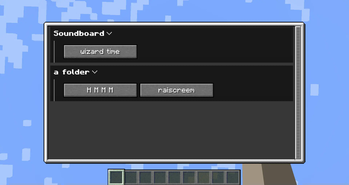
You can create any subdirectories inside to organize files or create other namespaces to override other sounds. Created subdirectories will form collapsible groups in the soundboard menu.By default, provided sounds won't look pretty. You need to provide a translation key for them.
Translations are stored inassets/<namespace>/lang. The default language isen_us.json.Category names are prefixed with
soundboard.dir.<namespace>.
For example, if you have a file inassets/mysoundpack/soundboard/scary/ghost_boo.wav, you'll have the following translation file:{ "soundboard.dir.mysoundpack": "My first sound pack!", "soundboard.dir.mysoundpack.scary": "Spooky sounds", "soundboard.file.mysoundpack.scary.ghost_boo": "Very scary ghost sound" }You can see the example sound pack in the Soundboard repository.
Translation files also support OwO-lib rich translationsTranslatable local sounds
You still can put
.wavfiles in.minecraft/config/soundboard, but this update allows you to customize their appearance.To provide a sound name, put a
<filename>.propertiesin its directory. For the category name put a.propertiesfile inside it.Property files follow the Java properties format, but only the
titlefield matters.For example, if you have the sound
.minecraft/config/soundboard/scary/ghost_boo.wav, you use these files:# .minecraft/config/soundboard/scary/.properties title=Spooky sounds# .minecraft/config/soundboard/scary/ghost_boo.properties title=Very scary ghost soundAudio editor
Ctrl-click on any sound to bring up the editor:

The audio editor allows you to cut the duration of the sound and modify the volume. You can also use play button in the corner to play it locally. (Others won't hear it, unless you have bad noise suppression)
The audio editor doesn't modify the original file and saves changes when closed, so you can bring it up again to adjust the values.
This update splits the mod into 2 addons - for Simple Voice Chat and Plasmo Voice, as well as a push to 1.21.
Not much in terms of functionality, but there has been some groundwork for future updates.Changes
- Added a keybind to stop sound playback (default U (there really are very few free keys...)).
Fixes
- In-browser keybinds sometimes not working.
Changes
- Default soundboard keybind is now J, in order to not conflict with Simple Voice Chat's group keybind.
- Soundboard now saves directories that were collapsed last time the screen was open.
- Soundboard screen can now be closed with the same keybind it's opened with.
Initial release
