
EzAuction
Menu-first marketplace with listings, buy orders, and async safety nets
2.1K
3

Список изменений
Added
- Live auction overhaul — complete rewrite of the live auction engine with new interactive features:
/bidcommand (alias/livebid) — dedicated command for all live auction interactions: place bids, join/leave sessions, and manage preferences. Bids can also be placed by clicking the suggestion in chat.- Clickable bid messages — the bid announcement in chat includes a clickable link that auto-fills
/bid <next-minimum>for one-click bidding. - Item hover previews — the item name in chat announcements shows enchantments, potion effects, and shulker box contents on hover.
- EzCountdown integration (optional soft-dependency) — configurable countdown display per-player via
ACTION_BAR,BOSS_BAR,TITLE,SCOREBOARD, orCHAT. Defaults to chat-only reminders when EzCountdown is absent or disabled. - Per-player notification preferences — players toggle notifications with
/bid notify [on|off]and choose display types with/bid notify display <types…>. Preferences persist across sessions (stored inlive-preferences.ymlor the MySQL table{prefix}live_player_preferences). - Live auction picker GUI —
/liveauctionopens a 54-slot inventory when multiple auctions are running, letting players select which one to join. - Opt-in chat filter — when
chat-filter-feature-enabled: true, players can run/bid mutechat onto suppress non-auction chat while in an active session. - Bidding configuration —
minimum-bid-increment-percentandminimum-bid-increment-fixedinauction.ymlcontrol the minimum raise required per bid. - Five new Bukkit events:
LiveAuctionStartedEvent(cancellable),LiveAuctionBidPlacedEvent(cancellable),LiveAuctionEndedEvent,LiveAuctionPlayerJoinedEvent,LiveAuctionPlayerLeftEvent. - New permissions:
ezauction.bid(default: true),ezauction.auction.live.notify(default: true).

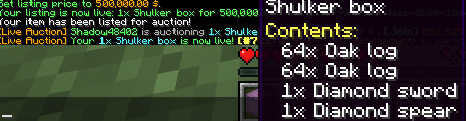

- Live auction seller management — sellers can enter and manage the live queue directly from the GUI or commands:
- Sell button in the Live Auction GUI — a lit sell button (slot 44) appears in the live browser for players with
ezauction.auction.live.sell; clicking it opens the sell menu pre-configured for the live queue. A grey button is shown to players without the permission. /liveauction sell— command shortcut to open the live sell menu without navigating to the GUI first.- Queue position feedback — on enqueue, the seller receives a chat confirmation with their position (e.g. "Your Diamond Sword has been added to the live queue at position #2"). If the queue is disabled the auction starts immediately and a separate instant-start message is shown instead.
- Cancel button in the Live Auction GUI — a cancel button (slot 37) appears only while the viewer has a queued entry; clicking it dequeues the item and refunds the deposit.
/liveauction cancel— removes the sender's own item from the live queue and refunds the deposit./liveauction cancel <id>(admin) — force-cancels an active live auction by ID, refunds all bidders, and returns the item to the seller.- Duplicate-entry guard — players who already have an item queued receive an
already-queuedmessage and cannot enqueue a second entry until the first is sold or cancelled. - New permissions:
ezauction.auction.live.sell(default: true),ezauction.auction.live.admin(default: op).
- Sell button in the Live Auction GUI — a lit sell button (slot 44) appears in the live browser for players with
Fixed
- JaCoCo Java 25 compatibility — upgraded
jacoco-maven-pluginfrom0.8.12to0.8.13to resolveUnsupported class file major version 69during test instrumentation on JDK 25. - Live auction first-bid minimum — the first bid on a live auction now only requires meeting the starting price. Previously, the minimum bid increment (percent and fixed) was incorrectly applied before any bid existed, making the starting price unreachable.
- Empty chat input bids the minimum — during the custom-bid chat prompt, pressing Enter with no input now automatically places a bid at the minimum amount instead of cancelling or erroring.
- Claim GUI —
/auction claimand the Claims button in the browser now open a dedicated 54-slot inventory instead of a bare command response. The GUI shows each pending return item with its expiry date in the lore, a Claim All button (slot 49), and a Back button (slot 45) that returns to the auction browser. - Configurable claim expiry — pending return items now carry an expiry timestamp. New
claim.expiry-dayskey inauction.yml(default7). The expiry is shown in the item lore inside the Claim GUI and resets whenever a new item is stored for the player. - Live Auctions shortcut in the browser — a Live Auctions beacon button (slot 47) has been added to the main auction browser GUI. Clicking it opens the live auction picker directly, without needing to type
/liveauction.
Метаданные
Канал релиза
Release
Номер версии
2.3.0
Загрузчики
BukkitPaperSpigot
Версии игры
1.21–26.1.2
Загрузок
13
Дата публикации
2 нед. назад
