
Nek's Command Maker (Server Edition)
A server-side only command maker that lets you add aliases to commands with custom arguments with a GUI.

Nek's Command Maker (Server Edition) 3.2.0
Список изменений
Command Maker v3.2.0 Changelog
Function Manager GUI overhaul, 88 downloadable functions, update checker, fully server-side, and more.
Release Summary
Version 3.2.0 brings a major GUI overhaul, expands the function library from 37 to 88 downloadable functions, adds an update checker, and makes the mod fully server-side — clients no longer need the mod installed. The GUI now uses a vanilla chest container so any client can use it.
New Features
- Function Manager GUI overhaul: Items now show descriptions on hover via lore tooltips. Each downloadable function has a custom icon matching its category.
- Delete Aliases tab: New 4th tab in the GUI for managing aliases. Select an alias and confirm deletion with the redstone block button — no more accidental deletions.
- Confirm button: Destructive actions (deleting aliases) now require a two-step confirmation. Select the alias, then click the redstone block to confirm.
- Update checker: The mod now automatically checks
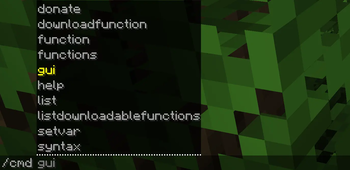
currentversion.txton startup. If a newer version is available, a green message appears at the top of command output telling you to update. /cmd helpcommand: New command listing all 14/cmdsubcommands with descriptions of what each one does.- 88 downloadable functions: Expanded from 37 to 88 functions. New categories: Adventure & RPG, Redstone & Machinery, Farming & Nature, plus many new Mini-Games, Combat, Building, Visual, Chaos, and Utility functions.
- Function icons: Each function in the catalog now has a custom Minecraft item as its icon, chosen to match its theme.
- Minecraft 26.1 support: Full server-1.22 module supporting the latest Minecraft version.
Improvements
- Fully server-side: The mod now only needs to be installed on the server. The GUI uses vanilla Minecraft chest rendering so any client (vanilla, Fabric without the mod) can open and use the Function Manager GUI.
- GUI tooltips: Every item in the chest GUI now shows its description on hover via the item lore component — no custom rendering needed.
- Right-click delete removed: Function deletion from the My Functions tab has been removed. Use the dedicated Delete Aliases tab with confirmation instead.
- JDK auto-download: Gradle toolchains automatically download the correct JDK for each module (JDK 17, 21, or 25). No PrismLauncher or manual Java setup needed.
- Search index expanded: All 88 function names are now searchable on the wiki.
- Wiki UI overhaul: Premium 2026-era design with indigo color palette, glass-morphism navbar, collapsible sidebar, breadcrumbs, back-to-top button, code language labels, print styles, and full dark mode support.
- Wiki comments: Discussion sections added to key pages via Giscus.
Bug Fixes
- Fixed outdated GUI command references —
/cmd guireplaces/deletealiases-guieverywhere. - Fixed Minecraft version compatibility ranges in all module
fabric.mod.jsonfiles. - Fixed economy system documentation to properly explain
${balance}variable setup. - Fixed outdated Java and Minecraft version requirements across documentation pages.
- Fixed broken wiki links and URL typo in README.
Deprecations
- Minecraft 1.17 and Minecraft 1.18–1.20.4 mod versions are now deprecated. They will not receive new features. Upgrade to 1.21+ or 26.1+.
How to Use
Install the mod on your server only — clients do not need it. Open the GUI with /cmd gui. Browse functions, download them, and manage aliases from the chest interface. Run /cmd help to see all available commands.
Notes
The function catalog JSON now supports optional icon fields — old format entries without icons will fall back to category defaults.
