
One Block
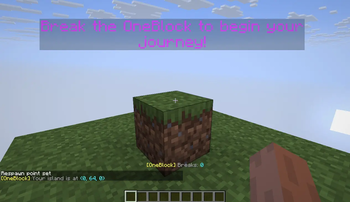
One Block: Begin your Minecraft adventure in a desolate world with just one respawning block. Break it, level it up, and unlock richer rewards with each upgrade.
415.7K
200
Installation
- Install your loader for Minecraft
26.1.2(Fabric / Forge / NeoForge). - Put the matching
OneBlock 3.0.1jar in yourmodsfolder. - Create a world using
level-type=oneblock:oneblock. Enable or disable built-in datapacks to toggle: starting island, multiplayer mode, void nether, void end.
Datapack usage by loader (client + server)
All loaders use the same world preset:
level-type=oneblock:oneblock
Built-in pack meanings
...multiplayer= one island slot per player...void_nether= removes Nether terrain...void_end= removes End terrain...no_island= disables initial 3x3 starter island
Fabric (and Quilt)
Singleplayer / client-hosted world
- In Create World → Data Packs, enable:
oneblock:oneblock_multiplayer(optional)oneblock:oneblock_void_nether(optional)oneblock:oneblock_void_end(optional)oneblock:oneblock_no_island(optional)
Dedicated server (server.properties)
- Set:
level-type=oneblock:oneblockinitial-enabled-packs=vanilla,oneblock\:oneblock_multiplayer,oneblock\:oneblock_void_nether,oneblock\:oneblock_void_end,oneblock\:oneblock_no_island
Forge
Singleplayer / client-hosted world
- In Create World → Data Packs, enable:
oneblock:oneblock_multiplayer(optional)oneblock:oneblock_void_nether(optional)oneblock:oneblock_void_end(optional)oneblock:oneblock_no_island(optional)
Dedicated server (server.properties)
- Set:
level-type=oneblock:oneblockinitial-enabled-packs=vanilla,oneblock\:oneblock_multiplayer,oneblock\:oneblock_void_nether,oneblock\:oneblock_void_end,oneblock\:oneblock_no_island
NeoForge
Singleplayer / client-hosted world
- In Create World → Data Packs, enable these built-ins:
mod/oneblock:resourcepacks/oneblock_multiplayer(optional)mod/oneblock:resourcepacks/oneblock_void_nether(optional)mod/oneblock:resourcepacks/oneblock_void_end(optional)mod/oneblock:resourcepacks/oneblock_no_island(optional)
Dedicated server (server.properties)
- Set:
level-type=oneblock:oneblockinitial-enabled-packs=vanilla,mod/oneblock\:resourcepacks/oneblock_multiplayer,mod/oneblock\:resourcepacks/oneblock_void_nether,mod/oneblock\:resourcepacks/oneblock_void_end,mod/oneblock\:resourcepacks/oneblock_no_island
Multiplayer spacing
- Set
oneblock.multiplayerIslandSpacing=<blocks>before first world creation. - If spacing was wrong once, delete the world and recreate it after updating this value.
Tip
If island spacing is wrong, delete the world and recreate it after updating spacing.
Совместимость
Авторы

Сведения
Лицензия:
Опубликован:3 года назад
Обновлён:4 часа назад
ID проекта: