

Calc2MC
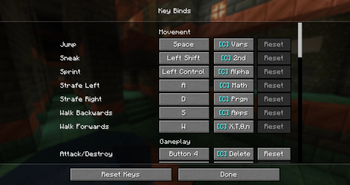
This mod adds one very... interesting feature. Support to use your calculator as a controller for minecraft. It just needs this mod and a separate app running on your calculator to work, with instructions at the bottom of the page. Also a part of this mod are customisable keybinds for the calculator and support to move around menus and use your mouse so you never have to put down the calculator.
Support & Compatibility
This mod only supports the Texas Instruments TI 84 Plus CE & the Texas Instruments TI‑84 Plus CE‑T Python Edition calculators.
e.g. one of these

Installation (IMPORTANT)
This mod requires a separate program running on your calculator in order to work properly.
1. Install Cesium / enable ASM programs
Before installing the calculator app, you’ll need to set up a shell such as Cesium on your calculator.
You can follow one of these tutorials:
2. Install the Calc2MC calculator program
- Download the latest Calc2MC calculator files from here. (MCCTRL.8xp)
- Connect your calculator to your computer using the USB cable.
- Open TI Connect CE
- Drag the Calc2MC files onto your calculator.
- Launch the program through Cesium.
3. Install the Minecraft mod
- Install the Minecraft mod like any normal Fabric/Forge mod.
- Start the Calc2MC program on your calculator FIRST.
- Launch Minecraft.
- Enjoy controlling Minecraft with your calculator.
Issues
If you face any issues and/or bugs feel free to report them in the bug tracker.
