
221
4

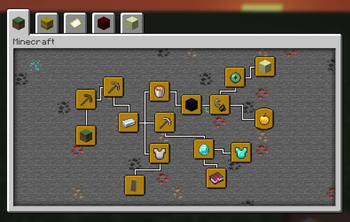
Features:
- Advancements can be clicked and dragged to freely change their position
- Set a fixed order for the advancement tabs to sort into
- Adjust the window size of the advancements screen
- Add fancy backgrounds with random variation to the tiling blocks
Details:
- Edit Mode for rearranging advancements can be toggled in the config. Make sure not to disable it while the advancements screen is still open, or any changes won't be saved.
- While rearranging advancements, hold shift for position snapping
- To render a resizable window, the vanilla gui texture (at minecraft:textures/gui/advancements/window) is tiled using 9-slice scaling, with a configurable slice margin
Persistent data (advancement positions, fancy backgrounds) is stored per-instance at
Likely not compatible with other mods which overhaul the advancements screen, as they tend to re-implement it with their own custom gui, whereas this works by modifying the vanilla gui directly.
Ссылки
Авторы

Сведения
Лицензия:
Опубликован:2 месяца назад
Обновлён:1 месяц назад
ID проекта: